

If you run a low-traffic website (less than 1000 visitors a day), your GA4 property is not really meant for data analysis and reporting. Its main purpose is to collect the event data.
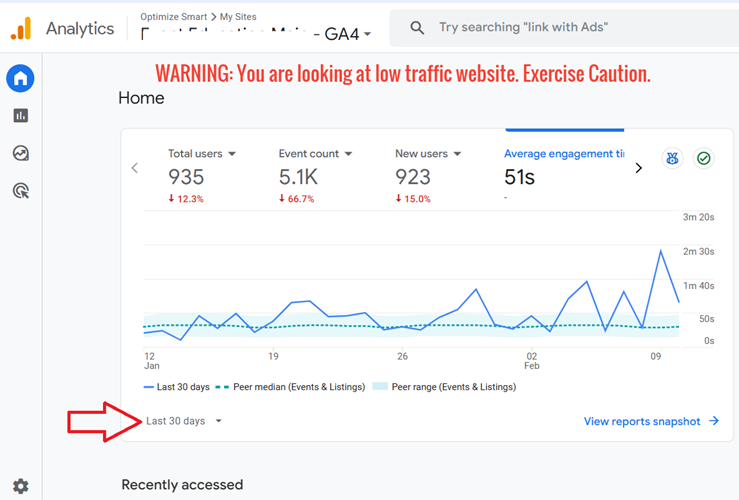
Google won't tell you this. So I have to.
GA4 applies data thresholding to protect user privacy.
When user counts in a report fall below an undisclosed threshold, Google withholds the row entirely. No flag. No warning. The number just disappears.
This breaks segmentation in a way most users never notice.
Example.
You analyse demographics for a small e-commerce website over a week.
Total users: 1,000.
By age group:
18-24: 300
25-34: 450
35-44: 200
45-54: not shown
55-64: not shown
65+: not shown
Visible segments sum to 950.
The remaining 50 are suppressed because those age buckets are too small to clear the threshold. There is no asterisk. No footnote.
The parts simply do not add up to the total, and most analysts never check.
Google does not publish the threshold value. You cannot tune it. Turning it off in the UI is not really an option, because the dimensions that trigger the most aggressive thresholding (age, gender, interests) come from Google Signals.
Switch off Signals, and the demographics disappear anyway.
The fix is BigQuery.
Raw event data exported to BigQuery is not thresholded. Segments add up. Cohorts work. Custom funnels work. You query the actual rows.
Contrary to popular belief, BigQuery is more useful for small businesses than big ones. Especially with GA4.
The name does the marketing a disservice.
Big businesses with high-traffic GA4 properties already get clean numbers in the UI. Their user counts clear every threshold. Their segments add up. Their demographics show every age bucket. The UI works for them.
Small businesses are the ones GA4 quietly breaks.
Under 1,000 visitors a day, and thresholding starts hiding rows.
- Segments stop summing to totals.
- Demographic breakdowns go blank.
- Funnels lose steps.
- The smaller your traffic, the less you can trust what the UI shows you.
BigQuery does not threshold. The raw event export contains every row, every user, every parameter. A site with 200 visitors a day has the same data fidelity as a site with 200,000 visitors.
The free tier handles this comfortably.
10 GB storage and 1 TB of queries per month, free.
A low-traffic GA4 export will not come close to either limit. Most small businesses will run BigQuery for years without paying more than a couple of dollars.
The irony is that the businesses sold on BigQuery as an enterprise tool often need it least (in the context of GA4). The ones told they are too small for it need it most.
If you run a low-traffic website and make decisions from the GA4 UI, you are making them based on a censored dataset.
BigQuery is not the upgrade. It is the baseline.

Other Articles on GA4.
- Fixing unassigned issues with GTM Server Side Tagging.
- How to exclude internal traffic in Google Analytics 4.
- Understanding data filters in Google Analytics 4.
- Conversion Funnel Analysis in Google Analytics 4.
- How to use custom templates in Google Tag Manager.
- 6 Critical Flaws in Google Analytics 4 Attribution Paths.
- Google Analytics 4 Admin Settings Tutorial.
- How to Connect Google Ads to Google Analytics 4.
- Google Analytics 4 Predictive Audiences – Tutorial.
- How to use Segment Overlap Report in Google Analytics 4.
- Audience Triggers in Google Analytics 4.
- Google Tag Manager Regex Table Variable Explained.
- Understanding Lookup Table in Google Tag Manager.
- Google Tag Manager Variables and Triggers Tutorial.
- How to find Average Order Value in Google Analytics 4.
- Google Ads tag still running in GTM? Here is the fix.
- 8 Signs Your GA4 Property Needs Expert Help.
- Google Tag Assistant Tutorial.
- Google Analytics 4 not working? Here is how to fix it.
- Google Analytics 4 for Low Traffic Websites.