

You set up GTM server-side tagging. The 40 to 50% of the website traffic is now reported as ‘unassigned’ in GA4 reports. Now what?
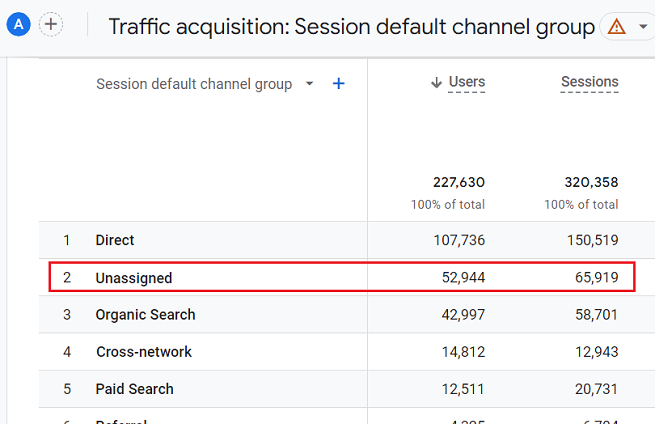
First of all, it is a common issue when you set up server-side tagging along with client-side tagging.
The following could be the top reasons for unassigned traffic:
- You may have a significant number of GA4 sessions that do not have ‘session_start’ event.
- Duplicate Session ID values can also create ‘unassigned’ traffic issues.
- Discrepancies in the Client ID value for incoming and outgoing requests.
- An event tag fires before the Google Tag.
- The ‘page_view’ event fires before the ‘session_start’ event.
- Cookies and Client Identification Settings in GA4 Client in Server GTM was set to “Server Managed”.
- Not all tags in server-side GTM have the server_container_url configured.
- Misalignment between client-side and server-side tracking.
- Misalignment between client-side and server-side consent handling.
- Not testing server side tracking by blocking client side GTM.
#1 You may have a significant number of GA4 sessions that do not have ‘session_start’ event.
In GA4, the ‘session_start ‘event should be triggered whenever a new session starts.
Without the ‘session_start’ event, GA4 might not recognize user interactions as belonging to a distinct session and may have difficulty attributing interactions to a specific source or medium.
This can result in source/medium data appearing as (not set) / (not set), leading to ‘unassigned’ traffic.
Find out what percentage of client-side and server-side sessions are without ‘session_start’ event.
#2 Duplicate Session ID values can also create ‘unassigned’ traffic issues.
When a new and unique Session ID and Client ID combination is identified, the ‘session_start’ event will only be sent for one unique Session ID.
If you send duplicate Session ID values with unique client ID values, it will result in new sessions but without ‘session_start’ and thus unassigned traffic.
#3 Discrepancies in the Client ID value for incoming and outgoing requests.
If there’s a discrepancy in the Client ID value for incoming and outgoing requests, that could potentially cause issues in session tracking, particularly if you’re using server-side tagging.
In a well-configured analytics setup, the Client ID value for incoming and outgoing requests should generally be consistent for a single-user session.
A difference in these values is usually not normal and could indicate a problem or misconfiguration in the tracking setup.
One of the most likely causes of such a difference is using both client-side and server-side tracking.
Passing the Client ID from the client-side to the server-side, and vice versa, is crucial to maintaining session continuity.
Without a consistent Client ID, each side would treat the same user as a different entity, leading to skewed or incorrect data.
A common Client ID ensures that events are attributed to the same user session across both client and server, enabling a more accurate representation of user behaviour.
#4 An event tag fires before the Google Tag.
In server-side tagging, event tags are more likely to fire before the Google tag compared to client-side tagging due to the different way event data is processed and passed between the client and server.
In client-side tagging, both the Google tag and event tags fire within the user’s browser.
In server-side tagging, events are first sent to the server (your server-side GTM container), where they are processed and then forwarded to GA4 or other platforms. This adds an extra layer of processing, which can introduce timing delays.
Because of this asynchronous processing in server-side tagging, there can be situations where event tags are sent to the server and processed faster than the Google tag (or page_view event), especially if the Google tag is delayed.
If the page on the client side has slow loading times or is bogged down with heavy JavaScript, the Google tag (typically responsible for sending the page_view event) might fire after the event tags.
In server-side tagging, if a user interacts with the page (e.g., clicks a button or scrolls) before the page fully loads and before the Google tag fires, the user engagement or click events may be sent to the server-side container first.
In this scenario, the event tags will reach the server and get processed faster than the Google tag.
Since the Google tag (and thus the page_view event) hasn’t fired yet, the session might not be fully initialised in GA4, leading to unassigned traffic or incomplete session data.
In client-side tagging, both the Google tag and event tags are typically fired in rapid succession since they all rely on the same browser environment.
However, in server-side tagging, events are passed to the server in different requests, and each event is processed independently by the server.
Due to network latency or server-side processing time differences, some events may get processed faster than the initial page_view event, leading to event tags firing before the Google tag in GA4.
Make sure that the GA4 configuration tag fires before any event tag.
#5 The ‘page_view’ event fires before the ‘session_start’ event.
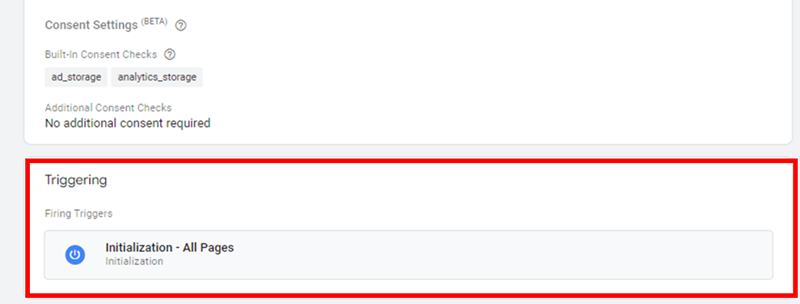
Change the GA4 Configuration Tag in the Client-side GTM container to fire on All initialization events instead of All Pages.
This way, the ‘session_start’ event fires before the ‘page_view’ event.
#6 Cookies and Client Identification Settings in GA4 Client in Server GTM was set to “Server Managed”.
Change the Cookies and Client Identification Settings in GA4 Client in Server GTM to JavaScript-managed:
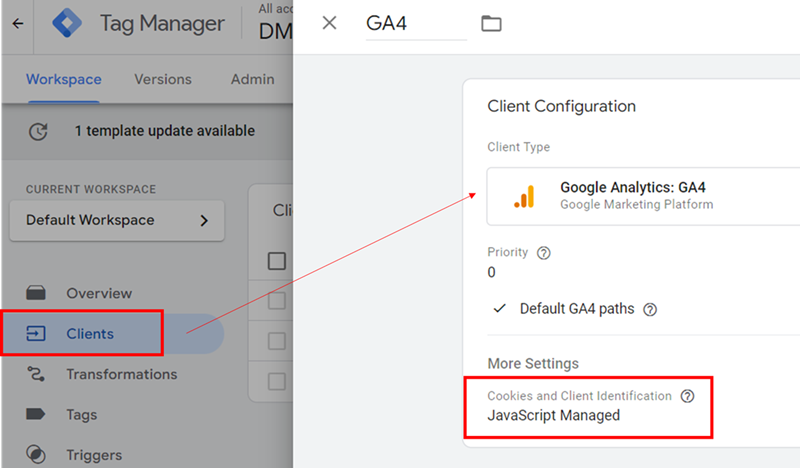
This should resolve the unassigned traffic issues related to server-side tagging.
The downside to ‘JavaScript-managed’ as opposed to ‘Server-managed’ is that some browsers might expire the cookies prematurely.
Now, you need to choose between the downside that some browsers might expire the cookies prematurely vs. fixing unassigned traffic.
I would rather go for the latter option, as unassigned traffic is pretty much useless for data analysis.
You should remember the primary reason for tracking website usage data. It is not to collect more or less data but to analyze data in order to gain insights and make informed decisions.
The quality and accuracy of the data are far more important than the quantity.
#7 Not all tags in server-side GTM have the server_container_url configured.
Suppose a tag doesn’t have the server_container_url configured.
In that case, it will bypass the server-side container and instead send data directly to the client-side GA4 endpoint or other endpoints (if configured), which can result in missing or incomplete session data because the tag isn’t being processed as intended in the server-side setup.
When a tag doesn’t pass through the server-side container, GA4 may be unable to assign traffic source/medium data correctly, leading to unassigned traffic in GA4.
#8 Misalignment between client-side and server-side tracking.
Misalignment between client-side and server-side tracking can lead to unassigned traffic issues in GA4 because the data captured and processed by the client-side and server-side setups may differ or be incomplete.
When these systems are not correctly synced, essential information such as traffic source, medium, or session identifiers may not be correctly captured or passed from one system to the other, leading to inaccurate or missing attribution.
For example, client-side tracking can automatically capture data from UTM parameters from the URLs in most cases. However, server-side tracking does not automatically capture data from UTM parameters.
The server-side container might receive the event, but without the source/medium details, which could lead to unassigned traffic.
To send UTM parameters server-side in GTM, you need to capture them client-side first and then explicitly pass them to your server container.
If referrer data is not passed from the client-side to the server-side container, GA4 may lack the information necessary to correctly attribute the session.
Sometimes, server-side tracking setups can treat each event as a new session if the session identifiers (like cookies or GA4’s client ID) are not aligned between client-side and server-side tracking.
This can result in fragmented sessions and unassigned traffic, where the system cannot determine the original traffic source for each session.
Let us suppose a user visits an e-commerce website from a Google Ads campaign.
The user’s browser receives a GA4 client ID when the first page loads, which is stored in a cookie.
This ID is used to identify the user across their session and track all events (e.g., page views, add-to-cart, purchase) under the same session.
The client-side GA4 tag fires, capturing the user’s session and associating it with the Google Ads source through UTM parameters.
All events are tracked under this session, and the user’s journey is correctly attributed to the Google Ads campaign.
Let us suppose, the website is using server-side GTM to handle tracking.
When an event occurs (like a page view or purchase), the client-side tracking sends data to the server-side container for additional processing.
The server-side container is expected to forward the session data, including the client ID, to GA4.
Suppose the server-side setup is not correctly configured to pass the client ID from the client-side tracking to the server.
Each time an event is sent to the server-side container, it generates a new client ID (or does not use a consistent client ID at all).
As a result, every time the user interacts with the website (e.g., views a product, adds to cart, or completes a purchase), the server-side setup treats each event as a new session because it doesn’t recognise the same client ID from the client-side tracking.
As a result, GA4 receives multiple events with different client IDs for what should be a single session.
Each event (e.g., page view, add-to-cart, and purchase) is now tracked as a separate session.
This fragmentation of sessions leads to incorrect session counts and makes it difficult to attribute traffic correctly.
The original traffic source (Google Ads) may not be consistently assigned to all events, leading to unassigned traffic in GA4.
In some cases, events may even show (not set) as the traffic source/medium, if the server-side setup cannot link the events back to the original session.
In short, misalignment of session identifiers (like the client ID) between client-side and server-side tracking can cause each event to be treated as a new session, leading to fragmented sessions and unassigned traffic in GA4.
#9 Misalignment between client-side and server-side consent handling.
When using Consent Mode, both client-side and server-side implementations need to be aligned.
If consent is handled differently on the server compared to the client, it can lead to unassigned traffic issues.
When consent handling is misaligned, traffic source information might be collected on the client-side but not processed on the server-side or missing from server-side data due to consent restrictions not being correctly applied.
To minimize unassigned traffic due to consent handling misalignment:
- Use a robust consent management platform that works across both client and server-side environments.
- Ensure consistent consent state communication between client and server.
- Regularly audit and test both client and server-side consent handling to identify and rectify any discrepancies.
- Use server-side logic to respect consent choices, particularly when forwarding data to third-party services.
#10 Not testing server side tracking by blocking client side GTM.
Block your own web GTM container and see what survives.
Most validation of server-side tagging gets done in a clean browser. No extensions. No tracking protection. No VPN. Default Chrome with the GTM web container loading happily.
That tells you almost nothing about what your real users see.
The point of moving to sGTM is resilience against a world where ad blockers, ITP, stricter browsers, and privacy extensions are aggressively pruning client-side tracking. To know if your setup is actually resilient, you have to make the browser hostile and watch what happens.
Pick a browser. Block the GTM web container. Then walk through the events you care about: pageview, add to cart, purchase, lead form, scroll, whatever drives your reporting.
Three things to watch:
- Which events still reach the tagging server.
- Which events depend silently on a client-side cookie, dataLayer push, or third-party script that just got blocked.
- Whether the server container can still claim, process, and forward what does arrive.
You will almost always find something.
- A purchase event that relied on a cookie set client-side.
- An attribution parameter that was supposed to come from gtag but never made it.
- A consent state that lives only in the browser.
Test in the browsers your users actually use.
Default Chrome is easy mode. Real-world conditions look more like:
- Brave with Shields on.
- Firefox with Enhanced Tracking Protection.
- Safari with ITP.
- Any of the above plus uBlock Origin or AdGuard.
You are not trying to defeat these tools. You are measuring how much of your data they cost you, and where the breakage happens.
If Web GTM is your only input, sGTM is not really server-side.

Take a printout of this and post it on your office wall:
If Web GTM is your only input, sGTM is not really server-side.
Most sGTM tutorials teach the same flow:
GA4 config tag in web GTM → hits go to analytics.yourdomain.com/g/collect → GA4 Client in sGTM → GA4 server tag → GA endpoint.
In that pattern, web GTM is the only thing feeding the tagging server. Disable it, and the chain collapses.
No hits reach the tagging server URL. The GA4 Client sees nothing. Server tags never fire. The "server-side" setup looks completely dead.
This is exactly what the stress test is supposed to surface.
If all of your traffic to sGTM comes from web GTM, then turning web GTM off leaves sGTM starved of input. That is not a sGTM problem. It is an architecture problem. You have built server-side tagging that depends entirely on a client-side gatekeeper.
To pass the stress test in any meaningful sense, you have to refactor so that at least some events reach sGTM from non-GTM sources:
- Measurement Protocol calls fired directly from your backend.
- Server-to-server events from your CRM, payment provider, or order management system.
- App SDK events for native traffic.
- Custom JS that bypasses GTM. Still client-side, still blockable, but specifically removes the GTM dependency.
You do not need to abandon Web GTM. You need to stop treating it as the only door into sGTM.
What is this stress testing really for?
The goal is not perfect data from every user. That is gone. It is not coming back.
The goal is to understand your real-world data loss honestly, reduce dependence on the most fragile parts of your stack, and push as many critical measurements as possible through channels that survive when the browser turns hostile.
Block your own web container. Watch what breaks. Then fix the parts that matter.

Other Articles on GA4.
- How to Create Landing Page Report in Google Analytics 4.
- How to segment Google Analytics 4 data by data stream.
- Setup Cross Domain Tracking in Google Analytics 4.
- How to see full page URLs in Google Analytics 4.
- Roll up Property in Google Analytics 4 – Tutorial.
- The Best Tag Auditing Tools for Google Analytics 4.
- How to Exclude URL Query Parameters in Google Analytics 4.
- How to Track Email Campaigns in Google Analytics 4.
- Google Analytics 4 Attribution Modelling Tutorial.
- Understanding Service Worker in GTM Server Side Tagging.
- Cohort Exploration Report in Google Analytics 4 (GA4).
- Google Analytics 4 vs Google Ads conversion tracking.
- Google Analytics 4 Custom Dimensions Tutorial.
- Google Analytics 4 Dimensions Tutorial.
- Event Scoped Custom Dimensions in Google Analytics 4.
- Google Analytics 4 Search Console Integration Tutorial.
- Fixing unassigned issues with GTM Server Side Tagging.
- How to exclude internal traffic in Google Analytics 4.
- Understanding data filters in Google Analytics 4.
- Conversion Funnel Analysis in Google Analytics 4.