

Before You Trust GA4 Attribution Paths, Watch Out for These 6 Critical Flaws!
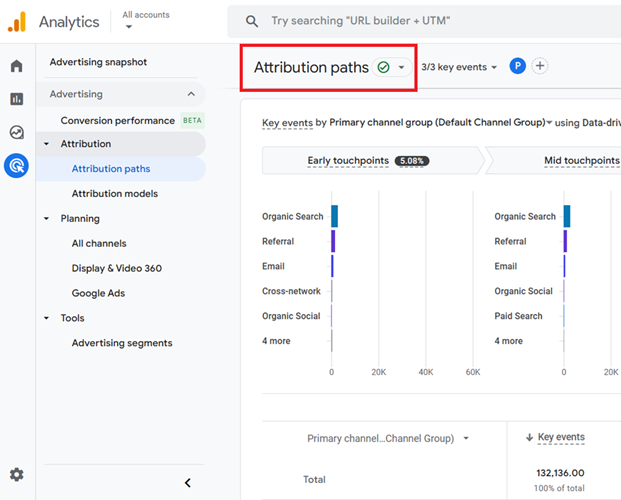
#1 GA4 Attribution paths are based on only ‘known’ touchpoints.
GA4 identifies a person through their web browser and device.
For example:
If a person visits your website via the Chrome browser on a desktop PC and then later makes a purchase via the Safari browser on an iPad, GA4 can report that they are actually two people who visited your website.
The first person visited your website via the Chrome browser on a desktop PC but didn’t make a purchase.
The second person visited your website via the ‘safari’ browser on an iPad and made a purchase.
Clearly, this is not true, but that’s how you will be reported for the customers’ behaviour on your website.
So, the attribution paths reported by GA4 will be based only on known touchpoints.
Another example:
If a person sees an ad on TV and later makes a purchase via a paid search ad on a desktop PC, GA4 will report that the person clicked on the paid search ad and made a purchase.
GA4 will completely ignore the role of the TV ad prior to key event.
Again, the attribution paths reported by GA4 will be based only on known touchpoints.
So, we can conclude that, in certain situations, the ‘Attribution Paths’ report can give a distorted picture of attribution paths.
So, if you are heavily involved in multi-channel and multi-device marketing, both online and offline, your attribution paths reports could be way off the mark.
#2 GA4 Conversion paths report attribution for only online touchpoints.
In other words,
GA4 does not record and report attribution for non-digital marketing channels. It shows attribution only across ‘digital’ marketing channels.
Consequently, offline users’ interactions, like via phone calls and in-store visits, are not considered when determining which marketing channel should get credit for key events like sales and conversions.
For example:
If a person sees an ad on TV and then later makes a purchase via a paid search ad on a desktop PC, then GA4 will give all the credit for the purchase to the paid search ad.
GA4 will completely fail to report the role of the TV ads in assisting the purchase. So you may conclude that your TV ads are not working, but in reality, they are.
You can get a distorted picture of attribution paths from your Attribution Paths report.
If you are heavily involved in online and offline marketing, you can not 100% trust your Attribution paths report.
#3 GA4 does not always record and report attribution across devices and browsers.
While GA4 offers advanced features (‘User ID’, ‘Google Signals’, reporting identities) for cross-device and cross-browser tracking, it is not foolproof.
The effectiveness of these features depends on user behaviour (e.g., logging in for ‘User ID’ tracking), the use of Google accounts (for Google Signals), and the proper configuration of tracking settings.
Consequently,
GA4 may not always record and report attribution perfectly across devices and browsers, leading to potential gaps in the data.
So if a customer clicks on your Google Ads ad via the Chrome browser on a desktop PC and then later returns to your website via the Safari browser on his iPhone to make a purchase through organic search, GA4 can give all the credit for the purchase to organic search.
GA4 can completely fail to report the role the desktop ad played in assisting the purchase. So you may conclude that your desktop Google Ads are not working, but in reality, they are.
If you are heavily involved in multi-device marketing (marketing across desktop, tablets, and mobile devices), you can not 100% trust your attribution paths report.
#4 Filtered reports omit certain touchpoints on attribution paths.
The data filter(s) applied to your GA4 property can omit certain touchpoints on attribution paths.
Data filters in GA4 can exclude or include specific event data, which would affect the touchpoints recorded in attribution paths.
If certain events or data are filtered out, they will not appear as touchpoints in the attribution paths.
Consent mode can also filter out a lot of data, making your attribution paths unreliable.
#5 Data sampling issues can skew the attribution path data.
GA4 has an upward limit (10 million events) on the amount of event data it will not sample to produce reports. This limit has been set to save resources like computation power and computation cost.
Depending upon the nature of a user’s query, GA4 may choose to analyse the complete traffic data set or only a subset of traffic data.
As long as a data sample is a good representative of all of the traffic data, analysing a subset of data will produce the same results as analysing all of the data.
However, when the selected sample is not a good representative of all of the traffic data, analysing a subset of data will not produce the same results as analysing all of the data.
In that case, GA4 samples the event data badly and you cannot rely on the attribution paths reported by it.
To fix missing touchpoints on your attribution paths, you should always aim to minimise or eliminate data sampling issues.
#6 Not all touchpoints are equally valuable.
Some touchpoints are more valuable than others, regardless of their position on an attribution path in terms of influencing the key events.
However, rule-based attribution models (like ‘Last click Paid and Organic Channels’ and ‘Last Click Google Paid Channels’) do not take this factor into account when distributing conversion credit.
Consider the following hypothetical conversion path of a user where the user is exposed to the following six marketing channels before he makes a purchase:
- Click on your display ad.
- Read a blog post via Twitter that reviews your product.
- Click on your paid search ad.
- Visit a product comparison website.
- Click on an organic search listing.
- Visit your website directly.
- Made a purchase.
Here, the user is exposed to six different marketing channels before purchasing.
Since each of these exposures is considered a touchpoint, there are six different touchpoints on the attribution path.
Now, let us see how credit for the conversion is distributed to different touchpoints under different attribution models.
In the ‘Last Click Paid and Organic Channels’ model, 100% of the credit for the key event is attributed to the last touchpoint, which is not direct traffic, unless the attribution path is entirely made up of direct traffic.
So, according to the ‘Last Click Paid and Organic Channels’ model, the ‘organic search’ gets all the credit for purchase. But this is not the case, as five more channels are in play.
The user read product reviews and visited the product comparison website before purchasing.
These two touchpoints are more valuable than the exposure to the display ad, paid search ad and organic search listing, as they played a very important role in the purchase decision.
If the user had been unsatisfied with the product review or pricing, he would not have made the purchase.
In the ‘Last Click Google Paid Channels’ model, 100% of the credit for the key event is attributed to the last Google Ads touchpoint on an attribution path. If there is no Google Ads touchpoint, it reverts to the Paid and Organic Last Click model.
So, according to the ‘Last Click Google Paid Channels’ model, ‘paid search’ gets all the credit for the purchase.
But this is not the case, as five more channels are in play.
In the Data-Driven attribution model, credit is distributed to touchpoints in proportion to their contribution to the key event. The channel that assists the most gets the maximum credit for the key event, regardless of whether it is the first touch, last touch, or middle touchpoint.
All other touchpoints get credit in proportion to their contribution to the attribution path.
So according to the data driven attribution model, exposure to product review and product comparison websites gets more credit for purchase than all other touchpoints as they played a key role in the decision-making process and the users’ purchase journey.
So,
When you use a last-click attribution model like ‘Last Click Paid and Organic Channels’ or ‘Last Click Google Paid Channels’, your attribution paths report is unlikely to be accurate.
These attribution models oversimplify the attribution by giving all credit to the last touchpoint, potentially ignoring the contributions of earlier touchpoints.
Data integration is the key to minimising missing touchpoints and fixing attribution issues.
To minimise the number of missing touchpoints in your conversion path and to get a holistic view of your marketing, you need to integrate as much data as possible from different data sources.
Without proper data integration, you will always get a silo view of your marketing campaigns via the attribution paths.

Other Articles on GA4.
- The Best Tag Auditing Tools for Google Analytics 4.
- How to Exclude URL Query Parameters in Google Analytics 4.
- How to Track Email Campaigns in Google Analytics 4.
- Google Analytics 4 Attribution Modelling Tutorial.
- Understanding Service Worker in GTM Server Side Tagging.
- Cohort Exploration Report in Google Analytics 4 (GA4).
- Google Analytics 4 vs Google Ads conversion tracking.
- Google Analytics 4 Custom Dimensions Tutorial.
- Google Analytics 4 Dimensions Tutorial.
- Event Scoped Custom Dimensions in Google Analytics 4.
- Google Analytics 4 Search Console Integration Tutorial.
- Fixing unassigned issues with GTM Server Side Tagging.
- How to exclude internal traffic in Google Analytics 4.
- Understanding data filters in Google Analytics 4.
- Conversion Funnel Analysis in Google Analytics 4.
- How to use custom templates in Google Tag Manager.
- 6 Critical Flaws in Google Analytics 4 Attribution Paths.
- Google Analytics 4 Admin Settings Tutorial.
- How to Connect Google Ads to Google Analytics 4.
- Google Analytics 4 Predictive Audiences – Tutorial.