

What is Google Analytics 4 Attribution Modelling?
Attribution modelling is the process of finding and fixing attribution issues, understanding the buying behaviour of your website users and determining the most effective marketing channels for investment at a particular point in time.
Through attribution modelling, you can get answers to questions like:
- Why do people buy from my website?
- What happens before they make a purchase?
- What prompted them to make a purchase or complete a predefined goal?
- How much time elapsed between a visitor’s initial interest and their purchase?
- What role did prior website referrals, searches, and ads play in conversion?
- How do I attribute conversions to a marketing channel?
- How much am I undervaluing paid search and how much am I overvaluing direct traffic?
- How can I improve ROI across all marketing channels?
- What is the value of carrying out paid search campaigns for branded terms when I already rank in the top five organic search results?
- How much in-store revenue did my email campaign generate?
- If I change my TV ad spend, how will it impact my organic search campaigns?
The following is the more technical definition of attribution modelling:
Attribution modelling is the process of understanding and assigning conversion credit to marketing touchpoints on a conversion path with the aim of achieving the following objectives:
- Understand the customers’ purchase journey.
- Determine the most effective investment marketing channels at a particular time.
- Find and fix attribution issues.
In order to understand the definition of attribution modelling, you would first need to understand the following terms really well:
- Conversion
- Conversion credit
- Conversion credit distribution
- Digital vs. non-digital marketing channels
- Touchpoints
- Conversion paths
- Attribution issues
Note: Attribution Modelling is full of jargon. If you do not understand the jargon, you will have a hard time understanding attribution reports and implementing attribution modelling.
What is a Conversion in GA4?
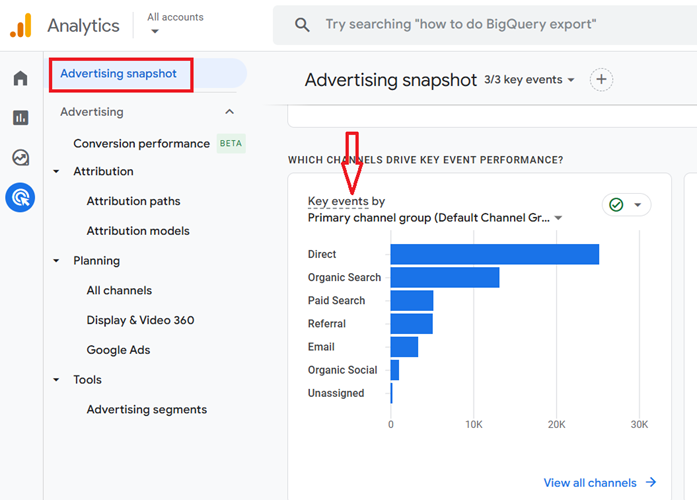
Conversion (aka Key Events) is one of the goals or purposes for setting up a website or mobile app. A conversion is what you are trying to achieve through your website/app.
There can be one or many purposes for which you have set up your website or app.
These purposes can be something like:
- Selling products
- Generating leads
- Branding
- Selling advertising
- Collecting donations
- Fighting for a cause, etc.
If one of your website goals is to generate orders on your website, then ‘the number of ecommerce transactions’ (aka purchases) could be defined as a conversion.
Similarly,
If one of your website goals is to get sign-ups for your newsletter, then the ‘number of newsletter signups’ could be defined as a conversion.
What are macro and micro conversions?
The major purpose of setting up a website is known as a macro conversion and other minor purposes are known as micro conversions.
For example,
If your main purpose of setting up a website is to generate sales, then the ‘number of ecommerce transactions’ can be your macro conversion.
The other minor purposes like ‘newsletters signup’, ‘downloading a brochure’, ‘providing customer support’, ‘requesting a follow-up’ etc., can be your micro conversions.
The technical definition of conversion in the context of GA4
In the context of GA4, a conversion is defined as a conversion event.
Since GA4 collects all of the users’ activities in the form of events, the events which are most important to your business must be marked as conversions:
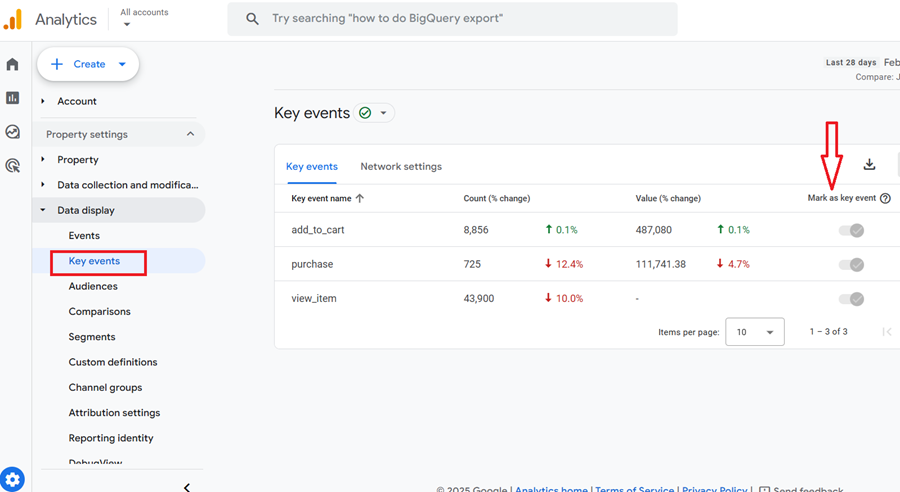
In GA4,
- You can mark an existing event as a conversion.
- You can stop marking an event as a conversion.
- You can add a monetary value to a conversion event.
- You can create a new conversion event based on an existing event.
Google Analytics 4 automatically designate the following events as conversions:
- purchase (web and app)
- first_open (app only)
- in_app_purchase (app only)
- app_store_subscription_convert (app only)
- app_store_subscription_renew (app only)
In addition to these events, you can mark up to 30 additional events as conversions per GA4 property.
The two categories of Conversions
In the context of attribution modelling, there are two categories of conversions:
- Ecommerce conversions
- Goal conversions.
An ecommerce conversion is a conversion that is directly tied to a transaction.
For example, a ‘purchase’ is an example of ecommerce conversion because it is directly tied to a transaction.
A goal conversion is a conversion that is not directly tied to a transaction.
For example, ‘newsletter signup’ is an example of goal conversion as it is not directly tied to a transaction.
Articles on Conversions:
- Google Analytics Conversion Tracking Tutorial
- Google Analytics Goals and Sales Funnels – Tutorial
- How to fix Goal Conversion Irregularities in Google Analytics
- Calculate Ecommerce & Goal Conversion Rate in Google Analytics
- Conversion Rate in Google Analytics – Learn to Analyze & Report
What is a Conversion Credit?
A conversion credit (also known as conversion credit score) is the amount of credit given to a touchpoint for completing a conversion.
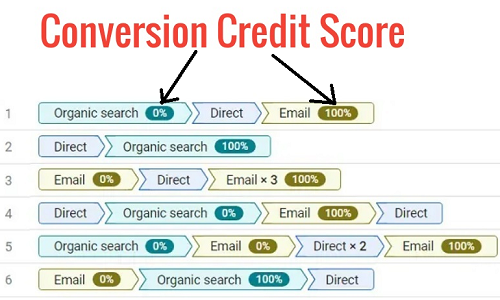
What is a Conversion Credit distribution?
A conversion credit distribution is the distribution of conversion credit to various touchpoints on a conversion path.
Articles on Conversion Credit:
- Conversion Credit Distribution for Attribution Models in Google Analytics
- Conversion Credit Models Guide – Google Analytics Attribution
Digital vs Non-Digital Marketing Channels
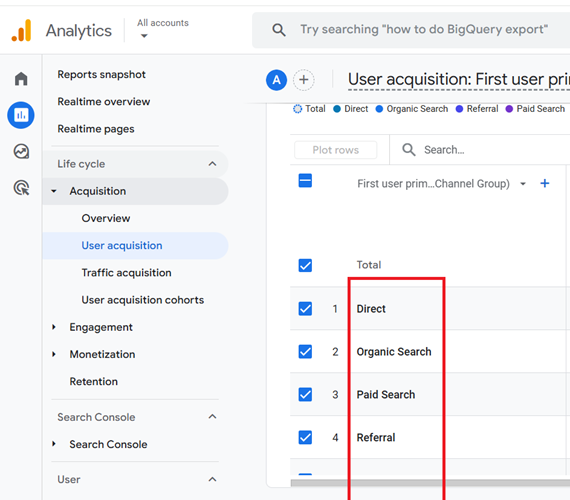
The following are examples of digital marketing channels:
- Direct traffic
- Organic Search
- Paid Search
- Display
- Referral traffic etc.
Related Article: Google Analytics Channels, Source and Medium explained in great detail.
The following are examples of non-digital marketing channels:
- ‘TV’
- ‘Radio’
- ‘Billboard’
- ‘Print Media’ (newspaper, magazine)
Related Article: Offline Conversion Tracking in Google Analytics – Tutorial
Why is the focus on digital marketing channels in attribution modelling?
In the case of attribution modelling, the marketing channels that we focus on are primarily digital but can also include non-digital marketing channels as long as these channels are used to measure and optimize a business’s online performance.
Here there is a strong focus on optimizing a business’s ‘online performance’.
The non-digital marketing channels can also be used to optimize a business’s ‘offline performance‘. But that is marketing mix modelling and not attribution modelling.
Related Article: Marketing Mix Modeling vs Attribution Modeling. Which one is right for your business?
What is a touchpoint in attribution modelling?
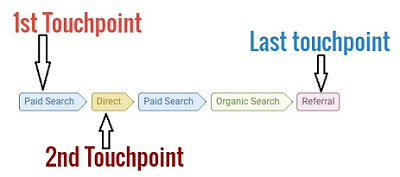
Technically speaking, any point of contact between a business and its customers is a touchpoint.
But in the case of attribution modelling, we focus mainly on marketing touchpoints.
So in the context of attribution modelling,
A touchpoint is exposure to a marketing channel. It is also known as ‘interaction’ or ‘touch’.
The two categories of marketing touchpoints
Following are the two categories of marketing touchpoints:
- Online marketing touchpoints
- Offline marketing touchpoints
Exposure to a digital marketing channel is called an online touchpoint.
Exposure to a non-digital marketing channel is called an offline touchpoint.
‘Store visits’ and ‘phone calls’ are examples of offline touchpoints.
Articles related to touchpoints:
- Multi-Touch Attribution in Google Analytics
- Understanding Missing Touchpoints in Attribution Modelling
What is a conversion path in attribution modelling?
A conversion path is a path a user took to complete a conversion on your website/app.
In the context of Google Analytics,
In the context of Google Analytics, a conversion path is a sequence of touchpoints (clicks, visits, impressions) with digital marketing channels during the 1 to 90 days period that leads to conversions.

The period of 1 to 90 days prior to conversions is known as the lookback window.
Consider the following hypothetical conversion path of a user:
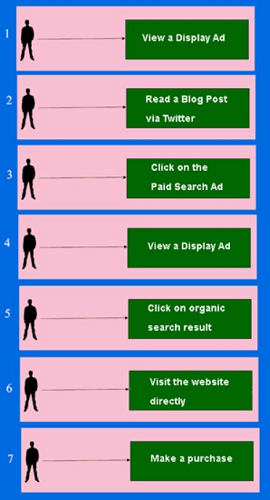
Here the user is exposed to 6 marketing channels before purchasing.
Google Analytics will report this conversion path as:

Important points to remember about conversion paths
- A conversion path is made up of one or more touchpoints.
- The conversion path is created for each conversion recorded by Google Analytics.
- The conversion paths are recorded via _ga cookie.
- There is no limit to the number of conversion paths Google Analytics can record.
Articles related to Conversion Paths:
- How to use Top Conversion Paths Report in Google Analytics
- Conversion Paths Report Explained in Google Analytics Attribution
- GA4 Conversion Paths Report in Attribution
- Top Conversion Paths Report vs Conversion Paths Report
Attribution issues
An attribution issue occurs when you can not determine the primary source of conversion, or you do not know the conversion paths.
For example, you don’t really know where your sales came from.
You don’t really know which marketing channel or set of channels has the biggest impact on sales.
As a business, you have attribution issues when you can not put your finger on any one marketing activity and can not say with any degree of confidence that this is the marketing activity that has the most impact on your sales.
The following types of businesses are most likely to suffer from attribution issues:
- Businesses that have a long sales cycle
- Multi-channel retailers
- Non-ecommerce websites
To learn more about attribution issues, check out this article: What is Attribution Problem in Online Marketing
Quick recap of the definition of GA4 Attribution Modelling
Attribution modelling is the process of understanding and assigning conversion credit to marketing touchpoints on a conversion path with the aim of achieving the following objectives:
- Understand the customers’ purchase journey.
- Determine the most effective marketing channels for investment at a particular point.
- Find and fix attribution issues.
I hope now the definition of attribution modelling makes sense to you now.
GA4 Attribution Modelling capabilities
Google Analytics 4 Attribution Modelling capabilities include
#1 Access to advertising reports (Advertising Snapshot report, Model comparison report, Conversion paths report):
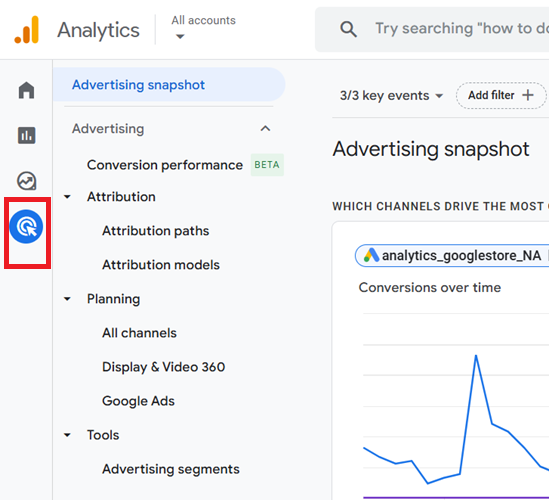
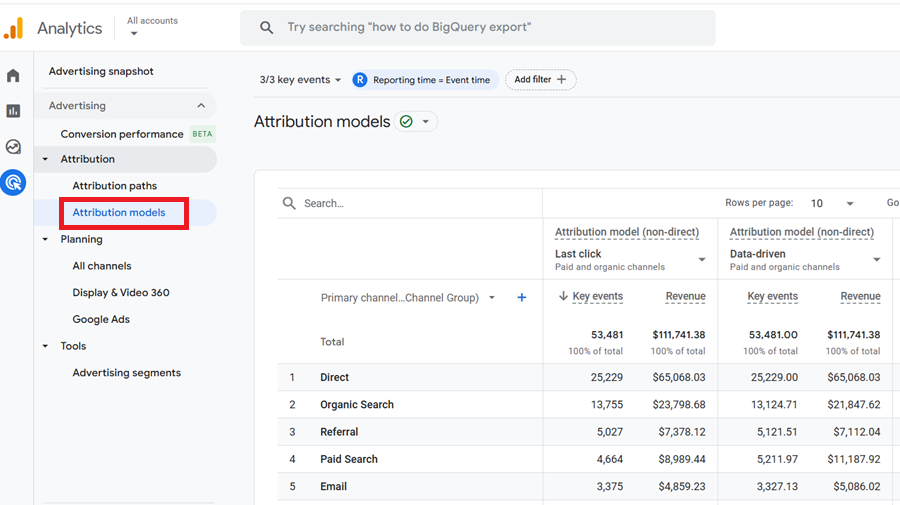
#2 Access to GA4 attribution models (Cross-channel models, Ads-preferred rules-based model):
#3 Attribution settings (which are used to change the Reporting attribution model and conversion window at the GA4 property level):
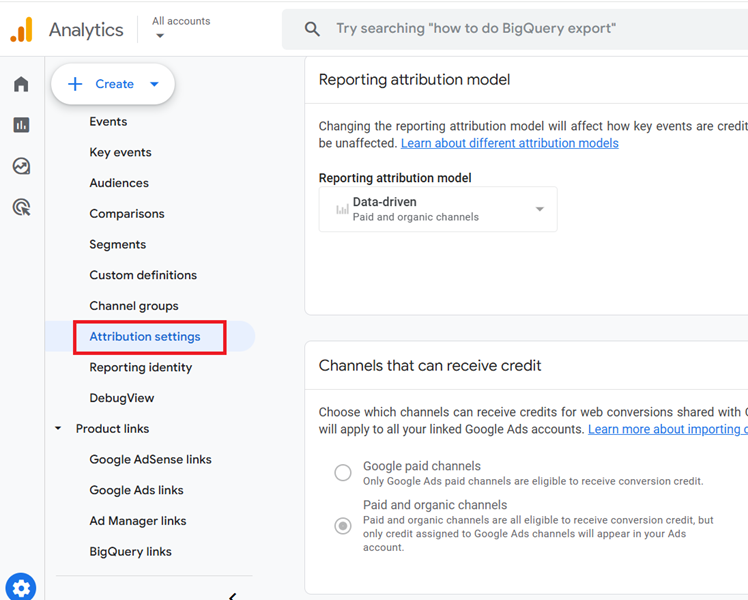
Note: GA4 attribution modelling capabilities are still nowhere as robust as the attribution modelling capabilities provided by Universal Analytics.
What are GA4 Attribution Models?
The attribution models in GA4 are rules or sets of rules or data-driven algorithms that are used to determine how conversion credit should be distributed to various marketing touchpoints on a conversion path.
The conversion path can include both website and mobile app touchpoints.
Categories of GA4 Attribution Models
There are four categories of GA4 attribution models:
- Cross-channel rules-based models – This category includes Cross-channel last click, Cross-channel first click, Cross-channel linear, Cross-channel position-based and Time decay attribution models.
- Ads-preferred rules-based model.
- Data-driven attribution model
- Reporting attribution model – This model is used to calculate conversion credit in all of your GA4 reports.
To learn more about GA4 attribution models, check out the following two articles:
- Guide to Attribution Models in GA4 (Google Analytics 4)
- How to Change Attribution Models in GA4 (Google Analytics 4)?
What is a Conversion window in GA4?
Conversion window refers to the time period that determines how far back in time a touchpoint is eligible for getting conversion credit.
For example, a 30 days conversion window means a touchpoint is eligible for getting conversion credit for up to 30 days from the day it first occurred.
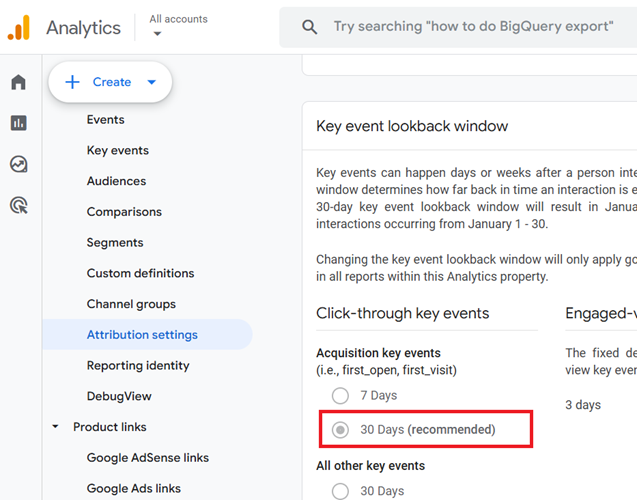
To learn more about GA4 conversion windows, check out this article: Which Conversion Window to use in GA4 (Google Analytics 4).
Channels that can receive credit
Once you have linked your Google Ads account to your GA4 property, you can choose which channels (Google paid channels or paid and organic channels) can receive credits for web conversions shared with Google Ads:
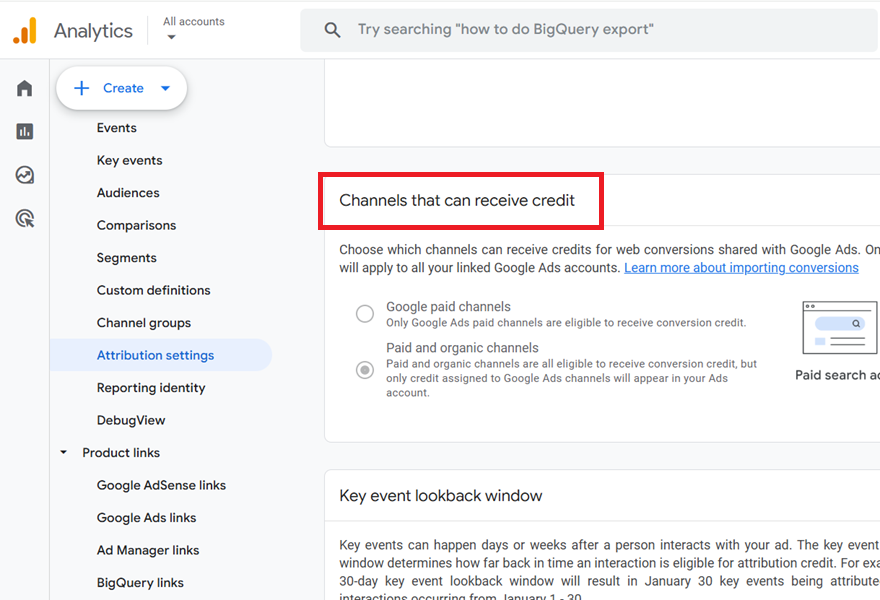
The default setting is ‘Paid and organic channels’ and you should keep using this setting.
If you change the setting to ‘Google paid channels’, then only Google Ads are eligible to receive conversion credit.
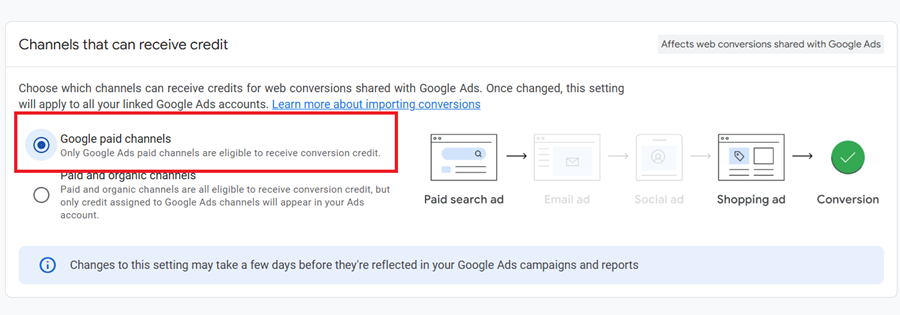
Note (1): Once changed, this setting will apply to all your linked Google Ads accounts and may impact the conversions you import into Google Ads for bidding and reporting.
Note(2): Once you change the ‘Channels that can receive credit‘ setting, the changes may take a few days before they are reflected in your Google Ads campaigns and reports. However, any change to this setting does not impact reporting in your GA4 property.
Advertising Snapshot Report in GA4.
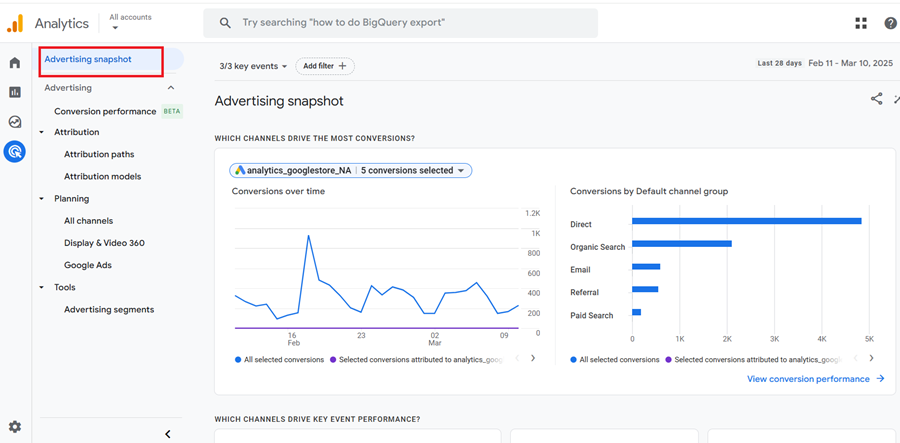
The Advertising Snapshot report is an advertising workspace in your GA4 property that gives an overview of your conversion performance and your customers’ purchase journeys.
It is made up of cards and reports through which you can get answers to questions like:
- Which channels drive the most conversions?
- What touchpoints do customers take to convert?
To learn more about the advertising snapshot report in GA4 check out this article: Advertising Snapshot in GA4 Attribution
Attribution Models report (formerly knowns as Model Comparison Report) in GA4
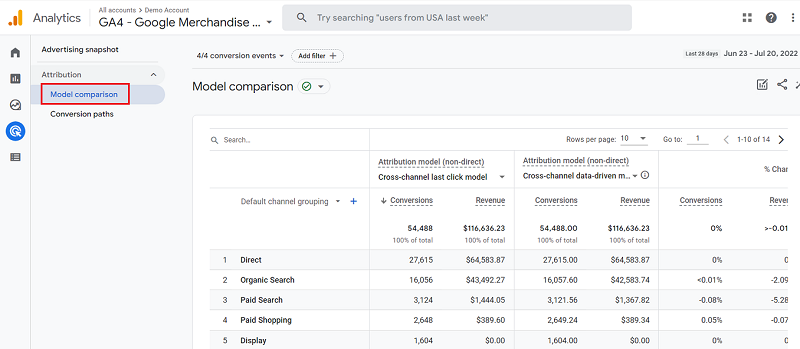
The GA4 Model Comparison report is used to compare different GA4 attribution models to each other. This comparison is carried out to identify new optimization opportunities.
The primary requirement for using the GA4 Model Comparison report is the ecommerce tracking setup and/or goal conversion tracking setup for your GA4 property.
Ideally, your GA4 property must have at least 30 days of historical data so your data analysis is statistically significant.
If you are using Google Ads, then make sure that you link your GA4 property with your Google Ads account.
To learn more about the Model Comparision report in GA4 check out this article: GA4 Model comparison report in Attribution
Attribution Paths Report (formerly known as Conversion Paths report) in GA4.
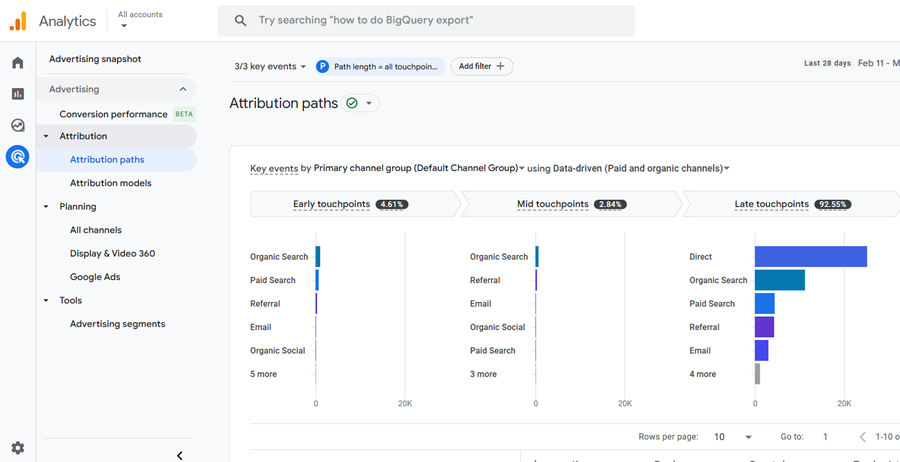
Through the GA4 Conversion paths report, you can determine all those user paths that resulted in a conversion on your website and/or mobile app.
You can analyze conversion paths under different attribution models and in a particular time period.
The primary requirement for using the GA4 Conversion Paths report is ecommerce tracking and/or goal conversion tracking setup for your GA4 property.
To learn more about the Conversion Paths report in GA4 check out this article: GA4 Conversion Paths Report in Attribution
Setting realistic expectations from Attribution Modelling in GA4
Keep the following points in mind while implementing attribution modelling in your organization:
- Attribution Modelling is much more than Google Analytics.
- You do not need perfect data in order to implement attribution modelling.
- Attribution Modelling is not the be-all and end-all of solving all the problems around ROI.
- Attribution modelling is not a one-time activity.
- Focusing on a single marketing channel is not attribution.
#1 Attribution Modelling is much more than Google Analytics.

No one tool can solve all of your attribution issues. And Google Analytics is no exception.
You need a whole set of tools at your disposal in order to understand your customer purchase journey and behaviour.
For example,
Google Analytics is one of the best free tools for measuring website usage data. It is also the best tool for attribution modelling.
It is not, however, the best tool for:
- Phone call tracking
- A/B testing
- Multivariate testing
- Advanced in-page analytics
- Advanced form tracking
- Conducting surveys
- Data visualisation
- Data forecasting
- Providing robust data integration capabilities
- Providing highly customised attribution modelling solutions.
Google Analytics has its own sets of limitations which you should be aware of.
Therefore, you should not limit yourself to just using Google Analytics and no other analytics tool or technology.
If you are a large enterprise, you should invest in more robust attribution modelling solutions.
If your budget allows, then create and use in-house custom attribution modelling solutions.
With custom solutions, you get maximum flexibility in terms of creating attribution models and applying custom credit rules.
You can achieve very robust data integration capabilities. Above all, you get complete ownership of your data and solutions.
#2 You do not need perfect data in order to implement attribution modelling.
If you seek perfection, then most of the time, you will procrastinate. This is because things are perfect only once in a while.
Do not spend the majority of your time trying to collect perfect data to make that perfect business decision.
Otherwise, there is a high probability that you will not take any decision or action at the end of the day.
Taking timely action is extremely important in today’s world of cut-throat competition. Imperfect action is always better than inaction. Moreover, no analytics tool is perfect.
You cannot expect 100% accurate data from any analytics tool out there, and Google Analytics is no exception.
So avoid being obsessed with collecting perfect data and be happy with good enough data.
#3 Attribution Modelling is not the be-all and end-all of solving all the problems around ROI.
This is because attribution modelling is not optimization. Optimization is what SEO, PPC and Conversion professionals do.
Even with ideal budget allocation, you will not get optimum ROI across marketing channels if:
- Your campaigns are being optimised poorly.
- Your website is suffering from usability and credibility issues.
- Your competitor is dominating your market.
False or unrealistic expectations from attribution modelling can disappoint decision-makers. It could make them not want to trust, use, and value the attribution data.
All of these are bad signs for getting budget allocation for attribution modelling efforts.
That’s why setting up realistic expectations from the very start is very important.
#4 Attribution modelling is not a one-time activity.
The marketing channel or activity that helped you to generate a conversion today may not help you to generate the same conversion tomorrow.
That’s why it is important to continuously explore the role of different marketing channels and campaigns in assisting conversions.
The performance of marketing channels and campaigns improves or deteriorates over time.
So you need to continuously find and separate good and bad marketing channels, ads and campaigns.
You then need to either improve the performance of the bad campaigns or replace them with brand new campaigns.
That is why attribution modelling is not a one-time activity. You cannot do it once and then forget about it.
#5 Focusing on a single marketing channel is not attribution.
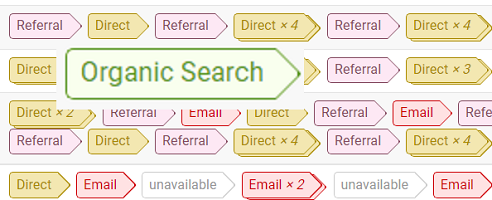
In a multi-channel marketing world, no single channel is solely responsible for conversions.
Different marketing channels work together to create sales and other conversions.
That is why we do not focus on measuring and optimising just one marketing channel in attribution modelling.
We do not create attribution strategies around a single channel.
Attribution Modelling is the KEY to online business success.
A long time ago, I received an email from a client which read something like this:
Hi,
I will put this month’s payment through but I have to ask – are you happy with the results so far?
Our cost per acquisition is so high. We don’t see any ROI from our Google AdWords campaigns.
If this continues after this month we will have to discontinue using your services.
Regards
Your client
This email was basically a final warning for me to either improve the campaigns’ performance or lose the project.
The cost per acquisition for the Google Ads campaigns was pretty high and all the generic keywords that I was bidding on were not resulting in enough sales to cover the ad spend.
Despite my best efforts, I was not able to make the campaigns profitable.
However, I knew from past experience that whenever I reduced the ad spend or paused the campaigns, there was a decline in the overall website sales.
At that time, I just believed what I saw in the analytics reports and the reports were telling me and my client that the cost per acquisition from the Google Ads campaigns was high and the campaigns were not profitable.
Later on, I had another client and I was in charge of their Facebook marketing campaigns.
Google Analytics wasn’t reporting many sales from Facebook and the Facebook campaigns didn’t seem to be profitable.
But, yet again, every time I reduced the ad spend or paused the Facebook campaigns, I noticed a decline in overall website sales.
I couldn’t figure it out! What was going wrong?
I was just relying on correlation is causation. Meaning that when I do something, something happens as a result.
So I was basically losing business because I did not understand the true customer purchase journey.
I did not understand how Google Analytics, Google Ads and Facebook actually attribute conversions and sales.
Because my client was not aware of the Last Ad Click attribution model used by Google Ads, and was not really familiar with attribution modelling in general, he had no reason to doubt his interpretation of the data.
He simply believed whatever he saw in the analytics reports. He thought that he was correctly interpreting the data and I could not change his belief.
After this, I came to the conclusion that if I do not understand, pretty fast, how marketing platforms actually attribute conversions and how customers use different marketing channels and devices in their purchase journey then one thing was certain, I was going to go out of business.
This fear of losing clients and going out of business prompted me to dig deep into attribution modelling.
Then I came to the conclusion that the cost per acquisition that my client was referring to in the case of their Google Ads campaigns, was actually ‘cost per last ad click acquisition’.
Then I started to understand how platforms like Google Analytics, Google Ads and Facebook actually attribute conversions.
Even if a campaign is not directly completing a sale, it may be initiating a sale or assisting a sale.
Even if a keyword is not directly completing a sale, it may be initiating or assisting a sale.
Not all direct traffic is actually direct. Whenever a referrer is not passed, that traffic is reported as direct traffic by Google Analytics.
Then I realised that if I can track offline marketing activities and conversions online and correlate them with the website usage data then I would be able to truly understand the customer purchase journey and determine the most effective marketing channels for investment.
So that is how I came to the conclusion that learning and implementing attribution modelling is the key to online business success.
How is Attribution Modelling helpful for ecommerce and non-ecommerce websites?
A non-ecommerce website is the one where the commerce is taking place offline.
For example, if a website sells properties then it is most likely a non-ecommerce website.
This is because the whole process of buying a property involves a lot of offline visits to the property, phone calls, a lot of paperwork and the final transaction is also carried out offline via a wire transfer.
Often non-ecommerce websites are set up to sell very high-priced items (properties, cars, yachts, etc.) or to sell services or to fight for a cause (animal rights, child rights, etc.).
In the case of a non-ecommerce website, the majority of conversions usually happen offline via phone calls, store visits, etc.
These websites generally do not have any macro conversion (like making a purchase) but have a lot of micro conversions (like book a call, submit the form etc).
If you are doing marketing for a non-ecommerce website then you will have to correlate your online marketing activities with offline conversions.
You will have to prove that your online efforts are really impacting offline conversions.
Otherwise, you will have a hard time reporting the value that you have added to the business bottom line. If you run or market a non-ecommerce website then you have attribution issues.
Attribution modelling is beneficial for both big and small companies.
There is a common misconception that attribution modelling is useful only for big companies with big ad spend. This is simply not true.
Attribution modelling is meant for companies of all sizes. From big public traded companies to small start-ups can benefit from attribution modelling.
In fact, Attribution modelling is more useful for small players because they need to be a lot more cost-effective. They can not afford to lose a lot of money in paid advertising.
If you can not find winners and losers then you can not scale your winners and get rid of the losers.
You can even implement attribution modelling by just using the free version of Google Analytics.
Of course, for big companies, it makes more sense to move beyond free tools and invest in more robust attribution modelling solutions and systems.
How to get crystal clear conversion attribution in GA4.
You have one sales funnel, the same landing page, ad copy, and offer for different marketing channels, and here lies the problem.
Traffic from different marketing channels tends to behave and convert differently.
For example, you can not expect Facebook ad traffic to convert like Google Ads traffic and vice versa.
Similarly, you can not expect YouTube traffic to convert like organic search traffic and vice versa.
Yet most marketers give the same treatment to traffic from different marketing channels.
So, they send traffic from all these different marketing channels to the same landing page.
All these different traffic types are exposed to the same ad copy and offer.
And all are eventually thrown into the same sales funnel to convert.
You need different funnels for each major traffic source, down to different order confirmation pages.
That way, you can know exactly how each traffic source behaves, where they are dropping off, etc.
That way, you know exactly what is working and not working in your multi-channel marketing.
You optimize each funnel differently.
What most people do instead is that they rely on segmenting their conversion funnel data.
That’s a very inefficient way of doing funnel analysis and optimization, esp. in the world of ad blockers, consent mode and privacy restrictions where you don’t know half of the time whether a user is new or returning or how many channels they have already been exposed to.
The more separation you can create between the customers’ purchase journeys from different marketing activities, the more clarity you will get about conversion attribution.
Conversely, the more intertwined and complex the customer journey becomes, the more challenging it is to attribute conversions to specific marketing efforts accurately.
I know what you are thinking. That’s too much development work.
That means re-tagging, restructuring marketing campaigns, creating new landing pages and ad copies, creating new strategies, funnels, etc.
Well, if it is too much work for you, then be content with whatever attribution data you are currently getting and make guesses about what is working and not working in multi-channel marketing.
The days of lazy marketing are over.

Other Articles on GA4.
- User Explorer Google Analytics 4 Tutorial.
- Google Analytics 4 Explorations Tutorial.
- How to Change Attribution Models in Google Analytics 4.
- Google Analytics Real-time report not working? Here is the fix.
- Google Signals in Google Analytics 4 - See demographics (gender, age) data.
- How to Create Landing Page Report in Google Analytics 4.
- How to segment Google Analytics 4 data by data stream.
- Setup Cross Domain Tracking in Google Analytics 4.
- How to see full page URLs in Google Analytics 4.
- Roll up Property in Google Analytics 4 – Tutorial.
- The Best Tag Auditing Tools for Google Analytics 4.
- How to Exclude URL Query Parameters in Google Analytics 4.
- How to Track Email Campaigns in Google Analytics 4.
- Google Analytics 4 Attribution Modelling Tutorial.
- Understanding Service Worker in GTM Server Side Tagging.
- Cohort Exploration Report in Google Analytics 4 (GA4).
- Google Analytics 4 vs Google Ads conversion tracking.
- Google Analytics 4 Custom Dimensions Tutorial.
- Google Analytics 4 Dimensions Tutorial.
- Event Scoped Custom Dimensions in Google Analytics 4.