

The objective of tag auditing is to understand how tags are currently being used on the website and which tags need to be updated, migrated or removed.
Through tag auditing, you can find web pages that are missing the Google Analytics tracking code or the Google Ads conversion tracking code.
If you do not do tag auditing, you will have a hard time fixing tracking and conversion issues on your website.
Let’s start with the most obvious tool for tag auditing.
1) Google Tag Assistant (with GTM Preview mode).
When you click Preview inside a GTM container, it opens Google Tag Assistant:
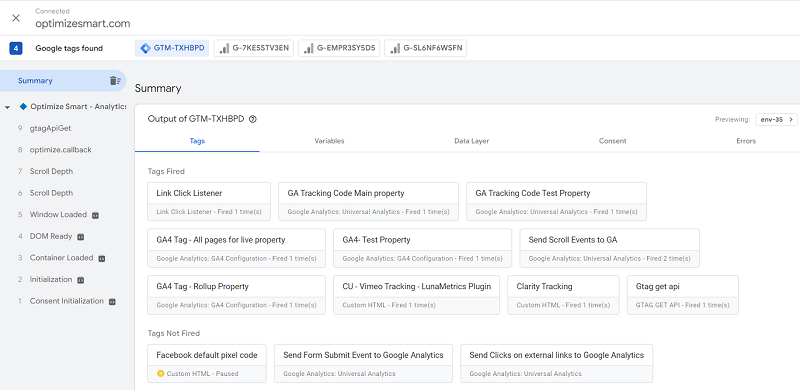
Tag Assistant is the ground truth for what a tag is actually doing on the page in front of you. It's free, it's official, and every GA4 implementer should know it first.
The catch: it's a debugger, not an auditor. One page at a time, manually, in your own browser, while you click through.
Useful for spot-checking a specific page or a specific tag's firing conditions, not for understanding tag coverage across a 10,000-page website. That's where the rest of this list comes in.
2) Screaming Frog SEO Spider.
Screaming Frog is a website crawler primarily used as a technical SEO audit tool, but I use it for tag auditing.
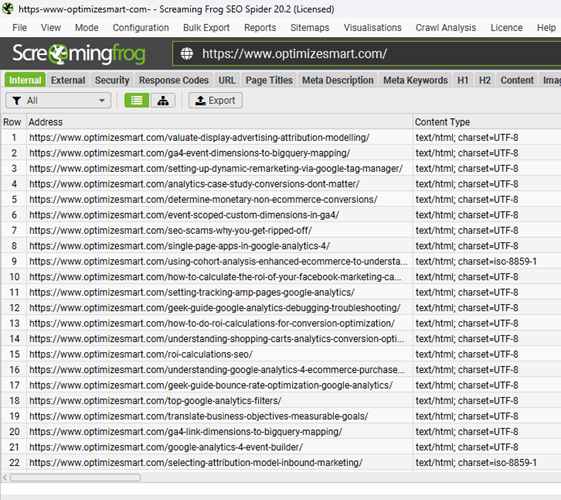
The advantage of using Screaming Frog is that you can scan the entire website (regardless of its size) for missing tags in one go.
This is particularly useful for identifying missing tags across a large website with thousands or tens of thousands of pages.
You can use the ‘Custom Search’ feature of the Screaming Frog SEO Spider to search the source code of all the web pages site-wide for a particular tag.
This tag could be:
- Javascript code for installing Google Analytics 4.
- Javascript code for installing Google Tag Manager Container.
- Javascript code for installing Google Ads Conversion Tracking.
- Data Layer used to track particular ecommerce events etc.
One thing to be aware of: Screaming Frog reads the HTML, not the network requests that actually leave the browser.
It can confirm a GTM container is present on a page, but it can't tell you whether a specific tag inside that container fired, where the GA4 hit routed (your sGTM endpoint vs direct to google-analytics.com), or whether a tag fired before consent was granted.
For coverage checks, it's excellent. For firing-behaviour checks, it's the wrong tool.
The other downside: 'Custom Search' and the Google Analytics integration are paid-only. The cost of Screaming Frog is still minuscule compared to dedicated tag auditing tools like 'Obeserve Point' and Tag Inspector, which can run into thousands or tens of thousands of dollars.
3) Observe Point.
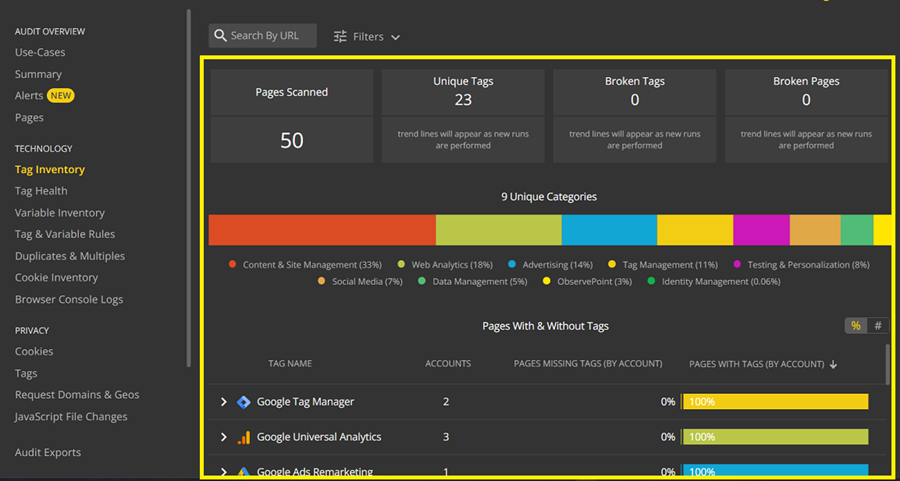
Observepoint is designed especially for tag auditing and privacy compliance.
It can be a very useful tool if you manage websites where tag auditing and privacy compliance are of “paramount importance”.
While ObservePoint isn’t the cheapest tag auditing tool on the market, it is still relatively cheaper than its direct competitors.
Through ‘observe point’, you can perform the following tag auditing tasks (but not limited to).
- Identify and monitor all the tags (unique, duplicate, broken, missing, waiting, unapproved tags) on your website in one go. No need to run the tool manually on each page.
- Run daily scans and real-time monitoring across all tags on the website.
- Monitor tag health, like load time and status codes for every tag collected in the audit.
- Monitor privacy compliance like cookie reporting.
Unlike Screaming Frog, ObservePoint loads pages in a real browser and watches what actually fires so it catches tags loaded via GTM, sGTM routing behaviour, and consent-mode interactions that source-code crawlers miss.
Honourable mention: Claude Code.
Many GA4 audits use tools such as ObservePoint or Screaming Frog, along with manual browser checks.
They are useful. But sometimes you need to check rules specific to a client's engagement. Rules that a packaged tool's UI may not model the way you need it to.
That is where Claude Code can help.
You can use it to build a Playwright-based crawler that audits GA4, GTM, consent behaviour, and server-side tagging against your own client-specific rules.
What would you actually build?
A small Node.js or Python project using Playwright.
Playwright is a browser automation library. It opens pages in a real Chromium browser, just like a real user would.
The crawler would:
- Visit each URL.
- Capture every network request.
- Check what tags fired.
- Snapshot window.dataLayer.
- Look for vendor globals like fbq or LinkedIn partner IDs.
- Save everything to SQLite, JSONL, or another simple format.
Then a separate reporting script turns that raw data into a CSV or HTML report.
That split matters. You can re-run reports without crawling the whole site again. When you are iterating on audit rules, that can save hours.
Why Playwright?
Because tag firing behaviour is a runtime concern, not a source-code concern.
Screaming Frog is strong at large-scale crawling and can render JavaScript in a headless browser, so it can see more than raw HTML. But its primary workflow is extraction from rendered pages, not the interception of requests and the capture of runtime events as first-class outputs.
That distinction matters for tag audits. What you actually need to verify is:
- Which network requests were left in the browser?
- In what order?
- With what payloads?
- And how that changed before vs after consent?
Playwright is built around exactly that workflow. Its request and response events expose every network call the page makes, which is what makes runtime tag-firing audits feasible to build cleanly.
Before opening Claude Code, drop this file at the root of your empty project folder. This is the spec Claude Code will read on every prompt and it's the difference between a working bespoke crawler and a generic tag finder.
# GA4 Tag Audit Crawler

## What this project does
A Playwright-based crawler that audits GA4, GTM, server-side GTM,
and consent-mode behaviour against client-specific rules.
Outputs raw captured data to SQLite for re-querying, plus
HTML/CSV reports generated separately from the captured data.

## Architecture principles
- Capture and reporting are separate. The crawler writes raw
  observations to SQLite. The reporter reads from SQLite.
  This means re-running reports does not require re-crawling.
- Real browser only. Use Playwright with Chromium. Do not
  fall back to plain HTTP fetching for any tag detection logic.
- Per-page, capture: every network request (URL, method,
  POST body, response status), full window.dataLayer snapshot,
  presence of vendor globals (fbq, gtag, _linkedin_data_partner_ids,
  ttq, _hsq, etc.), all GTM container IDs, all GA4 measurement IDs.
- Consent-mode aware. Each page is loaded twice: once with
  consent denied, once with consent granted. Both captures are
  stored and tagged with their consent state.

## Tag detection rules
Classify outbound requests by URL pattern:
- GA4 hit: matches /\/g\/collect/ on any host
- GA4 direct (bypass): GA4 hit where host is google-analytics.com
  or analytics.google.com
- GA4 via sGTM: GA4 hit where host is NOT in the Google-owned list
- GTM container load: matches /googletagmanager\.com\/gtm\.js\?id=GTM-/
- Meta Pixel: connect.facebook.net or facebook.com/tr
- LinkedIn Insight: px.ads.linkedin.com or linkedin.com/li.lms-analytics
- TikTok Pixel: analytics.tiktok.com
- Google Ads conversion: googleadservices.com/pagead/conversion

Any unmatched request that looks like analytics
(contains 'analytics', 'pixel', 'track', 'collect', 'beacon')
should be logged as 'unknown' for review, not silently dropped.

## Client-specific rules (edit per engagement)
- Approved sGTM hosts: [list here per client, e.g. gtm.clientdomain.com]
- Required dataLayer fields on product pages: item_id, item_name,
  price (number), currency
- Required dataLayer fields on purchase events: transaction_id,
  value (number), currency, items[]
- transaction_id format: [client-specific regex]
- No tag may fire when consent is denied except: [list of allowed
  consent-exempt tags, usually GTM container itself and consent platform]

## Crawl behaviour
- Respect robots.txt
- Sitemap-first: read /sitemap.xml and queue URLs from it
- Configurable max depth and max pages per run
- Configurable rate limit (default: 1 page per second)
- Allow URL list override via input file

## Storage schema
SQLite with tables:
- runs: run_id, started_at, finished_at, config_json
- pages: run_id, url, consent_state, loaded_at, status
- requests: run_id, url, request_url, method, host, classification, post_body
- datalayer_snapshots: run_id, url, consent_state, snapshot_json
- globals: run_id, url, consent_state, global_name, present
- findings: run_id, url, rule_id, severity, message

## Output
- Reporter script generates: HTML report (per run), CSV per finding type,
  optional BigQuery push for cross-run analysis.
- Findings severity: error (rule violated), warning (suspicious),
  info (observed but not a rule)

## Stack
- TypeScript, Node 20+
- Playwright with Chromium
- better-sqlite3 for storage
- Vitest for tests
A few of those fields you'll want to fill in based on the specific client engagement before you start. The approved sGTM hosts list, the transaction_id regex, and the consent-exempt tag list are the three that matter most.
Open Claude Code in the project folder, then hit Shift+Tab to enter plan mode and paste this:
Read CLAUDE.md. We're building the tag audit crawler defined there.

Before writing any code, produce a plan covering:

1. The module structure — what files exist, what each one's
   responsibility is, and what its public interface looks like.
   I want clean separation between: crawl orchestration, page
   visit logic, request interception/classification, dataLayer
   and globals extraction, storage writes, and reporting.

2. The data flow for a single page visit — from URL in the queue
   to rows in SQLite, including how the consent-state double-load
   works.

3. The minimal first milestone — the smallest end-to-end slice
   that proves the capture pipeline works. This should crawl
   exactly one URL, capture network requests and dataLayer,
   classify requests using the rules in CLAUDE.md, and write
   to SQLite. No reporter yet. No multi-page crawling yet.
   No client-specific rule enforcement yet. Just prove the
   capture-to-storage pipeline.

4. What you'd build in milestone 2 and milestone 3, briefly.

Do not write code yet. Just the plan.
Plan mode is the part most people skip and it's where Claude Code earns its keep. You'll get a plan back, you read it, you correct anything that's wrong (modules with the wrong responsibilities, classification logic in the wrong place, etc.), and only then do you approve and let it write code.
The follow-up prompt, once you've reviewed and accepted the plan:
Approved. Implement milestone 1 only — the single-URL end-to-end
capture pipeline. Set up the project scaffolding (package.json,
tsconfig, folder structure), install dependencies, and build
the minimum modules needed to crawl one URL, capture and classify
requests, snapshot dataLayer, and write to SQLite.

Do not implement consent-state double-loading yet. Do not implement
multi-page crawling yet. Do not implement client-specific rule
enforcement yet. Those are later milestones.

When done, run the crawler against https://www.optimizesmart.com
as a test target and show me the SQLite contents so I can verify
the capture is working before we build further.
That last line is important. Force Claude Code to actually run what it built and show you the output. It's the fastest way to catch a subtly broken classifier or a missed network event before you've built the next three modules on top of it.
For more details about creating this crawler, ask Claude.
What can a custom Claude Code crawler do that ObservePoint and Screaming Frog cannot?
Both ObservePoint and Screaming Frog are capable validation platforms.
ObservePoint has a rules engine, validates consent mode behaviour, and supports custom assertions.
Screaming Frog supports Custom Extraction against rendered pages.
The point of the list below is not that these tools fundamentally can't do these checks, it's that encoding deeply client-specific rules is friction in a packaged tool's UI and zero friction in code, and that the resulting raw dataset is yours to query however you like.
1. Enforce client-specific rules without fighting a UI.
ObservePoint can tell you whether GA4 fired and apply rules to validate that it did.
What's harder to express in any packaged tool is the long tail of contract-specific assertions: "every GA4 hit must route through gtm.clientdomain.com, except on /legal/* where no analytics should fire, and on checkout pages the transaction_id must match /^OP-\d{6}$/."
That kind of rule set lives more naturally in code, alongside the rest of the client's analytics implementation, than in a vendor's rules UI.
2. Detect server-side GTM bypasses.
This is common. Shopify apps, WordPress plugins, CRM tools, and other integrations often send GA4 hits directly to Google, bypassing the server-side GTM container the client paid you to set up.
The audit result from a generic tool might say: "GA4 is firing." A custom crawler can flag every GA4 request whose destination host is not on the approved server-side GTM domain list and produce a per-page report of which integration is doing the bypassing.
This check is doable in commercial tools with the right rule configuration. It's just usually faster to express in twenty lines of code than in a rules UI.
3. Validate the actual dataLayer schema.
Finding a dataLayer.push() is not enough.
You may need to check whether:
- item_id matches the client's SKU format.
- value is a number, not a string.
- currency exists on every ecommerce event.
- Required ecommerce fields are present.
- Event names follow the agreed taxonomy.
This is where AI-assisted coding is genuinely useful. You describe the rules in plain English.
The crawler enforces them. When the schema changes, you update the description and regenerate. The rule set lives in version control alongside the GTM container documentation, not in a separate vendor tool.
4. Compare pre-consent and post-consent behaviour.
Consent audits are often messy.
A custom crawler can load the same page twice, before consent and after consent and produce a clear diff:
- What was fired before consent?
- What was fired after consent?
- What fired when it should not have?
ObservePoint can validate consent mode and check gcs parameter values; this isn't a capability gap.
The advantage of doing it in a custom crawler is owning the raw before-and-after capture, which you can re-query as the consent rules evolve without re-crawling.
5. Own the raw dataset.
This one is underrated. A custom crawler writes structured raw observations to your storage of choice: JSONL, SQLite, BigQuery. That dataset is queryable forever, by any rule you think of later.
When the client comes back in three months and asks, "Did we ever fire purchase events with negative value?" you can answer that question using the captured data. With a packaged tool, you re-run the audit with a new rule and lose the historical comparison.
What Claude Code cannot do?
1. It is not a product.
Screaming Frog and ObservePoint work out of the box.
A Claude Code crawler does not. You still need to specify it, build it, test it, and maintain it. If you are not comfortable doing that, the comparison ends there.
2. It does not come with a vendor-maintained tag library.
ObservePoint maintains a library of marketing tag patterns covering hundreds of vendors and updates it when those vendors change endpoints.
Your custom crawler only knows what you teach it. If TikTok changes an endpoint or LinkedIn adds a new conversion URL, your regex may silently stop working until someone notices a missing tag in the report. Maintenance is your responsibility.
3. It will not satisfy every procurement process.
Enterprise clients may need:
- SOC 2 documentation.
- A named vendor.
- Security reviews.
- Formal support.
- Compliance paperwork.
A bespoke script usually does not clear that bar, even if the audit logic is excellent.
4. No scheduled monitoring or dashboards out of the box.
ObservePoint runs daily scans, alerts when tags break, tracks history, and gives multiple stakeholders a shared dashboard.
A custom crawler is a script. Scheduling, alerting, historical storage, and dashboards are all doable, cron or GitHub Actions for scheduling, Slack or email for alerting, BigQuery plus Looker Studio for storage and dashboards but each is another piece you assemble. None of it is free.
5. The audit is only as good as your rules.
Claude Code can help you write the crawler quickly. It cannot decide what "good tracking governance" means for your client.
Bad rules produce a clean-looking report that misses the real problems. Commercial tools encode years of opinionated defaults that catch things you didn't think to look for that is real value, not table stakes.
The real takeaway.
Claude Code is a force multiplier for consultants who already understand tag governance.
It helps you enforce rules that are deeply specific to one engagement: server-side GTM routing, contract-defined consent behaviour, client-specific dataLayer contracts and it gives you a raw dataset you can re-query as those rules evolve.
But it is not a replacement for Screaming Frog or ObservePoint when a team needs a packaged product that can be bought, deployed, and handed to a marketing manager. Both categories are valid; they solve different problems.
Use the right tool for the job.

Other Articles on GA4.
- Google Analytics 4 GDPR Compliance Checklist.
- Google Analytics 4 Behavioral and Conversion Modeling.
- GA4 – Missing Deep Links in your App [Fixed].
- How to create custom insights in Google Analytics 4 (GA4).
- Fixing data threshold issue in Google Analytics 4 (GA4).
- (organic) or (not set) as ‘session campaign’ for google / cpc in GA4.
- Session Fragmentation Is Ruining Your GA4 Attribution Data.
- Tracking Outbound Links/Clicks in Google Analytics 4.
- Understanding Data Sampling in Google Analytics 4 (GA4).
- User Explorer Google Analytics 4 Tutorial.
- Google Analytics 4 Explorations Tutorial.
- How to Change Attribution Models in Google Analytics 4.
- Google Analytics Real-time report not working? Here is the fix.
- Google Signals in Google Analytics 4 - See demographics (gender, age) data.
- How to Create Landing Page Report in Google Analytics 4.
- How to segment Google Analytics 4 data by data stream.
- Setup Cross Domain Tracking in Google Analytics 4.
- How to see full page URLs in Google Analytics 4.
- Roll up Property in Google Analytics 4 – Tutorial.
- The Best Tag Auditing Tools for Google Analytics 4.