

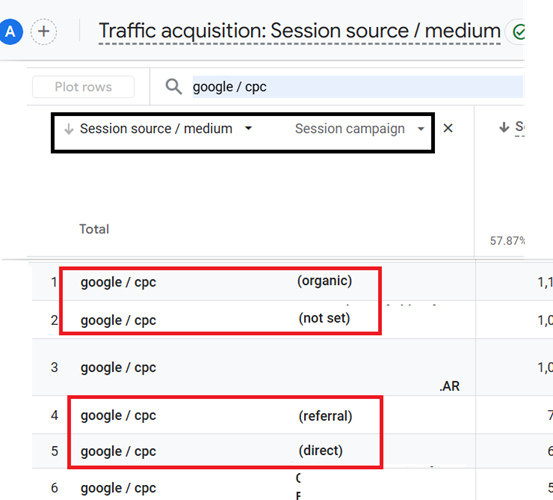
Here is why ‘Session campaign names’ for Google Ads traffic (google / cpc) might show as (organic), (not set), (referral), or (direct) in GA4, despite auto-tagging being enabled and GCLID data present.
#1 Google Consent Mode
Consider the following scenario:
A user clicks a Google Ad, lands on your website, and opts out of ad personalisation or rejects advertising/marketing cookies.
In such case, GA4 can still correctly label the traffic source as google / cpc because of the presence of GCLID in the Landing page URL but can not access detailed campaign data from Google Ads.
Without specific campaign information, the value of the ‘Session campaign’ dimension defaults to (organic).
While it might seem counterintuitive that GA4 doesn’t default the ‘Session Campaign’ dimension to ‘(not set)‘, there is a logical reason behind this.
GA4 prioritizes providing as much information as possible, even if it’s limited.
By defaulting the ‘Session Campaign’ dimension to ‘(organic),’ GA4 signals that the traffic is indeed from a Google Search, but the specific campaign details are unavailable.
Note: GA4 can also default the session campaign name to (organic) for Google Ads traffic when a user turns off personalized ads in ‘My Ad Center‘:
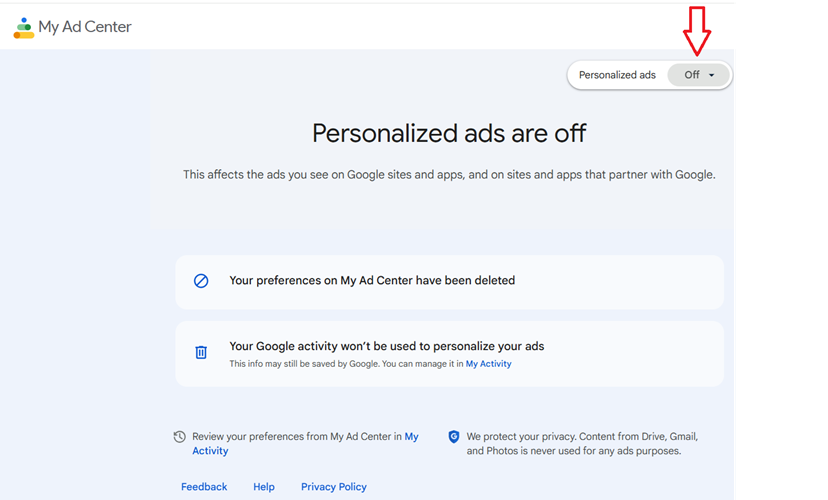
The gclid parameter still enables GA4 to recognize google / cpc as the source/medium, but consent restrictions limit campaign-level attribution, resulting in this fallback behavior.
Solution: Using both auto-tagging and manual tagging (applying UTM parameters along with the gclid) can help mitigate this issue. By manually adding utm_campaign, utm_source=google, and utm_medium=cpc, GA4 can still identify specific campaign data even if the gclid data becomes restricted due to consent settings.
Note: ValueTrack parameters in Google Ads can not solve this issue because there’s no ValueTrack parameter for campaign names. This makes manual UTM tagging necessary.
#2 Missing or delayed ‘page_view’ event.
Consider the following scenario:
A user lands on a page after clicking a Google Ad, but the ‘page_view’ event is delayed, does not fire, or does not fire in the correct order.
In such case, GA4 can still correctly label the traffic source as google / cpc because of the presence of gclid in the Landing page URL but can not retrieve the session campaign name in time, resulting in a (not set) label for the session campaign.
Note: Single page applications are most likely to have session campaign set to (not set) for google/cpc traffic because of missing ‘page_view’ events.
3) Broken GA4 session continuity.
The session campaign name reported as (referral) for google/cpc is mainly because of broken GA4 session continuity (interruptions in tracking continuity that split the GA4 session into two).
For example, when users navigate between domains or subdomains without cross-domain tracking, GA4 might interpret part of the GA4 session as a new referral.
Consider the following scenario:
A user clicks a Google Ad leading to example.com and then navigates to shop.example.com without cross-domain tracking.
In such case, GA4 maintains google / cpc as the source but may assign (referral) as the campaign name.
Google Ads traffic that passes through intermediary tracking URLs or third-party platforms can disrupt session continuity, especially if gclid is stripped along the way.
Consider the following scenario:
A user clicks a Google Ad but is first directed through a tracking service (tracking.example.com) before reaching the final landing page.
In such a case, GA4 might label tracking.example.com as the referring campaign and default to (referral) for the session campaign name.
4) Returning users after session expiration.
When google / cpc traffic has a session campaign name of (direct), it’s generally due to:
>> A returning user after session expiration, where the user revisits without the gclid parameter (e.g., via a direct URL or bookmark).
>> GA4’s inability to carry over campaign attribution without gclid for new sessions.
Summary:
When session campaign names for Google Ads traffic (google / cpc) show values like (direct), (referral), (organic), or (not set), the issue is primarily due to a loss of session campaign attribution, not a failure in traffic attribution.

Other Articles on GA4.
- Google Analytics 4 Measurement ID and Property ID.
- Prompt Engineering for GA4 BigQuery SQL Generation.
- Google Analytics 4 vs Universal Analytics: The Key Differences.
- How to create a new BigQuery project.
- How to create a new Google Cloud Platform account.
- How to overcome GA4 BigQuery Export limit.
- ChatGPT Workflow That Simplifies GA4 Data Analysis.
- Understanding Google Analytics 4 Sessions.
- Total vs Active, New, Returning users in Google Analytics 4.
- BigQuery Cost Optimization Best Practices.
- Google Analytics 4 Data Import Tutorial.
- Tracking ad impressions and ad clicks in Google Analytics 4.
- Testing Google Analytics 4 via Test Property.
- Google Analytics 4 GDPR Compliance Checklist.
- Google Analytics 4 Behavioral and Conversion Modeling.
- GA4 – Missing Deep Links in your App [Fixed].
- How to create custom insights in Google Analytics 4 (GA4).
- Fixing data threshold issue in Google Analytics 4 (GA4).
- (organic) or (not set) as ‘session campaign’ for google / cpc in GA4.
- Session Fragmentation Is Ruining Your GA4 Attribution Data.