

What are deep links in GA4?
Deep links are URLs that direct users to a specific page or content within an app or website rather than taking them to the home page/home screen.
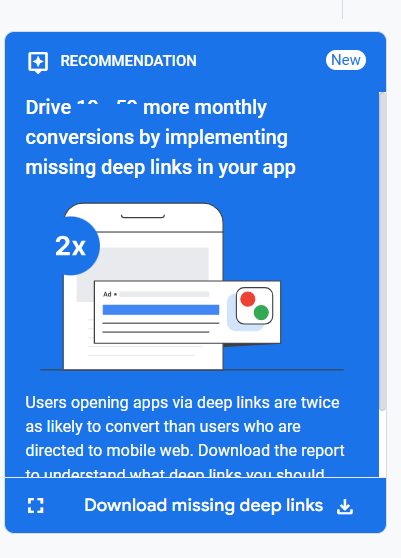
Deep links are often used in advertising campaigns, allowing users to be directed to specific website content or in-app content from ads, emails, or social media posts.
Types of deep links supported by GA4
GA4 supports the following types of deep links:
- Universal Links (for IOS).
- App Links (for Andorid).
- Custom Scheme Links (IOS & Android).
- Deferred Deep Links (IOS & Android).
These are deep links that can direct users to either the app or the website, depending on whether the app is installed.
What is deferred deep linking?
Deferred deep linking is a type of deep linking that allows users who don’t have an app installed to first be directed to the app store to download the app, and then, after installing the app, they are automatically taken to the specific content or page the deep link was originally intended to lead them to.
It essentially preserves the user’s context from the moment they click the link through to the installation and launch of the app.
Use deferred deep linking to preserve attribution data in GA4.
Deferred deep linking allows you to pass attribution data through the app installation process.
This ensures that information about the source, campaign, and other relevant details are not lost when a user installs the app.
Deferred deep linking helps maintain attribution data across different platforms (e.g., from web to app), providing a more complete picture of the user journey.
By preserving attribution data, marketers can accurately track which campaigns, ads, or channels led to app installs and subsequent in-app actions.
This is crucial for measuring the effectiveness of marketing efforts and calculating ROI.
Differed deep linking enhances user experience.
When users are directed to the intended in-app content after installation, it creates a seamless experience.
Why does GA4 prioritise deep linking for mobile apps?
Deep links are relevant both for websites and mobile apps, though their implementation and specific benefits can differ between the two platforms.
However, GA4’s recommendation for implementing deep links is primarily focused on mobile apps rather than websites.
This is because of the following reasons:
#1 Most marketers already use deep links extensively for websites. In contrast, deep linking for mobile apps is often underutilised despite the fact that it can significantly improve conversion rates and user engagement within apps.
#2 Google wants to encourage businesses to invest in deep linking within their apps to capitalise on the higher conversion potential that apps typically offer over web experiences.
#3 According to Google, “Users opening apps via deep links are twice as likely to convert than users who are directed to mobile web.” This indicates a significant performance advantage for app deep links over mobile web navigation.
#4 Deep links help GA4 attribute app installs to specific marketing campaigns or sources. When a user clicks a deep link, installs the app, and opens it, GA4 can report the source, medium, and campaign that led to the installation.
#5 Deep links in GA4 can include UTM parameters (utm_source, utm_medium, utm_campaign) to provide detailed attribution data.
#6 Deep links are crucial for tracking app engagement when a user clicks on a link that leads directly to specific in-app content. For example, if a user clicks on a product link from an email campaign, GA4 can track how they interact with the specific product page within the app.
#7 GA4 can use deep links to attribute installs from various ad platforms, including Google Ads (via auto-tagging) and Apple Search Ads.
#8 When deep links are implemented in apps, they create direct pathways to specific content or features within the app. This allows GA4 to track the user’s journey more comprehensively, from the initial point of entry (e.g., an ad click or email link) through to conversion.
#9 In-app conversions (e.g., purchases, sign-ups, or specific actions) can be more easily attributed to specific user journeys when deep links are used. This allows for more accurate measurement of marketing campaign effectiveness and ROI.
#10 Since deep links in mobile apps can bypass app home screens and take users directly to relevant content, they are especially valuable for re-marketing campaigns.
#11 Deep linking is particularly powerful for mobile apps because it leverages unique app capabilities and features that are often not available or as seamlessly integrated on mobile websites.
For example:
#11.1 Apps can use deep links to guide users directly to location-based features.
For example, a food delivery app can send a deep link via a push notification that opens directly to a restaurant’s menu based on the user’s current location, detected via GPS.
This creates a more personalised experience that’s hard to replicate on a mobile web page.
#11.2 Apps can leverage deep links to direct users to features that require camera access, such as scanning a barcode or using augmented reality (AR) functionality.
For example, a furniture retailer’s app might send a deep link to let users open the AR feature to visualise how furniture looks in their home.
#11.3 Apps can store user preferences, shopping history, or personalised settings locally on the device.
A deep link can take a user directly to content tailored to them, such as products they have shown interest in or new content based on their app behaviour without requiring them to log in or re-enter preferences, as might be required on a website.
#11.4 Deep links can take users directly to app-specific features like loyalty rewards or gamified actions (e.g., unlocking levels or achievements), which are hard to replicate on a website.
These features keep users engaged and increase retention.
#11.5 Deep linking can allow seamless integration between different apps owned by the same company.
An airline app might deep link users to a related hotel booking app, maintaining context and providing a consistent user journey across apps.
#11.6 GA4’s ability to track both web and app user journeys is powerful, but the app journey often provides more structured and meaningful data for tracking conversions, especially when deep links are implemented.
The ‘campaign_details’ event.
GA4 uses a ‘campaign_details’ event to capture attribution data from deep links shortly after an app install.
This event plays a key role in tracking the source of the user’s engagement with the app, particularly when deferred deep linking is involved (i.e., when a user clicks a deep link, installs the app, and is then redirected to the relevant content).
The following key information is captured in the campaign_details event:
- Campaign_id – The unique identifier of the marketing campaign.
- Campaign_source – The source of the campaign (e.g., Google Ads, Facebook, email).
- Campaign_medium – The medium used to deliver the campaign (e.g., search, social, email).
- Campaign_term – The keyword or search query that led to the click.
- Campaign_content – The specific ad content displayed to the user.
- Campaign_name – The name of the campaign.
Eligibility criteria for getting missing deep links recommendation in GA4
#1 Your GA4 property must be linked to your Google Ads account.
#2 You must have at least one active app data stream in your GA4 property.
#3 Your Google Ads account must have campaigns with eligible spend.
#4 You need to have sufficient app usage data and conversion data for GA4 to analyze and generate recommendations. The more data you have, the more likely GA4 is to generate recommendations.
How does GA4 identify missing deep links?
Here’s how GA4 identifies missing deep links:
#1 GA4 analyses data from your app data stream and linked Google Ads account. It looks at active campaigns and eligible campaign spend.
#2 GA4 examines conversion data and engagement metrics for different ad URLs and app screens.
#3 When GA4 detects potential opportunities for implementing deep links, it generates a recommendation.
#4 GA4 provides a downloadable CSV report listing the missing deep links.
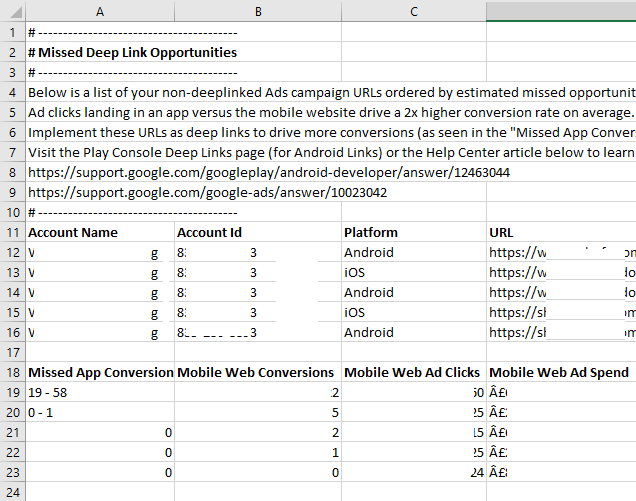
This report ranks ad URLs by corresponding missed conversions, helping prioritise which deep links to implement first.

Other Articles on GA4.
- Google Analytics 4 Measurement ID and Property ID.
- Prompt Engineering for GA4 BigQuery SQL Generation.
- Google Analytics 4 vs Universal Analytics: The Key Differences.
- How to create a new BigQuery project.
- How to create a new Google Cloud Platform account.
- How to overcome GA4 BigQuery Export limit.
- ChatGPT Workflow That Simplifies GA4 Data Analysis.
- Understanding Google Analytics 4 Sessions.
- Total vs Active, New, Returning users in Google Analytics 4.
- BigQuery Cost Optimization Best Practices.
- Google Analytics 4 Data Import Tutorial.
- Tracking ad impressions and ad clicks in Google Analytics 4.
- Testing Google Analytics 4 via Test Property.
- Google Analytics 4 GDPR Compliance Checklist.
- Google Analytics 4 Behavioral and Conversion Modeling.
- GA4 – Missing Deep Links in your App [Fixed].
- How to create custom insights in Google Analytics 4 (GA4).
- Fixing data threshold issue in Google Analytics 4 (GA4).
- (organic) or (not set) as ‘session campaign’ for google / cpc in GA4.
- Session Fragmentation Is Ruining Your GA4 Attribution Data.