

What is modeling in GA4?
“Modelling in GA4” actually refers to different types of data modelling techniques used within Google Analytics 4.
GA4 offers the following types of data modelling techniques:
#1 Behavioural modeling: Estimates user behaviour when they don’t consent to cookies.
#2 Conversion modeling: Estimates the impact of marketing when conversions can not be directly attributed to traffic source.
#3 Attribution modeling: Determines credit for conversions across touchpoints.
#4 Predictive metrics: Anticipates user behaviour like purchase or churn.
Observed data vs. Training data vs. Modelled data.
There are three categories of data in the context of GA4 data modelling:
- Observed data.
- Training data.
- Modelled data.
#1 Observed data
It is the actual data which comes directly from users who granted consent for GA4 to track their behaviour using identifiers like cookies or app IDs.
It provides precise and reliable information about their behaviour, including metrics like user counts, sessions, page views, events, and conversions.
#2 Training data
It is a combination of observed data and labelled data (also known as ‘labelled examples‘) used to train the machine learning algorithms behind modelled data.
Labelled data are data points with assigned labels/categories. They are used to guide and improve machine learning algorithms.
Examples of labelled data in GA4:
- Labelling specific events like “Add to cart” and “Checkout completed” as “conversion steps” to train the algorithm about your conversion funnel.
- Identifying user sessions with high page views and long average session time as “engaged users” to help predict future engagement patterns.
- Categorizing users based on demographics and past purchasing behaviour to improve user segmentation and personalization efforts.
The training data directly influences the accuracy and effectiveness of modelled data.
Biases within the training data can be reflected in the modelled data, leading to inaccurate predictions or insights.
Therefore, labelling should be done accurately and consistently to avoid confusing the algorithm.
By understanding the role and importance of labelled data, you can actively contribute to improving the effectiveness of GA4 data modelling and gain more accurate and actionable insights for optimizing your website or app performance.
#3 Modelled data
It is the estimated data for users who did not grant consent (opt-out users).
The modelled data also comes directly from users who granted consent for GA4 to track their behaviour using identifiers like cookies or app IDs.
In other words, the modelling itself leverages observed data.
Machine learning algorithms analyze patterns and behaviour from users who did consent and use these insights to estimate the behaviour of similar opt-out users.
Therefore, modelled data isn’t directly collected from opt-out users but inferred from observed data with similar characteristics.
This distinction is crucial for interpreting reports in GA4.
While modelled data helps fill in data gaps and provide insights into opt-out user behaviour, it is important to remember that it’s an estimation and may not be as accurate as observed data.
Note: GA4 strives only to report modelled data when it has a high degree of confidence in its accuracy. This helps avoid misleading users with potentially inaccurate insights.
Why is data modeling needed in GA4?
Any situation where user data is partially missing or unavailable due to privacy regulations, restrictions or technical limitations (like restricted third-party cookies and identifiers) is a key reason for using modelling—for example, consent banners and missing data from opt-out users.
In short, GA4’s modelling helps website/app owners gain insights while respecting user privacy in a changing data landscape.
How does modeling in GA4 impact your data and reports?
#1 Modeling in path and funnel explorations is applied differently than in standard reports.
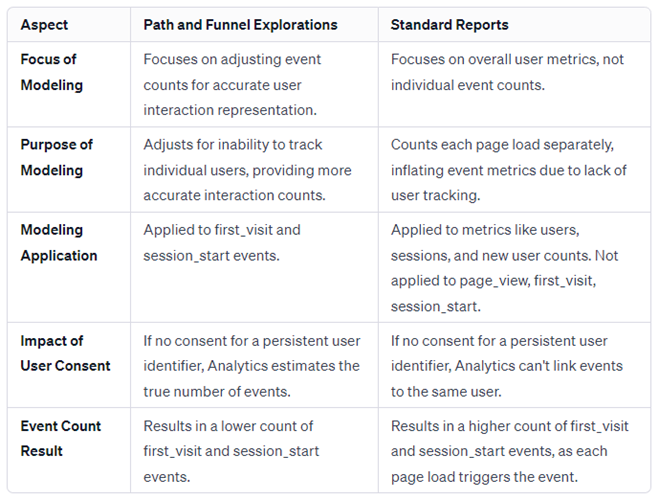
#2 Behavioural Modeling is not supported for the following GA4 features:
- Audiences: You can’t create audiences based on modelled data.
- Most Explorations: Except for free-form tables, other exploration types (user explorer, cohort, user lifetime explorations, etc.) won’t include modelled data.
- Retention reports: These reports focus on user behaviour over time and don’t currently incorporate modelling.
- Segments with sequences: Segments involving user actions across multiple sessions don’t work with modelled data.
- Predictive metrics: Features like predicting future conversions haven’t been integrated with modelling yet.
#3 Modeled data is not automatically included in BigQuery exports. However, if needed, you can access and utilize modelled data through the GA4 API.
What is Behavioural modeling in GA4?
Behaviour modelling uses machine learning to estimate the behaviour of users who opt out of cookies based on similar users who opt in.
It estimates user behaviour metrics like daily active users, new users, etc.
Eligibility criteria for using behavioural modeling in GA4
- Consent Mode must be enabled across all pages/apps, which can communicate the user’s cookie/app identifier consent status to Google and send cookieless pings when users deny consent.
- Consent Mode for web pages must load tags before the consent dialog appears.
- Your GA4 property needs 1,000+ events/day with analytics_storage=’denied’ for 7 days.
- Your GA4 property also needs 1,000+ daily users with analytics_storage=’granted’ for 7 of the previous 28 days.
- The ‘Blended’ reporting identity is enabled in your GA4 property.
While meeting the data thresholds (1,000+ daily users with consent and 1,000+ daily events) triggers model training, it may take longer than seven days for the process to complete and for modelled data to become available.
The complexity of your website/app, data volume, and chosen conversion paths can all affect the training time.
Modelled data becomes available only after your GA4 property meets the eligibility requirements and remains accessible as long as those requirements are maintained.
If your property falls below the data thresholds or consent rates dip, you might lose access to modelled data in your reports.
Note: Behaviour modelling is only available in GA4, not Universal Analytics.
What is Conversion modeling in GA4?
Conversion modeling uses machine learning to estimate the impact of traffic sources when conversions can not be directly tied to the traffic sources due to privacy regulations, restrictions or technical limitations (like restricted third-party cookies and identifiers).
Conversion modelling automatically mixes observed and modelled data in reports to give a full picture of conversion attribution.
Where to find conversion modeling data in GA4?
You can find conversion modelling data in GA4 within specific reports like ‘Events’, ‘Conversions’, and explorations using event scope dimensions.
What is the difference between behavioural modeling and conversion modeling?
While conversion modeling in GA4 focuses on estimating specific conversion events and their attribution to user journeys, behavioural modeling estimates broader user behaviour patterns and engagement on your website or app.
FAQ: If I implement advanced consent mode v2, will I see events of users who denied the consent in GA4?
You will be able to see events (some but not all) of users who denied consent.
When consent is denied, GA4 can use behavioural modelling and conversion modelling to estimate user behaviour, plugging any gaps in your reporting.
Let us suppose you want to see the revenue metric for all users, whether the user consent is granted or not.
With advanced consent mode v2 in GA4, you can see some, but not all, revenue metrics for users who denied consent.
However, the level of visibility and accuracy will depend on the following factors:
1) Quality and quantity of the consenting user data.
The effectiveness and accuracy of the data modelling in GA4, particularly when using advanced consent mode, heavily depends upon the quality and quantity of the data from users who have given consent.
This includes the relevance, completeness, and reliability of the data.
High-quality data leads to better modelling and more accurate predictions.
The quantity of data also plays a crucial role. Models are generally more accurate when they are trained on larger datasets.
A substantial amount of data from consenting users can provide a more representative sample of the overall user base, leading to better modelling outcomes.
2) Type of revenue event (direct purchase events or indirect purchase indicators).
The distinction between direct revenue events (like a “Complete purchase” button click) and indirect indicators (like adding an item to a shopping cart) is a key point.
Direct actions (like direct purchases) by non-consenting users are typically not tracked, so the system relies more on indirect indicators and data modelling.
Google can only estimate these events based on similar users who granted consent.
3) Accuracy of modelling.
The effectiveness of modelling depends on the availability of similar user data with complete revenue information.
The estimates for non-consenting users might be less accurate if you have a diverse user base with varied purchase patterns.
The granularity of your revenue data also plays a role.
Aggregate revenue figures might be more reliable than individual purchase details through modelling.
4) Expectations from Modeled Data.
You will likely see aggregated revenue figures with annotations like “modeled” or “(modeled)” indicating they include estimates for non-consenting users.
You might be able to see trends and general patterns in revenue generation even if individual purchase details are unavailable.
Remember:
1) Modelling provides valuable insights, but it’s crucial to remember that estimates may not be exact.
2) Non-consenting users might exhibit different behaviours compared to those who consent, leading to model inaccuracies.
3) Treat modelled data cautiously and avoid drawing definitive conclusions based solely on them.
If you operate a website which gets less than 1000 visitors/day, your GA4 data collection will be significantly impacted in the near future.
Your tracking will be skewed because of a lack of consented/observed data in your GA4 property.
For data modelling to kick in your GA4 property, your GA4 property needs 1,000+ daily users with analytics_storage=’granted’ for 7 of the previous 28 days.
So, in real life, you will need a lot more than 1000 visitors/day because most of them will likely deny consent. And the population of users who deny consent will only increase in the future.
You will struggle to find many consenting audiences, especially if you are EU-based. Using BigQuery won’t save you either, as modelled data is not available in BigQuery export.
No observed data = no modelled data.
Without enough observed data from consenting users, GA4’s data modelling techniques won’t have enough information to generate reliable estimates for opt-out user behaviour.
So what you can do then?
Find ways to maximize observed data collection.
1) Review your consent messaging and design to improve user acceptance rates.
2) Offer incentives or rewards for users who consent, such as exclusive content, discounts, or early access to features.
3) Focus on first-party data collection, like collecting email addresses.
By collecting and storing first-party data, you can build a richer user profile even with limited consent rates. This helps overcome data gaps caused by opt-out users and provides valuable insights into your audience.
3) Use server-side tagging.
Server-side tagging can reduce reliance on user consent in several ways. The most obvious one is converting third-party data into first-data.
During server-side processing, you can analyze and transform third-party data points like device IDs or campaign identifiers into first-party data elements like anonymous user IDs. This conversion gives you direct ownership and control over the data.
4) Focus on qualitative data collection.
Gather qualitative data about user behaviour and preferences directly from your audience.
5) Utilize feedback from customer support channels or social media to gain insights into user experience and pain points.
How to Check If GA4 Data Modeling Works for You
FAQ: How do I know whether my GA4 property collects modelled data after setting up Google consent mode and whether I should keep using consent mode?
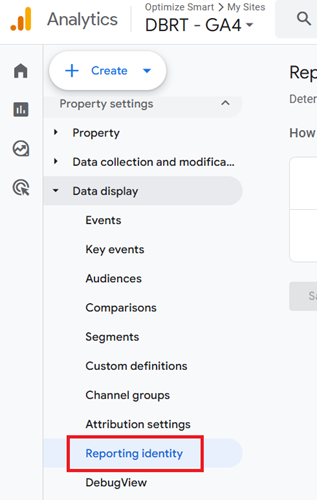
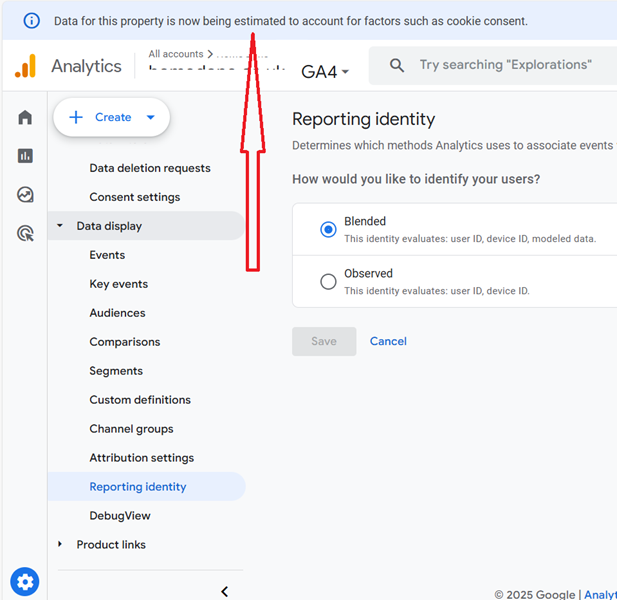
Once 3 or 4 weeks have elapsed from the date you first set up Google consent mode, navigate to ‘Reporting Identity‘ under ‘Data Display‘ in your GA4 Admin.
Click on the ‘Blended‘ drop-down menu:
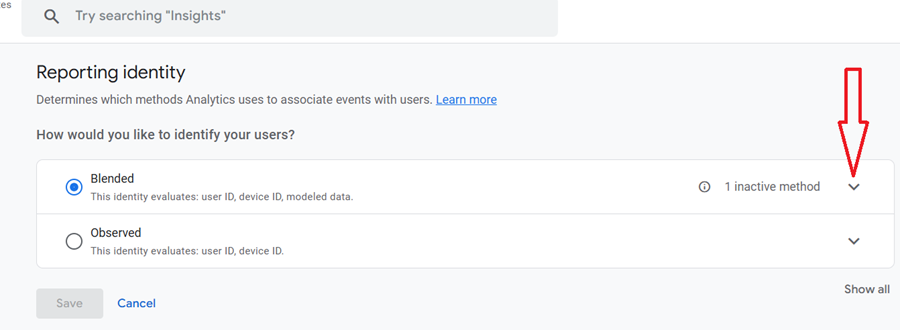
Look for the following similar notification:
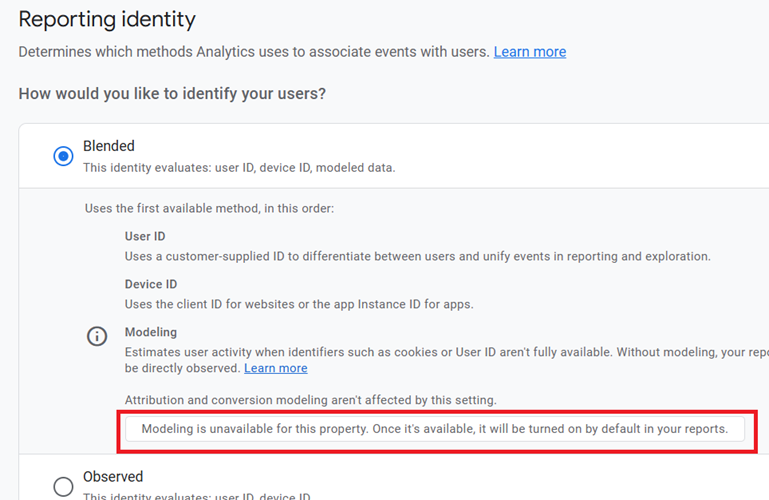
If data modelling is available for your GA4 property, you should see the notification ‘Modeling is available for this property’.
You can also see the following notification once behavioural modelling is available for your GA4 property:
Don’t be surprised if data modelling is not available to you. Very few GA4 properties qualify for data modelling.
Google entice users with modelled data if they set up consent mode. However, most GA4 properties never qualify for modelled data.
If your property does not qualify for modelled data even after waiting for a month and you are a business operating outside the European Economic Area (EEA) and/or don’t target users in the EEA, you can safely remove the consent mode setup as it serves no real purpose for you.
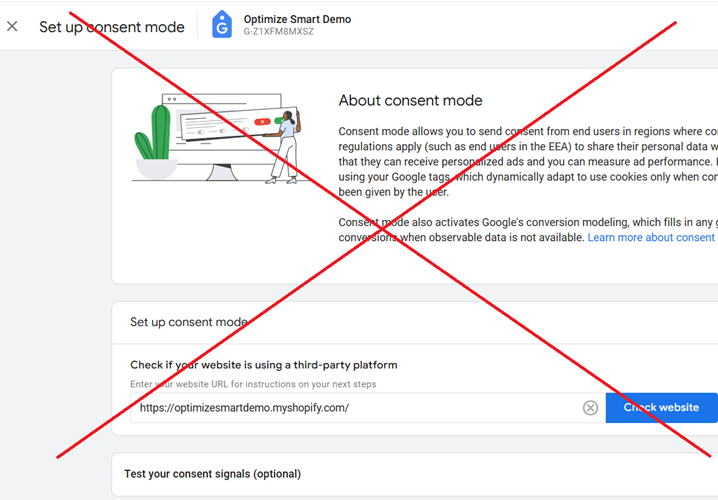
This will help you minimise data collection issues in GA4.
Google Consent Mode (both basic and advanced) are not mandatory for businesses operating outside the EEA and /or not targeting users in the EEA.
So, if you are an American business serving only USA-based customers, you don’t have to set up a consent mode to comply with GDPR or respect user privacy.
All you need is a cookie consent banner that tracks or does not track based on user consent choice.
So, what’s the downside of setting up Consent Mode?
Your GA4 property becomes more prone to various hard to fix data collection issues from (not set) to unassigned traffic.
When you use Google Advanced Consent Mode, the data discrepancy between GA4 and GA4 BigQuery export increases considerably, and you start collecting “junk data” in BigQuery.
When Advanced Consent Mode is implemented, there is a notable difference between what you see in your GA4 reports and what is available in your BigQuery export data tables.
For example, you could see far more conversions and purchase events in BigQuery.
This happens because, by default, the GA4 BigQuery export does not fully honour the Google Advanced Consent Mode and continues to import event data (some but not all) from your GA4 property even if users decline consent.
So what happens when the consent mode is not implemented and a user denies consent?
Without Consent Mode, your website’s cookie banner will still block Google tags from firing if a user denies consent.
This means no data is sent to Google platforms (GA4, Google Ads) for that user.
You are essentially in an “all or nothing” situation regarding data collection. But when you set up consent mode, you are half in and half out regarding data collection.
You are collecting full data from some users, partial or modelled data from others, and no data from some, depending on their consent choices and the specific implementation of Consent Mode, which skews your analytics data for Good.
With Consent Mode, the data collected is highly variable, inconsistent and unpredictable. You also see a lot more data discrepancy between GA4 and other platforms.

Other Articles on GA4.
- Google Analytics 4 Measurement ID and Property ID.
- Prompt Engineering for GA4 BigQuery SQL Generation.
- Google Analytics 4 vs Universal Analytics: The Key Differences.
- How to create a new BigQuery project.
- How to create a new Google Cloud Platform account.
- How to overcome GA4 BigQuery Export limit.
- ChatGPT Workflow That Simplifies GA4 Data Analysis.
- Understanding Google Analytics 4 Sessions.
- Total vs Active, New, Returning users in Google Analytics 4.
- BigQuery Cost Optimization Best Practices.
- Google Analytics 4 Data Import Tutorial.
- Tracking ad impressions and ad clicks in Google Analytics 4.
- Testing Google Analytics 4 via Test Property.
- Google Analytics 4 GDPR Compliance Checklist.
- Google Analytics 4 Behavioral and Conversion Modeling.
- GA4 – Missing Deep Links in your App [Fixed].
- How to create custom insights in Google Analytics 4 (GA4).
- Fixing data threshold issue in Google Analytics 4 (GA4).
- (organic) or (not set) as ‘session campaign’ for google / cpc in GA4.
- Session Fragmentation Is Ruining Your GA4 Attribution Data.