

DISCLAIMER: This checklist is for informational purposes only and is not a substitute for professional legal advice. Use your discretion.
What is GDPR?
GDPR stands for General Data Protection Regulation. It is European Union (EU) privacy law.
This law came into force on May 25, 2018. GDPR gives data subjects more rights and control over their personal data and its use.
The GDPR applies to any organization that processes or controls the personal data of data subjects, regardless of whether the organization is based in the EU.
The two versions of GDPR
Following are the two versions of GDPR:
- EU-GDPR
- UK-GDPR.
After leaving the EU (European Union), the UK developed its own version of GDPR called UK-GDPR.
The UK-GDPR is nearly identical to the EU-GDPR. The main difference is that the UK-GDPR can only be governed and enforced by UK data protection agencies and is more sensible and business friendly.
That’s why Open AI selected the UK to open its first office outside USA.
The DPA here does not harass businesses over trivial things like the absence of ‘reject all’ button on the cookie consent banner or UK-USA personal data transfer.
UK developed its own version of GDPR because it wasn’t happy with the EU version.
Now it can shape the law as it sees fit without any outside influence.
If you are a company based in the EU and your target audience mainly lives outside the EU, it makes economic sense to move your office over to the UK.
Additional Resources:
Why should you care about GDPR Compliance?
If you are processing the personal data of ‘data subjects,’ then you must comply with GDPR regardless of where you live.
Two levels of administrative fines can be levied (on a case-by-case basis) for not complying with GDPR:
1) Up to €10 million ($12.5 million), or 2% annual global turnover (whichever is higher).
2) Up to €20 million ($24.73 million), or 4% annual global turnover (whichever is higher).
Suppose you are a business entity (corporation, partnership, limited liability company, sole proprietor) based in the EU.
In that case, you should not ignore GDPR compliance, as it can directly and heavily affect your business.
Additional Reading
- General conditions for imposing administrative fines (EU-GDPR).
- What are the penalties for getting it wrong? (UK-GDPR)
- GDPR compliance checklist for US companies
How to make GA4 GDPR compliant?
Follow the checklist below to make GA4 GDPR compliant:
- Do not send PII data to Google Analytics 4
- Do not collect any PII on your website that you don’t really need.
- Avoid sending any hashed personal data to Google products.
- Use the POST method for form submission.
- Do not track any form field which contains PII.
- Use a POST-based search engine on your website.
- Do not track any search terms which contain PII.
- Ask for the bare minimum of personal information from your website users and customers.
- Do not ask for or process sensitive personal information from your website users and customers.
- Do not upload/send any data to GA4 that contains PII.
- Do the website Audit to find and remove PII data.
- Do a full audit of your analytics setup and all of your data sources.
- Do not activate Google Signals in GA4 if you don’t need it.
- Use granular location and device data collection settings.
- Use advanced settings to allow for ads personalization
- Exclude specific events from ads personalization in GA4
- Exclude specific user property from ads personalization in GA4
- Do not link your Google Ads account to your GA4 property if you do not actively use Google Ads.
- Use the ‘event data retention’ feature in GA4
- Use only the ‘Data Sharing Settings’ you really need in GA4.
- Switch to Server-Side Tagging to enhance GDPR compliance.
- Remove your website from the Wayback Machine.
- Understand the various GDPR jargon.
- Understand the scope of GDPR compliance.
- Practice Data Minimization.
- Implement ‘Privacy by design’.
- Provide the right of notification of data breach to data subjects.
- Provide the data subjects with the right to access.
- Provide the data subjects with the right to be forgotten.
- Provide the data subjects with the right to object.
- Provide the data subjects with the right to rectification.
- Appoint a Data Protection Officer (if required).
- Conduct a Legitimate Interest Assessment (LIA)
- Conduct a Data Protection Impact Assessment (DPIA).
- Develop a robust GDPR-compliant privacy policy.
- Block the EU member states from accessing your website, which is not your target market.
- Do not use data processors based in the EU (edge case)
- Create a separate EU business unit.
- Ask all of your data processors for GDPR-compliant privacy policies and GDPR-compliant data service agreements.
- Ask for explicit consent from data subjects.
- Do not rely on default consent.
- Make it easy for data subjects to withdraw consent.
- Maintain a database of the users’ consent.
- Obtain fresh consent whenever required.
- Use tools like ObservePoint for privacy validation and compliance.
1. Do not send PII data to Google Analytics 4
Personally Identifiable Information (also known as PII) is a subset of personal data that can be used to uniquely identify an individual.
Google considers any information that reveals an individual’s identity, contact or location as PII.
Examples of PII:
- Email address.
- Phone number.
- Social security number.
- Full names of the users.
- The precise location of users.
It is against Google Analytics terms of service to send PII data to the Google Analytics server.
If you are found to collect PII in GA, then you may end up losing your GA account for good.
Note: Google has implemented strict data privacy measures in GA4 to protect user data. It will automatically mask any PII data if it detects it. It’s unlikely that you’ll find any PII data in GA4 reports.
However, if you find any PII data, you should remove it as soon as possible.
Regularly go through all of your reports in your GA4 property to find any accidental leak of PII data.
You will likely find PII data passed as an event name, event parameter, page URL, page title, user id or via data import.
Use the following methods to remove PII data from your GA4 property:
- Use the GA4 API to delete PII data from specific reports or data streams programmatically.
- Use the data deletion requests feature in GA4 to delete PII data based on specific criteria, such as event name and event parameter.
- Use the user deletion API to delete user data by specifying the client ID, user ID or app instance ID.
- Use the data retention settings in GA4 to automatically delete PII data after a certain period.
- Use Google Tag Manager to prevent PII from being sent to GA4 in the first place.
- Use the GA4 Data Redaction feature to prevent the inadvertent collection and storage of PII data within GA4 data streams.
2. Do not collect any PII on your website that you don’t really need.
Do not collect personally Identifiable Information (PII) on your website (via a form, comment panel, etc.) you don’t really need.
Remove all the unnecessary fields from your forms on the contact us or checkout pages.
You must have a legitimate reason for collecting personal data, and you should only collect the minimum amount necessary to fulfil that purpose.
For example, do not collect unnecessary personal information like gender or date of birth if it is not required to process an order or a lead.
3. Avoid sending any hashed personal data to Google products.
Google allows you to send hashed user-provided data from your website to Google products like GA4 and Google Ads to improve conversion tracking (enhanced conversions).
Hashing in GA4 and Google Ads uses the SHA-256 algorithm, ensuring consistent hash values for identical email addresses across platforms.
This allows Google to match user-provided hashed data with its existing records.
Using a different hashing algorithm won’t prevent matching, as Google could hash raw emails using the new method.
Moreover, third parties can precompute hash values for known email lists, making hashed data vulnerable.
Hashing doesn’t anonymize data, it merely obfuscates it. The FTC warns that hashing alone doesn’t guarantee anonymity.
For GDPR compliance, avoid sending hashed personal data to Google and opt out of “enhanced conversions” and similar services.
For more details, check out this article: GDPR Alert: Are Your Enhanced Conversions Legal.
4. Use the POST method for form submission.
Ensure that the forms embedded on your ‘contact us’ page, ‘signup/login’ pages, ‘checkout’ pages, etc. use the POST method instead of the GET method.
If you use the GET method, the parameters of the form will end up as part of the URL in the browser address bar.
This could result in PII (like username and email address) appearing in the URLs of your web pages.
Google Analytics track and report the URL of each viewed web page.
So if the URL path contains PII, it could end up in your GA4 reports.
If you run Google ads on your website (via Google Adsense), the PII data may go to Google as part of the ad request. That’s how you accidentally send PII data to GA.
Use the POST method for forms embedded on your website to prevent PII data from appearing in the URLs and inadvertently being sent to Google and other third parties.
5. Do not track any form field which contains PII.
When tracking form fields in GA4, it’s important to ensure that you do not track any fields containing personally identifiable information (PII).
For example, if you have a form on your contact us page that collects the user’s name, email, and phone number, make sure you do not track these fields as they are classed as PII.
If you track these fields, PII can pass to your GA4 reports, which is against Google Analytics Terms of Service.
6. Use a POST-based search engine on your website.
When you use a POST-based search engine, the search results URL will not contain the query parameter.
So instead of a search page URL, like the one below:
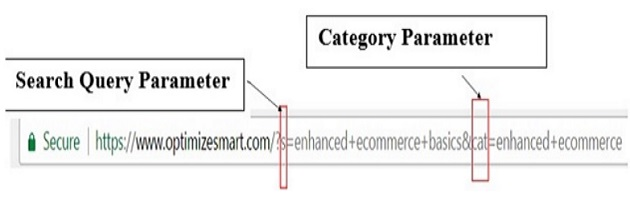
Your search page URL may look like the one below:

Using a GET-based search engine on your website can result in personally identifiable information (PII) data leaking into GA4 reports.
This happens because GET-based search engines append the user’s search query as a parameter in the URL, and GA4 can capture this parameter.
For example, a search query like ‘John Smith’ (which is a name) will be appended to the URL as a parameter, and GA4 can capture this parameter.
Now suppose you are not filtering out PII data in GA4.
In that case, this data (‘John Smith’) can appear in your GA4 reports, potentially exposing sensitive information about your website users and as well as breaking the Google Analytics Terms of Service.
7. Do not track any search terms which contain PII.
If you have implemented site search tracking on your website, ensure that any PII data is not sent to the GA4 server.
You can implement client-side validation to ensure that PII is not included in the search query.
For example, when a user submits a search query, you can check if the query contains any PII.
Suppose PII data is detected in the search query.
In that case, your validation script should prevent the search from being submitted and can give the user a message that their search contains PII, and they should remove it before trying again.
This way, your website will never collect PII data via site search tracking and send it to GA4.
8. Ask for the bare minimum of personal information from your website users and customers.
For example, many businesses ask for ‘the first name’ and ‘last name’ in addition to the email addresses of their newsletter subscribers.
But the ‘first name’ and ‘last name’ are not absolutely necessary for subscribing to a newsletter. So you can avoid asking for such personal information.
Many businesses ask for information about ‘gender’ or marital status (like Mr, Ms, Mrs), which I think is absolutely not required unless you are in the health/fitness industry or dealing with law enforcement.
Similarly, ask for a phone number on your contact/checkout pages only when you absolutely need it.
Otherwise, do not even provide the option for leaving a phone number on your website forms.
Use the legitimate interest and data protection impact assessments to decide what personal information to collect from your website users and customers.
9. Do not ask for or process sensitive personal information from your website users and customers.
Sensitive personal information includes (but is not limited to): political opinion, religious beliefs, race, health, etc.
A business can unknowingly or accidentally ask for sensitive personal information via online surveys, sweepstakes, feedback forms, contact forms, or social media.
Under GDPR, the processing of sensitive personal data is usually prohibited.
For example, you can ask your audience on your Facebook Fan page, “Do you think Donald Trump will win the next election?’
But as soon as someone from the EU participates in your survey, you will immediately come under non-compliance with GDPR.
In theory, by asking for the political opinion of EU citizens, you have processed sensitive personal data, and such type of data processing is prohibited under GDPR.
How running such a poll will really impact your business will depend upon how big of a deal you are.
If you are a famous public authority and someone files a complaint against you, you could get a warning or fine from a supervisory authority.
10. Do not upload/send any data to GA4 that contains PII.
This applies to uploading PII data to GA4 via:
- Google Analytics API
- Measurement Protocol
- ‘Google Analytics Data Import’ feature.
- User ID
- Any custom dimension
- Any custom campaign parameter (utm_source, utm_medium, utm_term, utm_campaign, and utm_content).
- Any event or event parameter.
- Any Site search dimension (like Search Term).
- Any Campaign dimension (like first user campaign)
It is important to note that just filtering out PII data from GA4 is insufficient.
Since collecting PII data in GA4 is against the ‘Google Analytics Terms of Service’, you should actively stop PII data from being sent to the GA4 servers from your website or tracking setup.
11. Do the website Audit to find and remove PII data.
Scan your entire website, page by page, or use a website crawler (like Screaming Frog SEO Spider) and ensure that the URLs, URL parameters, and page titles do not contain any PII data.
If you find such data, you have two options:
- Remove it completely.
- Replace the PII with a unique site-specific identifier (UUID).
Replacing PII with a UUID is a technique used to de-identify data.
De-identify data means removing or masking the information that can be used to identify an individual.
The goal of de-identification is to protect the privacy of individuals while still allowing the data to be used for research, analysis, or other purposes.
You can generate UUID for each individual in your data set by generating a unique random number or by using a hash function to generate a unique code. Then replace the PII with the corresponding UUID.
If the PII keeps popping up in page URLs, URL parameters, and page titles, then find the source of such PII data leak. Ask your developer to fix this issue either from the front end or back end, or both.
12. Do a full audit of your analytics setup and all of your data sources.
You are likely to find many instances where you collect unnecessary personal data about your website visitors and/or send unnecessary personal information about your website visitors to third parties (like Google Analytics, Google Ads, Facebook, etc.).
The likely culprits are third-party plugins you use on your website and the forms embedded on your website’s ‘contact us’ or checkout pages.
Minimize form fields. Ask only for information which you absolutely need to fulfil an order or submit a lead.
Do not hold personal data on the off chance that it might be useful in the future.
Under GDPR, you should not hold personal data you don’t really need.
Scan the data layers hardcoded on your website and make a note of all the unnecessary personal data you are currently tracking through them.
The data could be IP address, gender, name, email address, browsing history, etc.
Scan your databases, CRMs, and shopping carts.
Make a note of all the unnecessary personal data you have already got. Delete all such data ASAP.
13. Do not activate Google Signals in GA4 if you don’t need it.
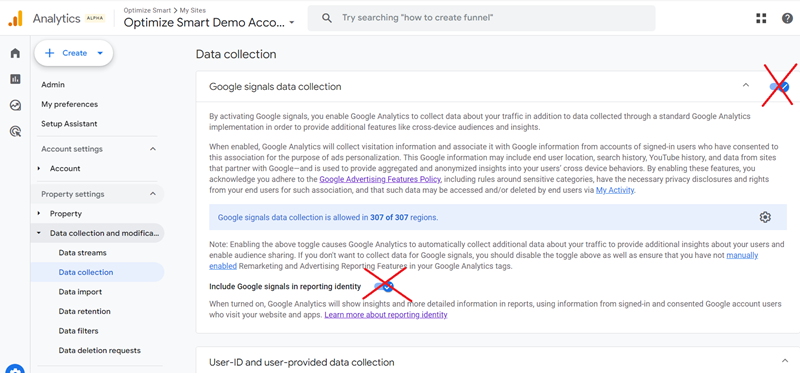
Google Signals is an advertising reporting feature through which Google Analytics 4 can collect cross-device data from those website users who have signed in to one of their Google accounts (Gmail, YouTube, etc.) and have turned on ad personalization.
When you activate Google Signals for your GA4 property, you can:
- More accurately track users across different devices and platforms.
- Remarket to more website users across devices.
- Collect demographic and interest data in your GA4 property.
- Create custom segments based on demographic and interest data.
- Create remarketing audiences in your GA4 property.
- Share your remarketing audiences with your linked advertising accounts (Google Ads, Display and Video 360).
Note: Google Signals is not enabled by default in GA4.
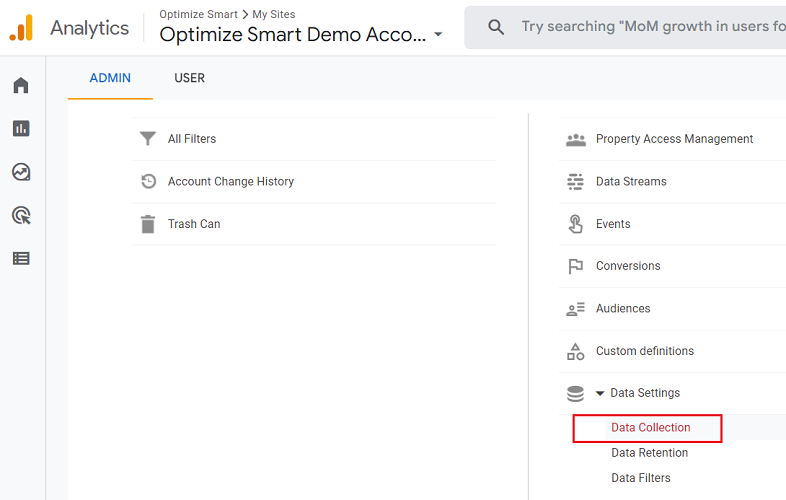
The ‘Data Collection’ is one of the settings you see in the section named ‘Data Settings’ under the ‘Property’ column in your GA4 admin:
When you click on the ‘Data Collection’ link, you get the option to enable ‘Google Signals’:
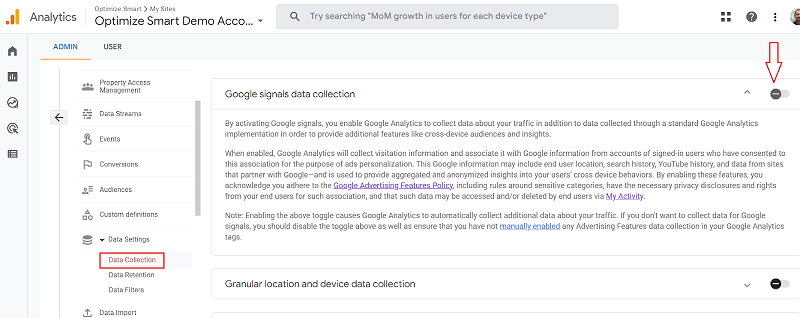
When you activate Google Signals in GA4, you acknowledge you adhere to the Google Advertising Features Policy, including rules around sensitive categories, have the necessary privacy disclosures and rights from your end users for such association, and that such data may be accessed and/or deleted by end users via My Activity.
According to the Google Analytics Advertising feature policy, if you’ve enabled any GA Advertising Features, you must notify your website visitors by disclosing the following information in your privacy policy:
#1 The Google Analytics Advertising Features you’ve implemented.
#2 How you and third-party vendors use first-party cookies (such as the Google Analytics cookie) or other first-party identifiers, third-party cookies (such as Google advertising cookies) or other third-party identifiers together.
#3 How visitors can opt out of the Google Analytics Advertising Features you use, including through Ads Settings, Ad Settings for mobile apps, or any other available means (for example, the NAI’s consumer opt-out).
Source: https://support.google.com/analytics/answer/2700409?hl=en&utm_id=ad
According to Google Analytics Advertising feature policy, you must get your website visitors’ prior affirmative consent if you are identifying them by merging PII with non-PII collected through any Google advertising product or feature.
For example, if you are using ‘user-id’ to personally identify a person in a CRM, you would first need the affirmative consent of your website visitors.
Note: Server-side tagging and measurement protocol do not support Google Signals yet.
14. Use granular location and device data collection settings.
GA4 gives you the option to enable or disable the collection of granular location and device data on the country and state levels (the state level is available only in the US).
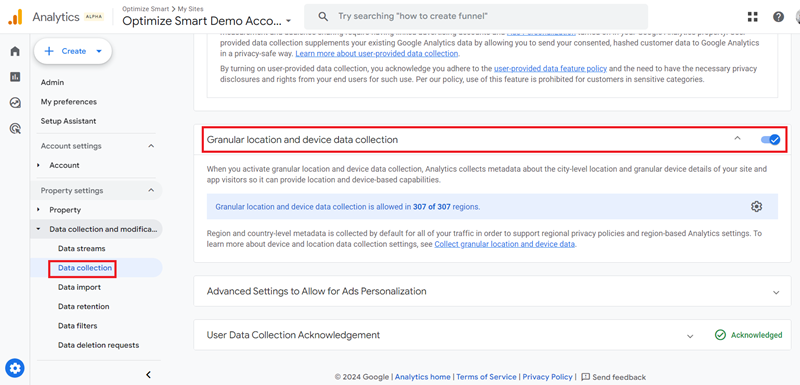
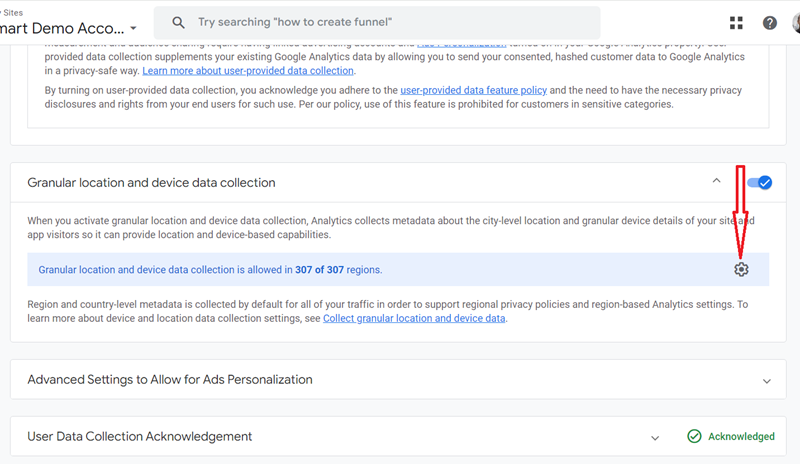
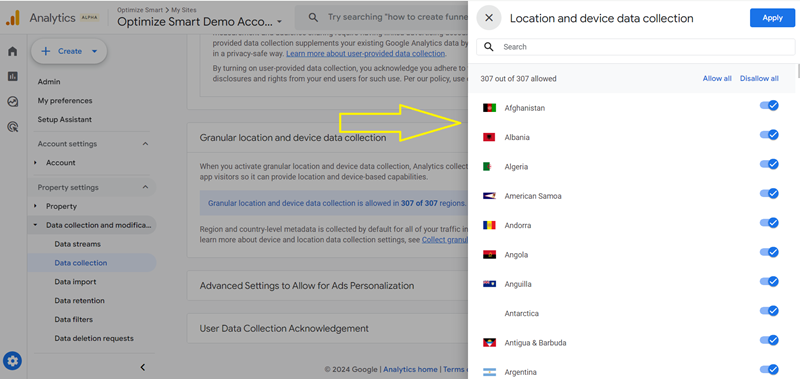
Google classify the following data as granular location and device data:
- City
- Latitude (of the city)
- Longitude (of the city)
- Browser minor version
- Browser User-Agent string
- Device brand
- Device model
- Device name
- Operating system minor version
- Platform minor version
- Screen resolution
When you disable the ‘granular location and device data collection’ setting, GA4 will stop collecting location and device data. However, the historical data will remain intact for as long as your data retention settings.
When you disable the ‘granular location and device data collection’ setting for a particular region, GA4 will stop collecting location and device data for that region.
Note: Server Side GTM supports the location and device controls.
15. Use advanced settings to allow for ads personalization
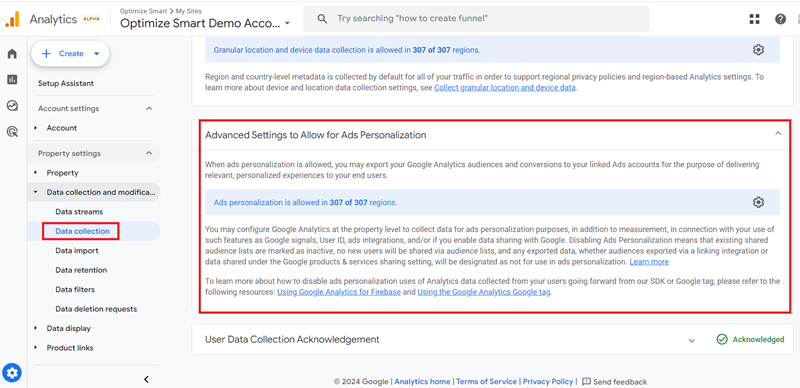
GA4 gives you the option to enable or disable ad personalization for users on the country and state levels (the state level is available only in the US).
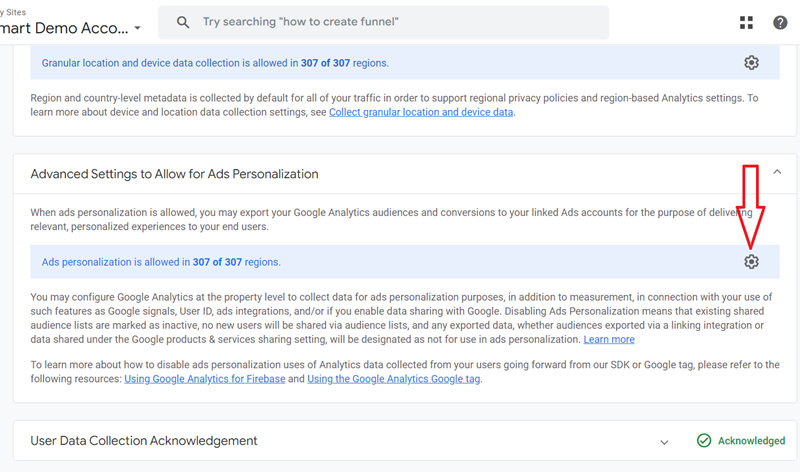
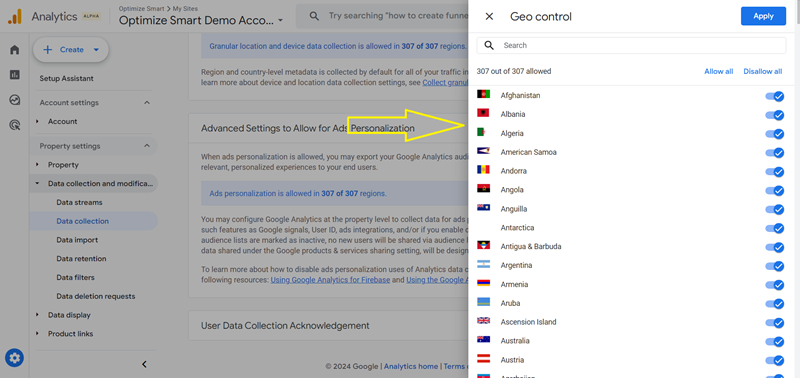
When you disable the ‘advanced settings to allow for ads personalization’, GA4 will disable ad personalization for your website/app users at the property level (for all regions).
What that means is all the GA4 events collected from disabled locations will be marked as NPA (i.e. not eligible for use for ads personalization).
You won’t be able to export your GA4 audiences and GA4 conversions to the linked Google Ads account for the purpose of delivering personalized ads to your website/app users.
You won’t be able to collect data for ads personalization purposes. However, you can continue to collect data for measurement purposes.
When you disable the ‘advanced settings to allow for ads personalization’ for a particular region, GA4 will disable ad personalization for your website/app users visiting from the location.
You can also disable the ads personalization for individual events or users through events control in measurement protocol or consent mode in GTM.
Note: When you disable the ads personalization for all or individual events or users, it does not impact the historical data.
16. Exclude specific events from ads personalization in GA4
Follow the steps below to exclude specific events from ads personalization in GA4:
Follow the steps below to exclude specific events from ads personalization in GA4:
Step-1: Navigate to the admin area of your GA4 property.
Step-2: Click on ‘Events’ under ‘Data Display‘:
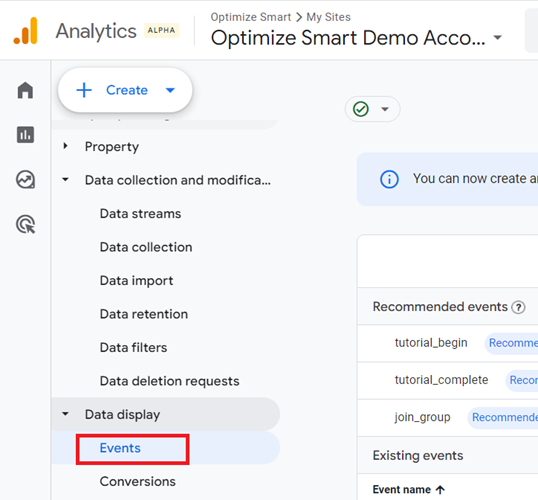
Step-3: Click on the three dots menu next to the event you want to exclude from ads personalization:
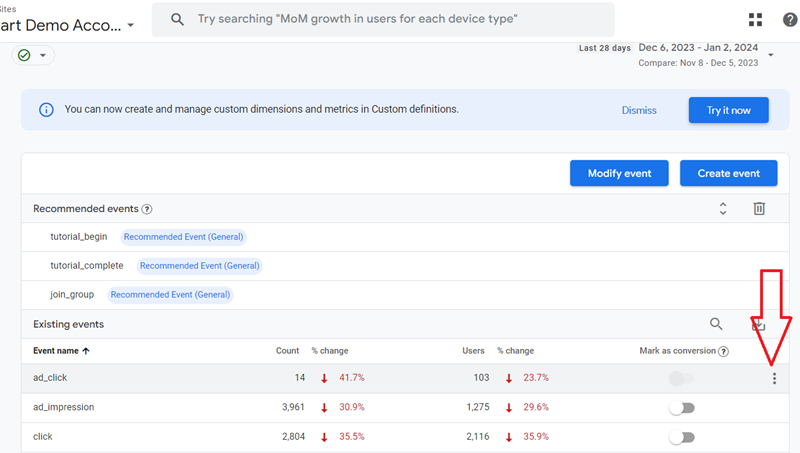
Step-4: Click on ‘Mark as NPA’ (no personalized ads).
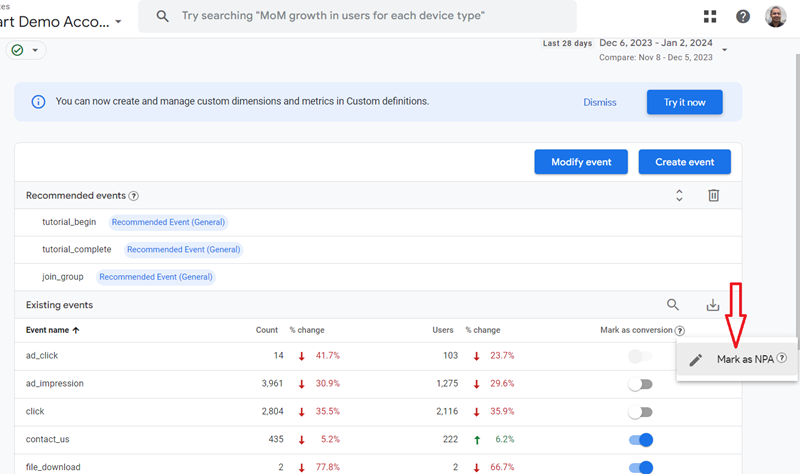
Note(1): If you want to re-include the event for ads personalization, follow steps 1 to 3 again and this time click on ‘Unmark as NPA’.
Note(2): Marking an event as NPA does not affect the data that has already been exported to Google Ads or Display and Video 360.
17. Exclude specific user property from ads personalization in GA4
Follow the steps below to exclude specific user property (user-scoped custom dimension) from ads personalization in GA4:
Step-1: Navigate to the admin area of your GA4 property.
Step-2: Click on ‘Custom Definitions’ under ‘Data Display‘:
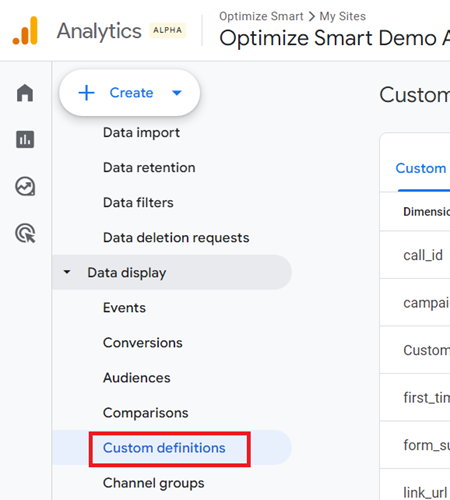
Step-3: Click on the three dots menu next to the user property you want to exclude from ads personalization:
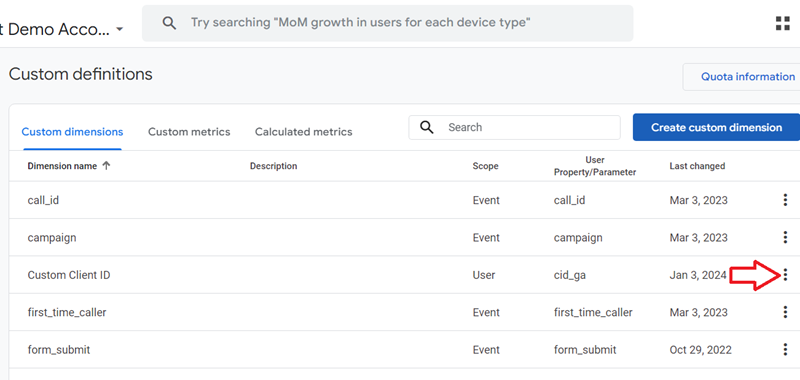
Step-4: Click on ‘Mark as NPA’ (no personalized ads).
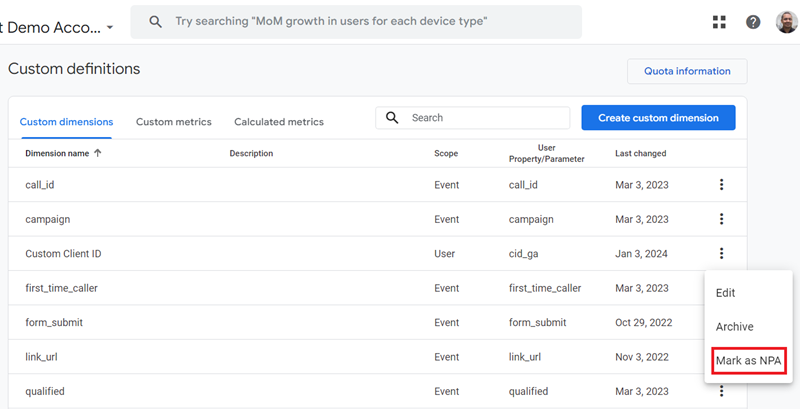
Note(1): If you want to re-include the user property for ads personalization, follow steps 1 to 3 again and click on ‘Unmark as NPA’.
Note(2): Marking a user property as NPA does not affect the data that has already been exported to Google Ads or Display and Video 360.
18. Do not link your Google Ads account to your GA4 property if you do not actively use Google Ads.
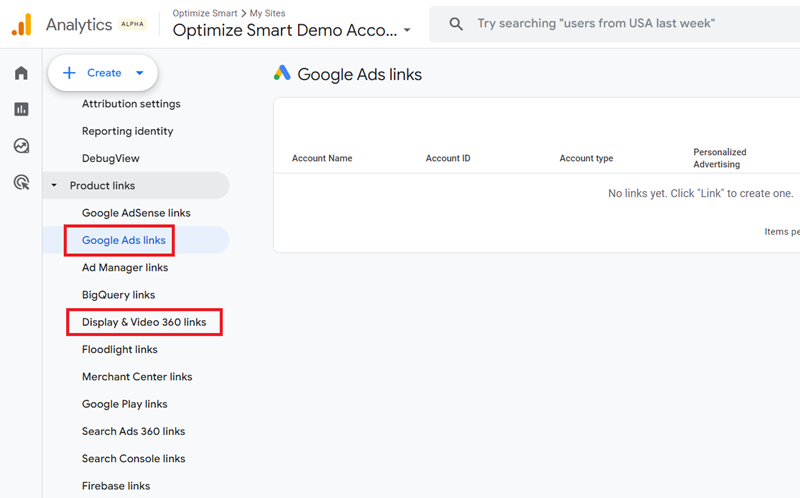
To use and benefit from Advertising Reporting Features for a GA4 property, you would need at least one active Google Ads account or Display & Video 360 account, and this account must be linked to your GA4 property.
I have seen countless GA4 setups where a business is not actively using Google Ads, but the Google Ads account is still linked to the GA4 property.
If you are not actively using Google Ads or Display & Video 360 account, unlink it from your GA4 property.
19. Use the ‘event data retention’ feature in GA4
The ‘Data Retention‘ is one of the settings you see under ‘Data Collection and Modification‘ in your GA4 admin:
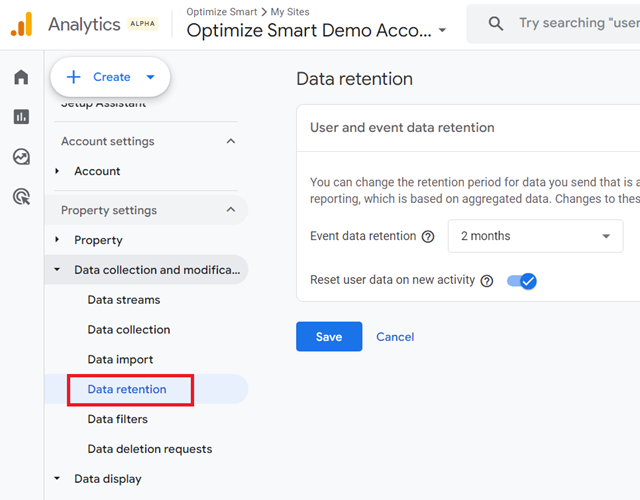
Through the ‘User and event data retention‘ feature in GA4, you can set the amount of time for which GA4 retains user-specific data for inactive website users before automatically deleting it.
This amount of time is called ‘event data retention.’
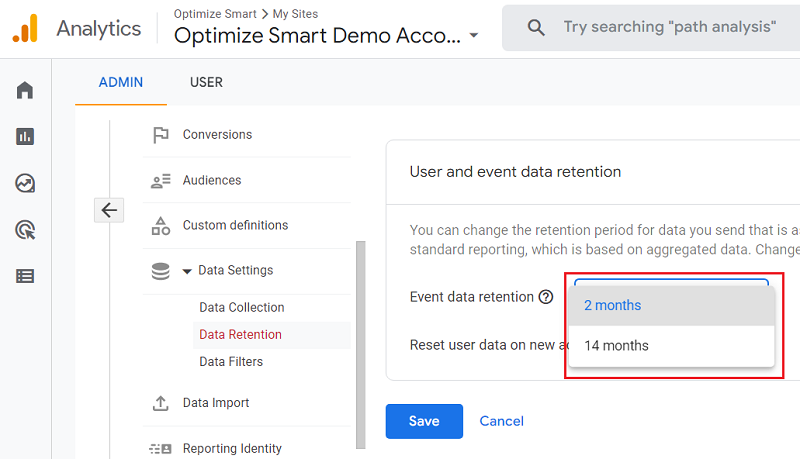
The default data retention setting is 2 months in GA4:
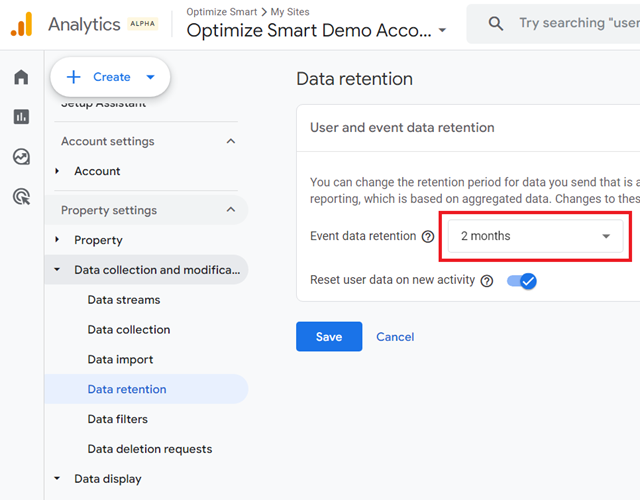
That means you lose user-specific data for inactive website users in GA4 every 2 months.
The user-specific data is the data that is associated with cookies, user identifiers, or advertising identifiers.
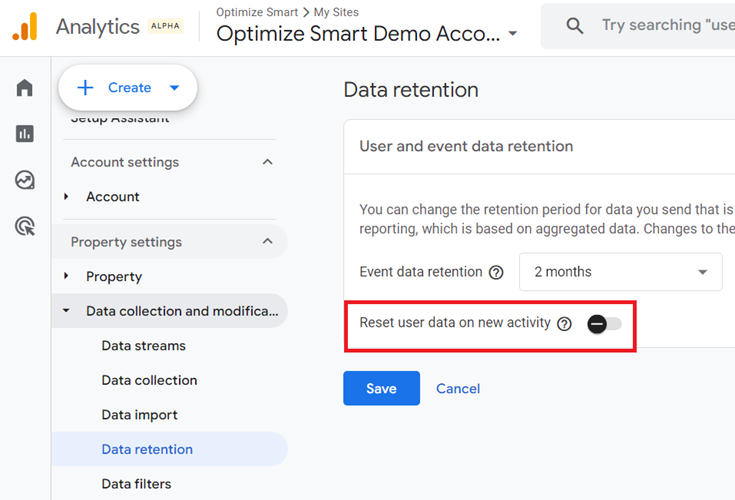
The data retention is reset on the new user’s activity:
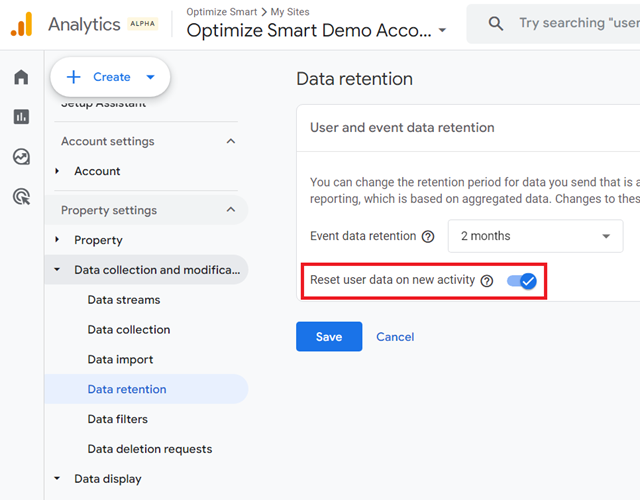
But if there is no new user activity, then the user-specific data for inactive website users are automatically deleted once the data retention has expired.
You also have the option to turn off the ‘Reset user data on new activity’:
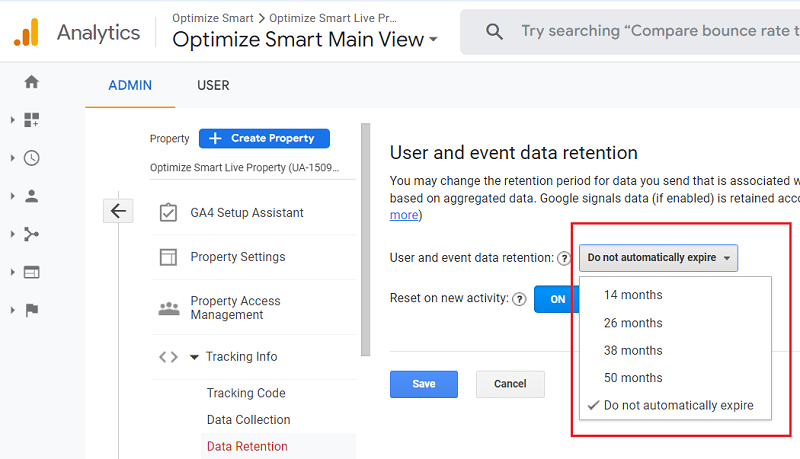
In the case of GA3 (universal analytics), you can set the data retention to one of the following:
- 14 months
- 26 months
- 38 months
- 50 months or
- Do not automatically expire.
In the case of GA4, you can set the data retention to either 2 months or 14 months. There are no other options:
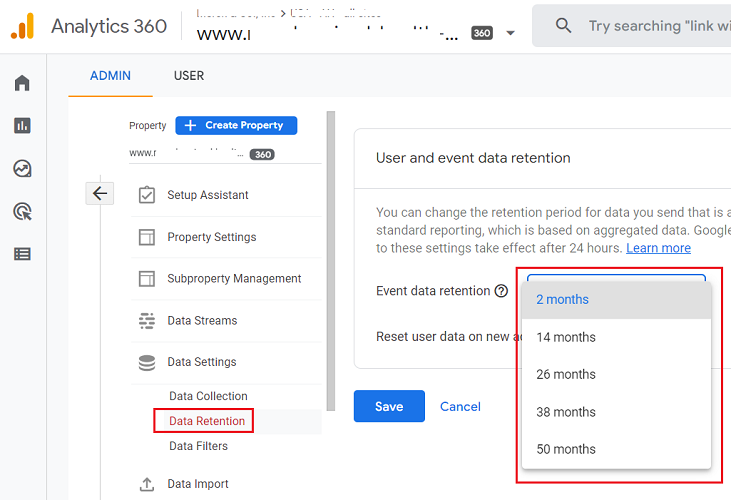
In the case of the GA4 360 property, you can set the data retention setting to one of the following:
- 2 months
- 14 months
- 26 months
- 38 months
- 50 months.
Since you can not set the data retention setting to ‘Do not automatically expire‘ in GA4, you will eventually lose user-specific data for inactive website users. It is inevitable.
If you want to protect your data from being deleted, then transfer it to BigQuery.
Through the GA4 data retention feature, you can easily practice data minimization within GA4.
Note: You may need to consult your client, data controller or data protection officer before changing the data retention settings of your GA4 property, as they must comply with your company’s privacy policy.
20. Use only the ‘Data Sharing Settings’ you really need in GA4.
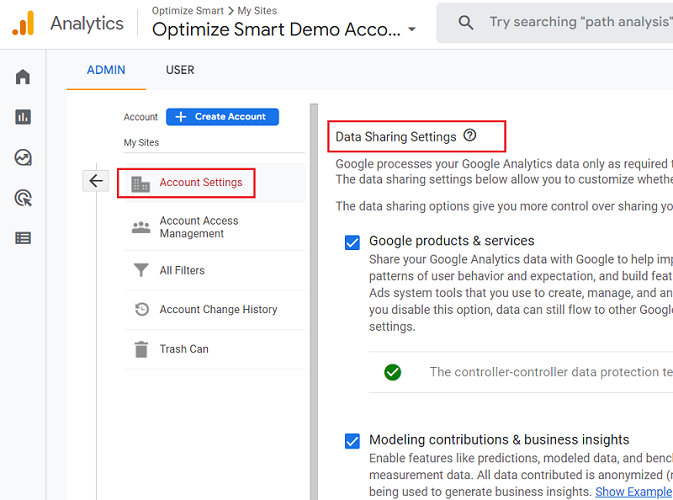
You can see all of the ‘data sharing settings’ under ‘Account Settings’ in your GA4 admin area:
Google products & services
The ‘Google products & services’ setting allows for data sharing with other Google products and services, like Google Ads, Google BigQuery etc.
Turn off this setting if you are not actively using Google products (other than GA4):
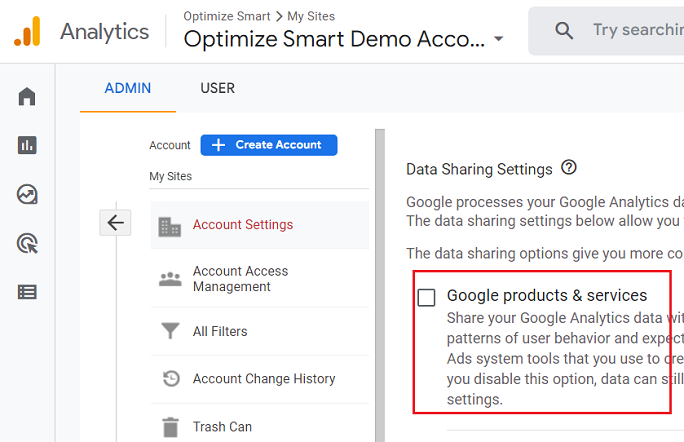
Note(1): Once you disable the ‘Google products & services’ setting, it will prevent GA4 from sharing data with other Google products and services. This means that you will lose certain capabilities, such as seeing and measuring the performance of Google Ads in GA4, using GA4 data in BigQuery etc.
Note(2): Any data collected and used by Google under the ‘Google products & services’ setting is subject to the Google Measurement Controller-Controller Data Protection Terms, and Google is, for GDPR purposes, an independent controller of such data.
Modeling contributions & business insights
The ‘Modeling contributions & business insights’ setting allows the use of machine learning models in GA4 to use and benefit from predictive metrics, predictive audiences, predictive insights etc.
Turn off this setting if you do not want to share your analytics data with third parties for the purpose of industry benchmarking, predictive analytics etc.
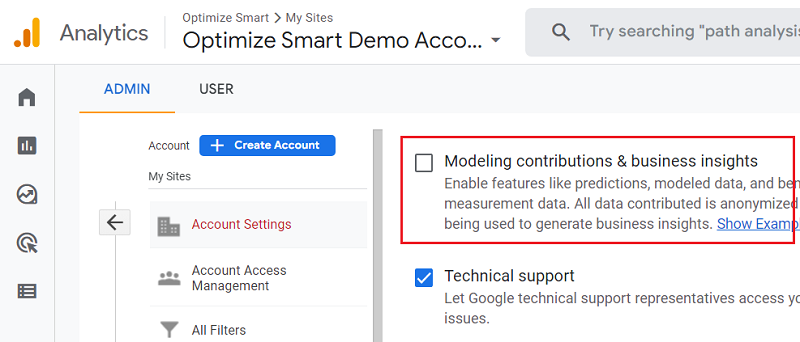
Note(1): The data is shared in an aggregate and anonymous form.
Note(2): Once you disable the ‘Modeling contributions & business insights’ feature, you won’t be able to use and benefit from the predictive analytics capabilities of GA4.
Technical support
Turn off this setting in GA4; if you do not want Google support representatives, access your Google Analytics data to fix technical issues.
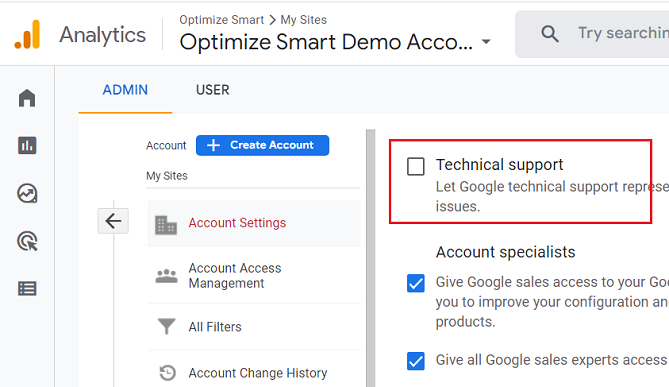
Unless you are using GA4 360, you won’t be getting any dedicated technical support from Google, anyways.
So keeping this setting to ‘OFF’ is not going to harm you.
Account specialists
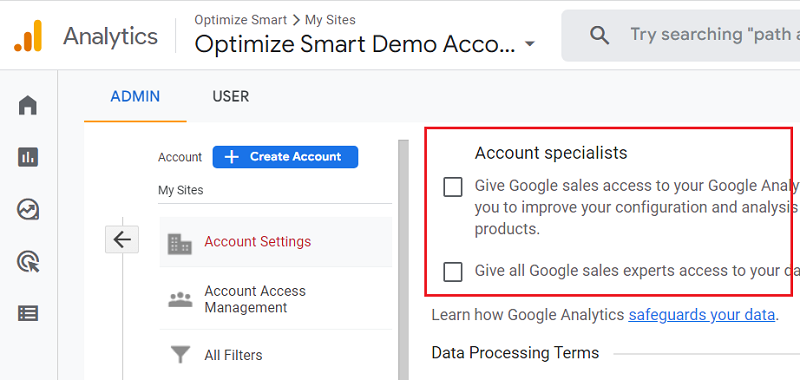
Turn off these settings unless you are using GA4 360.
21. Switch to Server-Side Tagging to enhance GDPR compliance.
Server-side tagging is the tagging used to set up server-side tracking.
To really understand server-side tracking, you first need to understand client-side tracking.
Client-side tracking involves setting up tags (a bunch of JavaScript tracking codes) that collect data from the users’ browser (client) and send them to first and third parties.
The tags set up cookies on your users’ web browsers when executed. These cookies send your website users’ data to first and third parties.
However, web browsers like ‘Safari’ ultimately control the behaviour of these cookies. They enforce rules on how cookies can be used and set.
Ad blockers can also control the behaviour of cookies. They can stop the tags from executing on a user’s web browser.
And when a tag is not executed, no cookies are set.
So when you use client-side tagging, your tracking tends to be unreliable as it is at the mercy of your website users and web browsers.
The other side effect of client-side tagging is that you have very little control over what data is shared with third parties like Google and Facebook.
For example, when you fire Facebook pixels on your website, you don’t really know what user data you are sending to Facebook.
Server-side tagging allows for greater control over what data is shared with third parties.
In the case of server-side tagging, we fire tags from our web server instead of the users’ web browser. We can also use measurement protocol to send data.
This allows for greater control over the data shared with third parties, as the tags can be modified on the server to prevent third parties’ use of unauthorized personal data.
Server-side Tagging supports both basic and advanced consent mode implementations.
Consent mode refers to adjusting how your third-party tags behave based on the consent status of your users.
The users are presented with a consent prompt to approve a specific category of data collection before any data is collected and processed.
If the user does not give consent, no data is collected or processed.
There are two types of consent modes: basic and advanced. The advanced consent mode provides more granular control over the shared data with third-party services.
In short, server-side tagging can greatly enhance your GDPR compliance.
The opponent of server-side tagging argues that it can be used to bypass ITP and ad blockers and use third-party cookies in the first-party context.
But like client-side tagging, server-side tagging is just a technology that can be misused.
Eventually, it is not the tech but the company that uses it that is responsible for GDPR compliance.
22. Remove your website from the Wayback Machine.
“The Wayback Machine (web.archive.org) is a non-profit project founded by the Internet Archive to preserve a historical record of the Internet for research and broad public benefit.”
That’s how the people who work for the Wayback machine describe their organization.
But you may be surprised to know that the Wayback Machine does not follow the GDPR guidelines and can also put your organization at risk of violating the GDPR law.
Here is how they are breaking the GDPR law:
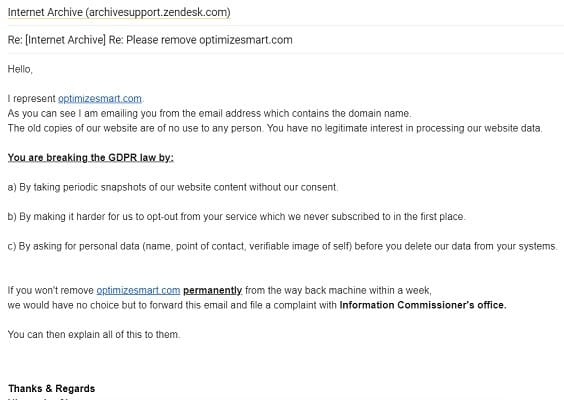
1) They take periodic snapshots of your website content without your consent. Now imagine a user asking you to delete PII data from your website, and you removed it. But it continues to appear in the snapshots taken by the Wayback Machine.
Any content/data you removed from your website for various reasons over the years could still appear in the snapshots indefinitely.
In a court of law, these snapshots can be used against you as legitimate evidence.
2) You can not block the Wayback machine bots via robots.txt or .htaccess file. Y
3) The Wayback machine makes it very hard to opt out of their service, which you never subscribed to in the first place. They do not openly and clearly disclose how to opt out of their service. I had to do a lot of research to find this information.
4) When you ask to opt-out, they ask for even more personal data (name, point of contact, verifiable image of self) before they delete your data from their systems.
5) They openly violate copyright laws in the name of public interest and non-profit.
I asked the Wayback Machine to remove our website from their system, and they sent us page-long instructions to follow, asking for ten different IDs, including a photo ID. Uploading this and that files on the server:
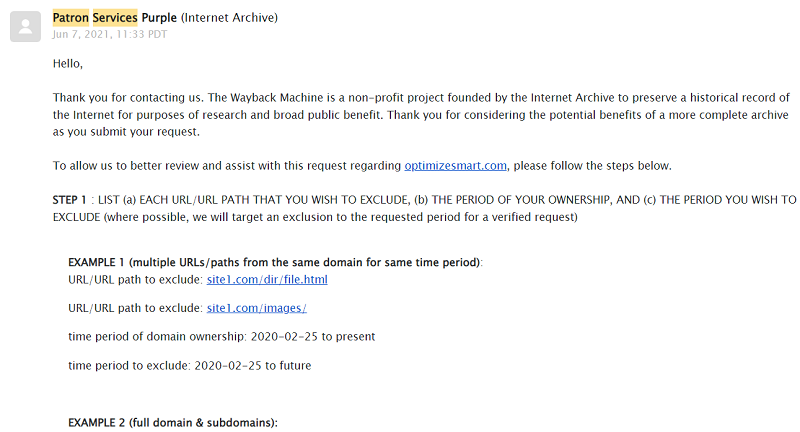
They say they are processing the data for the broad public benefit.
However, the old copies of your website are of no use to any person. They have no legitimate interest in processing your website data.
Once I reminded them that they were breaking the GDPR law and were just a few button clicks away from being reported to the Information Commissioner’s office, they removed our website within 24 hrs without asking for any information they had asked for earlier.

If you want to remove your website from the Wayback machine, just email info @archive .org from the email address, which includes the domain name you want to exclude.
Use the following subject line: Please remove [yourwebsite .com].
That’s it. You don’t need to provide any other information they ask for. If they insist, then you can send an email like the one below:
23. Understand the various GDPR jargon.
Before you are in a position to do a GDPR compliance audit and/or enforce GDPR across your organization via a checklist, you would first need to understand the various GDPR jargon:
23.1 About European Union (EU)
The European Union (or EU) is a political and economic union of 27 member states located primarily in Europe.
The member states are Austria, Belgium, Bulgaria, Croatia, Cyprus, Czech Republic, Denmark, Estonia, Finland, France, Germany, Greece, Hungary, Ireland, Italy, Latvia, Lithuania, Luxembourg, Malta, Netherlands, Poland, Portugal, Romania, Slovakia, Slovenia, Spain, and Sweden.
Note: EU is not the same as Europe. EU is a political and economic union. Whereas Europe is a continent. Not all European countries are part of the EU. For example, UK and Switzerland are not part of the EU.
23.2 What is a third country?
If your country is not a member state of the European Union, then your country is referred to as a ‘third country‘ under GDPR.
GDPR imposes restrictions on the transfer of personal data to third countries or international organizations.
Since the UK is no longer a part of the EU, it is considered a third country under GDPR.
But because of the ‘EU-UK Trade and Cooperation Agreement‘, the data can flow freely between the EU and the UK without additional safeguards.
You can find more information about GDPR restrictions on the transfer of personal data to third countries or international organizations via the following websites:
- Adequacy decisions – How the EU determines if a non-EU country has an adequate level of data protection.
- Guidelines on Data Protection Impact Assessment (DPIA).
- GDPR Article 44 – General principle for transfers.
- GDPR Article 45 – Transfers on the basis of an adequacy decision.
23.3 Who are the data subjects?
In the context of GDPR, a data subject is an individual whose personal data is processed by an organization.
A data subject can be any person within the border of the EU (European Union) at the time of processing their personal data.
Though Data subjects are primarily EU citizens (i.e. the citizens of the countries which are a member of the European Union), you don’t have to be an EU citizen to be considered a data subject.
What that means is non-EU citizens of any nationality (including but not limited to: temporary residents, tourists, international students, migrant workers, refugees, etc.) who are within the border of the EU at the time of processing of their personal data are considered as data subjects.
So if you are an American and you go to any EU member state (like Germany), say for travel, then under GDPR, you automatically become a data subject.
Once you move out of the EU border, you are no longer considered a data subject (unless your personal data is still processed by an organization “established” in the EU).
The same goes for EU citizens.
If you are an EU citizen and you move out of the EU border, say for travel or business purpose or temporary/permanent stay, you are no longer considered a data subject (unless your personal data is still processed by an organization “established” in the EU).
In other words, if a Data Subject moves out of the EU border, then their personal data processed under these circumstances is not covered by the GDPR, and they are no longer a Data Subject in the context of the GDPR (unless their data is still processed by an organization “established” in the EU).
GDPR gives data subjects more rights and control over their personal data and its use.
It is important to remember that GDPR does not give more rights and control over your personal data if you are not a data subject.
23.4 What is Supervisory Authority?
GDPR is enforced by supervisory authorities, also known as data protection authorities (DPAs).
A supervisory authority is an Independent governing body that enforces GDPR.
Each EU member state has appointed a supervisory authority which works with other member states supervisory authorities.
In the case of the UK, the ’Information Commissioner’s Office’ (ICO) act as a supervisory authority.
Supervisory authorities have the power to
- Impose administrative fines.
- Carry out audits to determine whether an organization is complying with GDPR.
- Issue warnings, enforcement notices and reprimands.
- Publish details of enforcement action taken against an organization to increase transparency and accountability.
- Order the rectification, restriction or erasure of your data.
- Impose a temporary or permanent ban on your data processing.
- Suspend data transfers to third countries.
Note: You can find the complete list of supervisory authorities here: Our Members.
23.5 What is personal data?
In the context of GDPR, personal data is any information that relates to you and/or that can be used to uniquely identify you on its own or in combination with other information.
Examples of personal data include:
- Contact details (name, house address, ZIP/PIN code, phone number, email address).
- Medical data (health records, genetic data)
- Biometric data (fingerprints, recorded voice, facial recognition data)
- Financial data (credit card information, bank account details).
- Location data (Geolocation data which is GPS or fine-grained location information).
- Identification data (Passport, driving license, social security number, photos, videos).
- Online identifiers (IP addresses, cookies, user id, client id)
- Behavior, preferences, or interests data (browsing history, purchase history)
- Sensitive Personal Data (person’s skin colour, race, sexual orientation).
- Any piece of data that permanently identifies a particular user.
- Any piece of data that permanently identifies a particular device.
- Any piece of data that is deemed to be ‘Protected Health Information’ (as defined under HIPAA)
- Any piece of data deemed to be “Personally Identifiable Information”, according to your country’s law.
Note: Personally Identifiable Information (also known as PII) is a subset of personal data that can be used to uniquely identify an individual.
Additional Reading:
- What is considered personal data under the EU GDPR?
- What is considered personal data under the UK GDPR?
23.6 What is sensitive personal data?
Under the GDPR, personal data can be classified as either ‘ordinary personal data’ or ‘sensitive personal data’.
Sensitive personal data refers to personal information that is considered to be more sensitive and requires additional protection.
Sensitive Personal Data includes genetic data and biometric data.
What that means is if you are processing data related to a person’s skin colour (black, white, brown, etc.), race (Asian, caucasian), sexual orientation (gay, lesbian, transexual, etc.), data related to health, etc. then that is all considered as sensitive personal data.
Political opinions and religious and philosophical beliefs are also considered sensitive personal data.
Under GDPR, the processing of sensitive personal data is prohibited. Only in specific cases is the processing allowed.
Additional Reading
- What is considered sensitive personal data under the EU GDPR?
- What is considered sensitive personal data under the UK GDPR?
23.7 What is data processing under GDPR?
Any operation or set of operations (whether manual or automatic) performed on personal data is data processing.
Anything that you do with personal data is data processing.
Data processing can include (but is not limited to):
- Collecting data.
- Storing data.
- Modifying data.
- Structuring data.
- Sending data.
- Using data.
- Accessing data.
- Deleting data.
Note: GDPR applies to data processing by law enforcement agencies but with specific provisions. It does not apply to data processing carried out by individuals purely for personal or household activities as long as the data is not used for any other purpose.
Additional Reading
23.8 Who is the data controller?
You are a data controller if you decide why and how personal data is processed.
You are a data controller if you determine the purposes and means of processing personal data.
Any individual or business entity (corporation, partnership, limited liability company) can be a data controller.
For example,
You are a data controller if you use email addresses to send newsletters to your subscribers/customers.
You are a data controller if you use cookies to re-market to your website visitors or customers.
Similarly, you are a data controller if you use your website users’ behavioural data or browsing history to provide a personalized user experience.
Long story short, if you own a website and/or mobile app, then under GDPR, you are most likely a ‘data controller’.
23.9 Who is the data processor?
If you process personal data on behalf of a controller, then you are a data processor.
Any individual or business entity (corporation, partnership, limited liability company, sole proprietor) can be a data processor.
For example, if you process personal data on behalf of your client(s), you are a data processor.
What that means, under GDPR, all consultants, agencies, and freelancers are most likely data processors, as they process personal data, on behalf of their clients, in some shape or form.
When you use an analytics tool like ‘Google Analytics’ to track & manage website usage data, then Google Analytics becomes your data processor, as it processes website usage data on your behalf.
When you use an advertising platform like ‘Google Ads’ or ‘Facebook’ to market or re-market to your website visitors/customers, then ‘Google Ads’ & Facebook become your data processor as they process marketing data on your behalf.
When you use an A/B testing tool to show different variations of a page to your website visitors, your A/B testing tool becomes your data processor, as it processes website usage data on your behalf.
Similarly, when you use an email marketing and automation tool like ‘Get Response’, it becomes your data processor, as it processes email addresses on your behalf.
Most data processors, if not all, can also be considered data controllers in their own right for their processing and administrative purposes.
23.10 Rights of data subjects under GDPR
Under GDPR, a data subject has got certain rights.
When you, as a business entity, provide the following rights to ‘data subjects’, you are considered to comply with GDPR:
- The right of notification of data breach.
- The right to access.
- Right to be forgotten.
- The right to object.
- The right to rectification.
- Privacy by design.
24. Understand the scope of GDPR compliance.
24.1 The GDPR applies to both automated and manual personal data.
The personal data stored and processed in an electronic format is called automated personal data.
Examples of automated personal data:
- Personal data is collected and analyzed through tracking software (like GA4) or cookies.
- Personal data is stored in databases (like Google Sheets or BigQuery).
- Personal data is transmitted over networks (via emails, intranet, messaging apps etc.)
The personal data stored and processed in non-electronic format (like through the use of paper records and files) is called manual personal data.
Examples of manual personal data:
- Personal data is written down on a piece of paper or stored in paper files and records.
- Personal data is stored in a physical format (like photographs or videos.).
24.2 GDPR can apply to both data controllers and data processors
Under GDPR, data controllers and data processors must make a greater effort to process personal data, clarify how data will be processed, and ask for users’ consent wherever applicable.
Under GDPR, the data processors must notify the data controllers whenever there is a personal data breach. The data controllers must notify supervisory authorities and data subjects as soon as possible.
As a data controller, you are legally obligated to ensure that your data processors comply with GDPR.
24.3 Do you have to comply with GDPR?
You will have to comply with GDPR if you’re a data controller and/or data processor who is:
- Based in a country that is a member of the European Union, even if you only process data outside the EU.
- You are based outside the EU but process the personal data of data subjects.
24.4 How do you know if you are processing the personal data of data subjects?
In the following cases (but not limited to), you are knowingly, unknowingly, or accidentally processing the personal data of data subjects, esp. EU citizens:
#1 You sell products/services to EU citizens.
#2 EU citizens buy products/services from your website even when they are not your target market and/or you are not specifically targeting them.
#3 A EU citizen attempt to buy a product/service from your website even when you do not sell to them. For example, if you are a business based in the US and you get an order from a person in the EU, you won’t fulfil the order because you don’t sell outside the US. But you are now required to comply with GDPR. Why?… Because you now hold an EU citizen’s personal details (billing and shipping address) in your database.
#4 You ask for personal data from EU citizens, like email addresses, in exchange for anything like a free ebook.
#5 An EU citizen uses the contact form embedded on your website. As soon as the form is submitted, you are now required to comply with GDPR. This is because your website has processed an EU citizen’s personal data (name, email address).
#6 You track the online activities of your website users via analytics tools like ‘Google Analytics’, ‘Google Tag Manager’, ‘Hotjar’, ‘Optimizely’ etc. When an EU citizen lands on your website, you will immediately come under the GDPR rule. You now must comply with GDPR as you have tracked the online activities of EU citizens.
#7 You directly market or remarket to EU citizens.
#8 An EU citizen is exposed to your marketing campaign, which uses personalization (like dynamic remarketing). Since personalization is not possible without tracking the online activities of EU citizens, you are knowingly/unknowingly processing the personal data of EU citizens and, as such, must comply with GDPR.
#9 You collect users’ feedback via online surveys, and someone from the EU participated in the survey. Since you now hold the personal data of EU citizens, you must comply with GDPR.
#10 You provide a personalized user experience to your website users. Since providing a personalized user experience (like geo-targeting) is not possible without tracking the online activities of EU citizens, you are knowingly/unknowingly processing the personal data of EU citizens and, as such, must comply with GDPR.
#11 If someone sends an email to your company mail server from the EU, all the information in the header of that email would put your company under GDPR, whether you solicited the email or not. So as soon as you get an email from an EU citizen, you are immediately under GDPR rule.
In theory, any person in the EU can go to a website hosted/operated in any country, order something, subscribe to a newsletter, or use the contact form. Suddenly, that company is now under GDPR rule.
Long story short, if your website is accessible to EU citizens, then there is always a high possibility that you are knowingly, unknowingly, or accidentally processing the personal data of EU citizens in some shape or form and, therefore, must comply with GDPR.
24.5 A quick recap of the scope of GDPR compliance
#1 If you (as an individual or company) are based in the EU, you must comply with GDPR. Why? Because you are based in the EU and GDPR is EU law.
#2 If you are based outside of the EU but process the personal data of data subjects, then you have to comply with GDPR.
#3 You do not need to comply with GDPR if you are based outside of the EU, and all your data processors and controllers are also based outside of the EU.
#4 If you are based outside of the EU, but some/all of your data processors or controllers are based in the EU, you should comply with GDPR even when you are not actively processing the personal data of data subjects.
25. Practice Data Minimization
In the context of GDPR, ‘data minimization’ is a practice of collecting, storing, and using only that personal data which you absolutely need for the purpose specified in your privacy policy.
Data minimization discourages the processing of ‘Big Data’, where businesses gather as much information as possible about their target audience.
To comply with GDPR, you need to get into the habit of collecting as little personal data as reasonably possible.
Because the more personal data you process, the more systems and processes you would need to create and manage to comply with GDPR.
Without implementing data minimization, you could unknowingly and unnecessarily make GDPR compliance harder for your business.
Additional Reading
26. Implement ‘Privacy by design’
GDPR recommends that you build/update your website, mobile app, technology systems, projects, products, and services to protect users’ personal data by default.
Privacy by design is based on the principle that privacy should be built into systems and processes rather than added as an afterthought.
By implementing ‘privacy by design’, you can minimize or even completely eliminate the possibility of sending Personally Identifiable Information (PII) to third parties like Google, Facebook etc.
Additional Reading
- Data protection by design and by default (EU-GDPR).
- Data protection by design and by default (UK-GDPR).
27. Provide the right of notification of data breach to data subjects.
Under GDPR, the data processors must notify the data controllers whenever a personal data breach occurs.
The data controllers must notify supervisory authorities and data subjects as soon as possible. This must be done within 72 hours of becoming aware of the breach.
Additional Reading
- Communication of a personal data breach to the data subject (EU-GDPR).
- Notification of a personal data breach to the supervisory authority (EU-GDPR).
- Personal data breaches (UK-GDPR)
28. Provide the data subjects with the right to access.
All data subjects have the right to know the following:
- If their personal data is being used.
- How can they access it?
- How can they change or delete it?
- Why it’s being used, or who it’s shared with?
- How long will it be stored?
You should provide all of this information in your privacy policy.
Additional Reading
29. Provide the data subjects with the right to be forgotten.
If a data subject asks you to erase their personal data, you must comply ASAP (provided you have no legal grounds to keep processing it).
You should delete data subjects’ data in the following events:
- you no longer need it
- the data was used unlawfully, or
- if a data subject exercises their right to object.
Additional Reading
30. Provide the data subjects with the right to object.
A data subject has the right to object at any time to using their personal data for direct marketing or any other legitimate purpose.
For example, if a data subject asks you to stop retargeting them, you must do so. Although, how this can be technically implemented remains a challenge.
Additional Reading
31. Provide the data subjects with the right to rectification
A data subject has the right to ask you to update their personal data if it’s incorrect or incomplete. And you should do it as soon as possible.
Additional Reading
32. Appoint a Data Protection Officer (if required).
Under GDPR, certain organizations (usually those that do large-scale processing of personal data) must appoint a Data Protection Officer (DPO).
The organization that instantly comes to my mind is Facebook.
But if you are Apple, Amazon, Netflix, Uber, or some other big company, you would most likely be required to appoint a DPO and not just one but a whole team of DPO.
A DPO is basically a data privacy and protection expert, and thanks to GDPR, they are suddenly in great demand.
The job of a DPO is to enforce, maintain, and monitor GDPR compliance in your organization. He is in charge of all personal data processing activities in your company.
A DPO is the first point of contact for supervisory authorities and/or data subjects. You, as a business, can and should appoint a DPO, even when it is not required by law, to be on the safe side.
The European Data Protection Board (EDPB) provides guidance on the role and tasks of the DPO, as well as the criteria for appointing a DPO.
Additional Reading
33. Conduct a Legitimate Interest Assessment (LIA).
A Legitimate Interest Assessment (LIA) is carried out to identify the legitimate interest of the data processing.
LIA’s objective is to ensure that an organization’s interest in processing personal data does not outweigh the individual’s right to privacy.
Use LIA to build/update your website, mobile app, technology systems, projects, products, and services to protect users’ personal data by default.
Use LIA to draft your privacy policies.
According to Article 6(1)(f) of GDPR:
1.Processing shall be lawful only if and to the extent that at least one of the following applies:
(f) processing is necessary for the purposes of the legitimate interests pursued by the controller or by a third party, except where such interests are overridden by the interests or fundamental rights and freedoms of the data subject which require protection of personal data, in particular where the data subject is a child.”
Legitimate business interests are not focused on any particular purpose, giving you more scope to rely on and use them to your advantage.
You don’t need to bombard your users with consent requests for everything you do on your website when they are unlikely to object to the processing.
GDPR does not clearly define all the factors to consider when deciding if your purpose is a legitimate business interest.
But under GDPR, the following purposes do clearly constitute a legitimate business interest:
- Direct marketing
- Fraud prevention
- Ensuring network and information security.
- Indicating possible criminal acts or threats to public security.
- Processing employee or client data.
- Administrative transfers within a group of companies.
The ICO recommends carrying out a three-part test to determine whether or not your purpose constitutes a legitimate interest:
It makes the most sense to apply this as a test in the following order:
- Purpose test – is there a legitimate interest behind the processing?
- Necessity test – is the processing necessary for that purpose?
- Balancing test – is the legitimate interest overridden by the individual’s interests, rights or freedoms?
This concept of a three-part test for legitimate interests is not new.
In fact, the Court of Justice of the European Union confirmed this approach to legitimate interests in the Rigas case (C-13/16, 4 May 2017) in the context of the Data Protection Directive 95/46/EC, which contained a very similar provision.
This is a piece of good news because you can use ‘legitimate interest’ to your advantage simply by passing the ‘three-part test’.
Let’s make a case for using Google Analytics Tracking on your website without asking for users’ consent by using the ‘three-part’ test:
Purpose test – is there a legitimate interest behind the processing?
Yes. We have a legitimate interest in tracking website usage data via Google Analytics because ……. It helps us provide better user experience and effectively markets our products to our target audience.” << add more reasoning>>
Necessity test – is the processing necessary for that purpose?
The processing is absolutely necessary because without using ‘Google Analytics’, we can not track website usage data. We need to track website usage data for effective marketing and not lose money on advertisements. Also, there is no less intrusive alternative available.
Balancing test – is the legitimate interest overridden by the individual’s interests, rights or freedoms?
We are not collecting and/or sending any PII data to Google Analytics.
The IP addresses that we are tracking have been anonymized. So our legitimate interest does not override an individual’s interests, rights or freedoms.
According to GDPR,
“the interests of the individual could, in particular, override your legitimate interests if you intend to process personal data in ways the individual does not reasonably expect. “
Again, what constitutes ‘reasonable’ is vague and can be used to your advantage.
What you as a business consider as ‘reasonable’ may not be ‘reasonable’ for me and vice versa.
Outline all possible ways you use and process data in your privacy policy and then inform your website users about the changes.
That way, your website users should reasonably expect you to use their data that way.
Additional Reading
- Overriding legitimate interest (EU-GDPR).
- How do we apply legitimate interests in practice? (UK-GDPR)
34. Conduct a Data Protection Impact Assessment (DPIA).
A Data Protection Impact Assessment (DPIA) is a process used to identify and assess the potential impact of a project on the privacy of individuals and to identify and mitigate any potential risks to privacy.
In the context of DPIA, a project refers to a specific activity that involves collecting, using or storing personal data. This activity could be new developments, technologies, systems or processes or changes to existing systems or processes.
According to GDPR, a Data Protection Impact Assessment is mandatory when the processing of personal data is likely to result in a high risk to the rights and freedoms of individuals.
Following are the examples of projects that may require DPA:
- The development of a new website, mobile app, system or process that collects personal data on a large scale.
- The development of a new website, mobile app, system or process poses a high risk to the rights and freedoms of individuals.
- Marketing campaigns that use personal data for targeted advertising.
- Using a new security system that uses facial recognition for surveillance or identification purposes.
Before starting a project, determine what personal data will be collected, used, and stored and how it will be processed. Identify and assess the potential risks to privacy associated with the project.
Develop and implement measures to mitigate or eliminate identified risks to privacy. Regularly review your project(s) to ensure the mitigation measures work as intended.
Note: It is a best practice to conduct DPIA even when it is not legally required.
Additional Reading
35. Develop a robust GDPR-compliant privacy policy.
Create a robust GDPR-compliant privacy policy based on your legitimate interest assessment and data protection impact assessment.
The GPDR-compliant privacy policy should clearly outline the following (but not be limited to):
- Definitions used in the policy. If you are referring to ‘we’ in the policy, who exactly is ‘we’?
- Information your website users, voluntarily provide to you.
- Information you collect automatically.
- Details of the types of personal data you collect, process and store.
- Details of various technologies you use (like cookies and web beacons) to collect, store and protect information when a user/customer uses your website, products or services.
- Details of the information you obtain from third-party sources (public databases, social media platforms, third-party data providers).
- How and when may you use and disclose personal information?
- How do you protect personal information from loss, misuse, unauthorized access, disclosure, alteration, and destruction?
- How do you keep your data accurate and up to date?
- How do you use cookies and similar technologies in your organization?
- Details of all the first and third-party cookies served through your Websites.
- Details of your data retention policies.
- Contact information for your data protection officer or the person responsible for data protection.
Optimize Smart has got a very robust ‘GDPR compliant privacy policy’. Take a look: https://www.optimizesmart.com/terms/.
Note: Always seek legal advice when creating or updating a privacy policy to ensure it fully complies with GDPR.
Additional Reading
- Writing a GDPR-compliant privacy notice (template included) (EU-GDPR).
- How to write a privacy notice and what goes in it (UK-GDPR)
36. Block the EU member states from accessing your website which are not your target market.
Use the legitimate interest and data protection impact assessments to make this decision.
There is big business liability associated with holding unnecessary personal data.
When you process a large volume of personal data of EU member states which are not your target market, you are holding unnecessary personal data.
List all EU member states you don’t do business with and then block them from accessing your website. That’s the most powerful way to practice data minimization.
WordPress plugins (like wordfence) can block entire countries from accessing your website.
For example, if your target market is only ‘Germany’, collecting personal data of people living in other EU member states is an unnecessary business liability.
To comply with GDPR, get into the habit of collecting as little personal data as reasonably possible.
Because the more personal data you process, the more systems and processes you would need to create and manage to comply with GDPR.
I never thought I would give such recommendations, as it goes against ‘net neutrality’ and promotes internet censorship.
But the draconian fines imposed under GDPR, their regulatory overreach and ambiguous & hard to implement guidelines are just too much of a risk for any big business to ignore the processing of unnecessary personal data of EU member states.
37. Do not use data processors based in the EU (edge case)
If you are not based in the EU, and the EU is not your target market, do not use data processors based in the EU.
Once an EU citizen leaves the EU border, they are no longer considered a data subject (unless their personal data is still being processed by an organization “established” in the EU).
It is safe to conclude that, as long you are not based in the EU, your data processors are not based in the EU, you do not process data of EU citizens, and you block your website from being accessed by any EU member country, you have little to worry about GDPR compliance.
38. Create a separate EU business unit.
Create a separate ‘EU Business unit’, if you are a business based outside of the EU and you serve EU customers in addition to customers from the rest of the world.
This EU business unit should be fully GDPR compliant, with its own separate website and data controllers and processors, which are all EU based.
Why create a separate EU business unit?
GDPR compliance can put a lot of restrictions on data processing, tracking and management. It can greatly increase your data management cost.
So when you create a separate EU business unit, it will not negatively impact your online tracking and marketing activities across all international markets.
It will not increase your data management cost worldwide.
Additional Reading
- Rules for the protection of personal data inside and outside the EU (EU-GDPR).
- General Data Protection Regulation (EU-GDPR)
- GDPR checklist for data controllers (EU-GDPR)
39. Ask all of your data processors for GDPR-compliant privacy policies and GDPR-compliant data service agreements.
To implement ‘privacy by design’, all your service providers (aka data processors) must also have GDPR-compliant privacy policies.
They should ideally have GDPR compliant data service agreement (also called the ‘Controller-Processor Agreement’) with you.
Following is an example of a ‘controller-processor agreement’ from GetResponse:
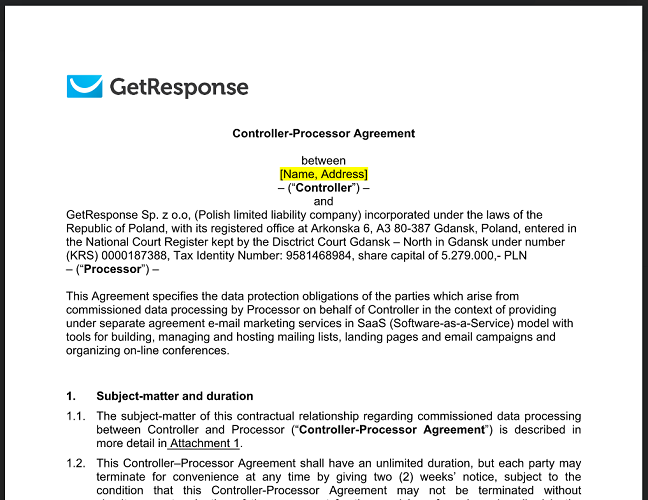
Note: Ensure you ask for a controller-processor agreement from your web host.
40. Ask for explicit consent from data subjects.
GDPR has taken users’ consent to a whole new level.
GDPR expects that you ask for ‘explicit consent‘ from ‘data subjects’ instead of ‘implicit consent‘ wherever possible.
Explicit consent must be very clear, concise, and specific.
It should clearly specify why you want the consent and what you will do with it.
The consent needs to be in plain English (or whatever language you use).
It should not be vague and full of jargon that a regular person can not understand.
Following is an example of ‘explicit consent’:
“When you sign up on our website, we assign you a unique ID. Through this ID, we track your website usage across different devices and browsers. This helps us maintain certain website functionality and provide you better user experience. Please click the checkbox below; if you are fine with this.”
The following is not ‘explicit consent’, as it is not clear, and it does not tell why you are asking for the consent and what you are going to do with it:
“We do User ID tracking. Please click the checkbox below, if you are fine with this”.
Additional Reading
- Article 7 GDPR Conditions for consent (EU-GDPR).
- What are the GDPR consent requirements? (EU-GDPR).
- Consent (UK-GDPR).
41. Do not rely on default consent
Default consent is not ‘valid consent’.
A default consent can be in the form of pre-ticked boxes on a form or consents mentioned somewhere in the terms and conditions.
So under GDPR, you should not use pre-ticked boxes as a form of user consent.
All consent requests must be clearly presented to data subjects, regardless of them being mentioned in your terms and conditions.
For example, let us suppose a user is automatically subscribed to your newsletter as soon as he makes a purchase on your website.
The user did not explicitly opt-in to your newsletter, so you do not have valid consent from the user to send him a newsletter.
42. Make it easy for data subjects to withdraw consent
Under GDPR, you should make it easy for data subjects to withdraw consent and tell them how.
For example, if you send out newsletters to ‘data subjects’, there needs to be an ‘unsubscribe’ link somewhere in the email, which is clearly visible and works in just one click.
Under GDPR, you should avoid making consent to a precondition of a service.
You should avoid penalizing ‘data subjects’ for withdrawing consent.
So if a data subject refuses to give you a particular consent, you should not kick them out of the website (by redirecting them to the Google Home page).
43. Maintain a database of the users’ consent.
GDPR requires you to record each consent (like what, when, and how it was given) and maintain records.
Under GDPR, organizations must maintain records of all consents obtained from individuals for processing their personal data.
This includes maintaining records of the collected data, its use and when and how consent was obtained.
By keeping accurate and up-to-date records, organizations can demonstrate that they take GDPR requirements seriously and are committed to protecting individuals’ privacy rights.
One of the biggest advantages of maintaining records of all consents is that if an individual makes a complaint against your company about unauthorized processing of their personal data, you can use their records of consent to demonstrate that the individual provided explicit and informed consent.
Use a consent management platform (CMP) to record and manage the consent organizations obtained from individuals to process their personal data.
CMP is specifically designed to collect, store and manage users’ consent. It can also be used to manage opt-outs, withdrawal requests and provide compliance reporting and auditing capabilities.
Following are examples of top consent management platforms:
- Quantcast Choice (free consent management platform)
- OneTrust
- TrustArc
- Usercentrics
Additional Reading:
44. Obtain fresh consent whenever required.
You may need to obtain fresh consent from data subjects whenever you update your privacy policy, change your terms and conditions or whenever there is a material change to the processing of personal data that was not previously covered by the original consent.
An organization must obtain explicit and informed consent from individuals (in a clear and unambiguous manner) if they want to process their personal data for a new purpose or in a different way than originally intended.
45. Use tools like ObservePoint for privacy validation and compliance.
Observepoint is an online tool designed especially for tag auditing and privacy compliance.
Observe Point can be a very useful tool if you manage websites where privacy compliance is of paramount importance.
Through ‘observe point’, you can perform the following tasks (but not limited to):
#1 Setup automated audits to ensure that Privacy Policy and ‘Do Not Sell/Share’ links are accessible from all pages on your website.
#2 Automatically scan a website for consent management platform (CMP) tags that should be loading your cookie consent banner.
#3 Test and verify your CMP respects all possible user-specified consent preferences.
The consent preference could be ‘accept all’, ‘reject all’, or ‘opt-in/out’ to specific categories and locations.
Unapproved cookies/tags are those that are not vetted for privacy compliance.
When cookies and tags are not vetted for privacy compliance, they may collect data without the user’s knowledge or consent, which can be a violation of privacy regulations.
To ensure compliance with privacy regulations, implement measures to vet and approve cookies and tags before they are used on a website.
This may involve conducting a privacy impact assessment, obtaining user consent, and ensuring that appropriate safeguards are in place to protect user data.
#4 Schedule automated audits to see any new but unapproved technologies loading on your website.
Unapproved technologies are those that are not vetted for privacy compliance.
Many teams working on the same website can accidentally introduce the use of new technology (tags, cookies etc.) that are not vetted for privacy compliance.
A regular website audit can expose all such technologies for inspection.
#5 Identify all the first-party and third-party cookies being used on your website.
What they’re being used for?
How frequently is each cookie set?
Which pages do/don’t have each cookie?
Are any cookies Non-secure?
#6 Monitor all the first-party and third-party cookies for potential privacy risks.
Google Analytics GDPR Compliance FAQs
Q1. Is it illegal to use Google Analytics?
On July 10th, the European Commission adopted a new adequacy decision for the EU-U.S. Data Privacy Framework.
This decision concludes that the United States ensures an adequate level of protection – comparable to that of the European Union – for personal data transferred from the EU to US companies under the new framework.
On the basis of the new adequacy decision, personal data can flow safely from the EU to US companies participating in the Framework, without having to put in place additional data protection safeguards.”
Source: https://ec.europa.eu/commission/presscorner/detail/en/ip_23_3721
What that means is that Google Analytics is no longer illegal anywhere in Europe.
Many competitors of Google Analytics spread misinformation that ‘Google Analytics is banned’ everywhere and can damage your reputation.
I am often asked whether Google Analytics is banned in my country.
Google Analytics is banned only in three European countries: Austria, France, and Italy. It is not banned anywhere else.
GA is banned in these countries because the privacy authorities in these countries do not like GA sending the IP addresses of their citizens to U.S based servers.
Under GDPR, I.P. addresses are considered personal data (even if you anonymize them).
Google is a U.S. based company, and they are by law obliged to disclose this data to U.S. intelligence services if requested.
This does not sit well with the privacy authorities in these countries.
GA is unlikely ever to get banned outside of the E.U., which includes all of Asia, Africa, North America and South America.
So if you operate in one or more of these regions, you don’t need to worry. Keep using Google Analytics. It is not going anywhere for you.
Now, how can you safeguard your interest?
Ask yourself the following questions:
#1 Are you based in one of these three countries: Austria, France, and Italy? If yes, uninstall GA on your website and use another analytics solution provided based in the EU. Matomo Analytics is one good option.
#2 Are you based outside these three countries, but you still serve them (i.e. they are your potential clients)? If yes, track your website visitors from these countries via an analytics tool other than GA. Make sure that the analytics solution provider is based in the EU.
#3 Are you based outside these three countries, and you don’t serve them (i.e. they are not your potential clients)? If yes, you don’t need to do anything now. However, if you want to be extra safe, you can make your website unavailable in these three countries and not use data processors based in these countries.
Q2. Does GDPR still apply to the UK?
Yes, but mainly in the context of a ‘third country’ under EU-GDPR.
After leaving the EU, the UK has its own version of GDPR, the UK-GDPR.
So there are now two versions of GDPR: EU-GDPR and UK-GDPR.
The UK-GDPR is nearly identical to the EU-GDPR.
The difference is that the UK-GDPR can only be governed and enforced by UK data protection agencies.
UK developed its own GDPR version to shape the law as it sees fit without any outside influence.
Q3. Do I need user consent to use Google Analytics on the website?
In general, ‘No’. I already made a case for ‘legitimate business interest’ for using Google Analytics.
However, if you are collecting PII data via GA (which you should not be in the first place) and/or merging personally identifiable information with non-personally identifiable information collected through any Google advertising product or feature, you would need prior affirmative consent from your website users.
Q4. Do I need user consent to use ‘Google Analytics Advertising Features’ on the website?
In general, ‘No’.
If you use the ‘Google Analytics Advertising Features’ (like remarketing, demographics, or interest reporting), just update your privacy policy to inform your users about the data collection and usage practices.
However,
If you are identifying website users by merging personally identifiable information with non-personally identifiable information collected through any Google advertising product or feature, then you would need prior affirmative consent from your website user.
For example, if you are using ‘user-id’ to personally identify a person in a CRM, you would first need the affirmative consent of your website visitors.
Q5. Do I need user consent for remarketing?
In general, “Yes.”.
Under GDPR, you generally need to obtain user consent for remarketing, which involves showing targeted ads to users based on their previous interactions with your website or app.
You can not carry out remarketing for legitimate business interests; for the remarketing to work, you would need to share your users’ data with third parties.
You would need your users’ consent to accept advertising cookies.
Make sure your remarketing has minimal impact on your website users as an individual (watch out for the ad frequency cap) and that it follows the policies for Personalised advertising.
Q6. Do I need user consent for using ‘user-id’?
“Yes”. Because it is not possible to make a case of ‘legitimate business interest’ for using ‘user-id’ as it will fail the ‘balancing test’.
If you are using the ‘user-id’ feature of GA, you should get prior affirmative consent from your website users that you will track their activities across devices and browsers at the time of signup.
Q7. Do I need user consent for using ‘client id’?
In general, “No”.
You can make a case of ‘legitimate business interest’ for using ‘client id’.
Purpose test – is there a legitimate interest behind the processing?
Yes.
We have a legitimate interest in tracking ‘client id’ via Google Analytics because …….GA won’t work without first setting up a ‘client id’.
And we need Google Analytics to track website usage data to provide better user experience and effectively market our products to our target audience.” << add more reasoning>>
Necessity test – is the processing necessary for that purpose?
The processing of client ID is absolutely necessary because without ‘client id’, Google Analytics won’t work.
Without ‘client id’, we can not track website usage data, and we need to track website usage data to do effective marketing and not lose money on advertisement.
Also, there is no less intrusive alternative available.
Balancing test – is the legitimate interest overridden by the individual’s interests, rights, or freedoms?
GA uses client ID to identify a unique browser/device, and that too in an anonymous way.
It does not really track individual users. However, that is implied in GA developers’ documentation.
For Google Analytics, a user is a unique web browser/device and not necessarily an individual.
As such, it has minimal impact on your website users as an individual when it comes to privacy.
Some people cite Recital 30 in GDPR as reasoning for asking for consent for using ‘client id.”
(30) Natural persons may be associated with online identifiers provided by their devices, applications, tools and protocols, such as internet protocol addresses, cookie identifiers or other identifiers, such as radio frequency identification tags. This may leave traces which, in particular when combined with unique identifiers and other information received by the servers, may be used to create profiles of the natural persons and identify them.
If you ask for consent for every online identifier, you, realistically, can not operate a website, let alone run an online business.
Then you will have to ask for consent before you can load your website into a user’s web browser.
Because your web server can not communicate with users’ web browsers if it does not know where the request came from (i.e. IP address).
And IP address is considered personal data under GDPR.
So there is a strong case of ‘legitimate business interest’ for using online identifiers.
Q8. Do I need prior consent for placing cookies on the users’ hard disk?
In general, “Yes.” Make sure that you clearly outline all the first and third-party cookies you used on the website in your privacy policy.
If you need to use essential cookies to maintain certain website functionality like login, security, authentication etc., then you don’t need prior consent for such cookies from the users.
Q9. Do I have to display a cookie consent banner on my website?

The cookie consent banner is a legal requirement as specified in Article 5(3) and Article 6 of the GDPR regulation.
Organizations that use cookies on their websites must provide clear and comprehensive information about their cookies, including their purpose and how individuals can control their use.
However, if you are not based in the EU, your data processors are not based in the EU, you do not process data of EU citizens, and you block your website from being accessed by any EU member country, you don’t need to display a cookie consent banner on your website.
Q10. Do I have to display the ‘Reject All’ button on a cookie consent banner on my website?
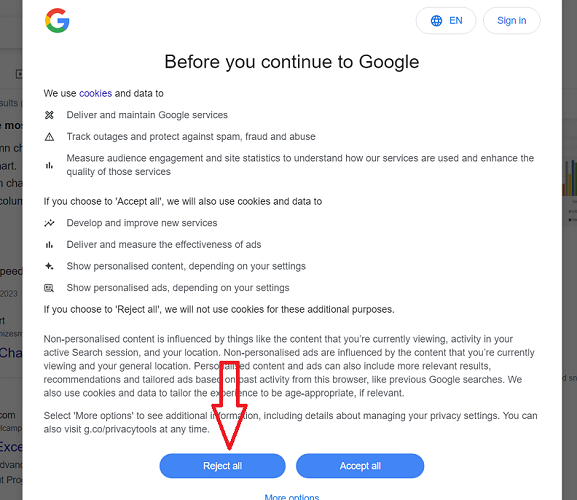
Google uses the ‘Reject all” button when you visit it for the first time. That should give you a clue.
The ‘Reject All’ button is used to reject all non-essential cookies.
Whether or not you need to display a “Reject All” button on a cookie consent banner on your website depends on the specific requirements of the data protection laws that apply to you.
GDPR does not specify the means by which an individual can accept or withdraw consent, so it is up to the organization to provide appropriate mechanisms for this.
In Jan 2023, the French Data Protection Authority (‘CNIL’) fined TikTok UK and Ireland €5 million for not offering the ‘Reject all’ button on the website’s cookie banner.
According to regulators, not providing an easy way to reject all cookies is manipulating cookie consent.
You can read more about this here >> TikTok fined in France for manipulative cookie-consent flow
So we now know for sure that you can be fined for not having the ‘reject all’ button, at least under the French Data Protection Act.
In addition to that, you may also need a button/link to your website privacy policy in your cookie consent banner:

Q11. Do I need prior consent for tracking IP addresses?
It is important to note that GDPR does not prohibit the processing of personal data. Under GDPR, an IP address is personal data.
You can make a good case for ‘legitimate business interest’ for tracking IP addresses.
For example, you need to track IP addresses to protect website users from malware, adware, spyware, viruses, and other malicious software.
That makes your case for tracking IP addresses legitimate.
Google Analytics tracks IP addresses for providing geolocation data.
You can also make a good case for ‘legitimate business interest’ for tracking IP addresses by Google Analytics by using the three-part test:
Purpose test – is there a legitimate interest behind the processing?
Yes.
We have a legitimate interest in tracking IP addresses via GA because ……. It helps us provide a better user experience and effectively market our products to our target audience.
If we can’t track where our users are coming from, we can not effectively market to them and lose money in advertising.
Necessity test – is the processing necessary for that purpose?
The processing is absolutely necessary because GA can accurately track geolocation data only if it can track IP addresses.
Balancing test – is the legitimate interest overridden by the individual’s interests, rights, or freedoms?
GA does not report IP addresses in its reports.
GA4 automatically anonymizes IP addresses by default, and you can not disable the IP anonymization feature.
When you anonymize visitor IP, the last three digits from your website visitor’s IP address are automatically deleted.
In other words, the IP anonymization feature sets the last octet of IPv4 IP addresses and the last 80 bits of IPv6 addresses to zeros.
For example,
If a website visitor has a public IP of 15.244.101.184, then as soon as the Analytics Collection Network receives the IP data, Google will mask the IP to 15.244.101.0.
IP address anonymization makes it difficult to use the IP address to identify an individual, as the precise location of the device associated with the IP address is obscured.
And most internet users are using dynamic IPs.
Multiple court rulings in the US have stated categorically that IP addresses do not identify a person, with one ruling going so far as saying it can’t even be tied to a state, let alone an individual.
As such, our use of IP addresses in the context of GA has minimal impact on our website users and does not override their individual interests, rights, or freedoms.
Q12. How do I decide when I should ask for consent?
Carry out the three-part test to determine whether or not your purpose constitutes a legitimate business interest, and use your discretion.
Q13. Is Server side tracking GDPR compliant?
As far as I am aware, GTM server side tracking is not illegal or against GDPR.
In fact, implementing server-side tracking can make you more GDPR compliant as it allows for greater control over what data is shared with third parties.
Using server-side tracking does not allow you to follow the GDPR guidelines any less strictly.
You still have to follow GDPR, collect data according to your privacy policy and ask for your users’ consent.
The server-side tracking helps in getting back that GDPR compliant data that ad blockers and browsers are currently blocking.
It is not against GDPR to retrieve GDPR-compliant data from ad blockers and web browsers.
However, if you are too worried about not respecting users’ choices who want total anonymity, do not implement server-side tracking.
Because such tracking will help you regain a lot of data currently being blocked by users who want to continue to benefit from their ad blockers, do not track settings, or want total anonymity.
In the end, use your discretion.
Q14. Do I still need to display a cookie consent popup if I am using server-side tracking?
When you use server-side tracking, you don’t need to set up any first or third-party cookies on users’ hard disks.
You also don’t need to store information on a user’s device or gain access to information on a user’s device.
However, you may still need to display some type of consent popup if you are tracking something for which you need explicit prior consent according to GDPR and/or your privacy policy.
So while the ‘cookie’ consent popup is out, the consent popup is still likely to remain unless you decide not to disclose it.
In the case of client-side tracking, any person can checkout via the developer console or some browser extension what data you are collecting, sending and where.
This is not the case with server-side tracking. It’s like a black box. So you are expected to use it responsibly and not break the rules.
But you should still consult your data controller/processor to be completely sure, as your situation might be different, esp. if you are based in the EU.
Q15. Is there a way to avoid or minimize GDPR compliance?
As long as your website is accessible to EU citizens, there is always a good chance that you are knowingly, unknowingly, or accidentally tracking their online activities via analytics tools like ‘Google Analytics’.
Through my extensive research on GDPR, if the EU is not your target market, you are not based in the EU, your data processors are not based in the EU, and you want to minimize GDPR compliance, then block all EU countries from accessing your website.
That way, your website will not be able to process any data from EU citizens, and you have little to worry about GDPR compliance.
GDPR considers IP addresses as personal data but not IP blocks.
So you can block an entire country from accessing your website by blocking all the IP blocks used by that country.
Many tools are available (like Wordfence) to block the entire country from accessing your website.
I understand that blocking all EU member countries from accessing a website will greatly reduce the chance of even accidentally processing the personal data of data subjects.
There is no directive under GDPR which prohibits blocking EU member states from accessing a website.
Eventually, ‘enhanced privacy’ can come with a heavy price for data subjects, with many companies blocking all of Europe just to be on the safe side.
Q16. How can I become 100% GDPR Compliant?
Not all the guidelines set in GDPR are easy to understand. Some of them are vague and open to interpretation.
Understanding GDPR is one thing, but enforcing it is a whole new game.
Enforcing GDPR can become very technically challenging, and nobody (including me) knows exactly how you can become 100% GDPR compliant and/or what 100% GDPR compliance looks like.
Since there is no official definition of full GDPR compliance, your company can always be fined, no matter what you do, to become compliant.
There is no step-by-step guide that you can download, easily follow, and become 100% GDPR compliant overnight.
In addition to that, supervisory authorities have got limited resources.
So they can not realistically monitor the data protection and privacy practices of millions of businesses worldwide.
So most small and medium-sized businesses are safe unless the media expose them for GDPR non-compliance or they are reported to supervisory authority by an individual.
Resources for further reading

Other Articles on GA4.
- Using Funnel Exploration Report in Google Analytics 4.
- Google Advanced Consent Mode and GA4 BigQuery Export.
- Which Conversion Window to use in Google Analytics 4.
- Tracking single page apps in Google Analytics 4.
- Create Content Groups in Google Analytics 4.
- Google Analytics 4 BigQuery Tutorial for Beginners to Advanced.
- Google Analytics 4 Measurement ID and Property ID.
- Prompt Engineering for GA4 BigQuery SQL Generation.
- Google Analytics 4 vs Universal Analytics: The Key Differences.
- How to create a new BigQuery project.
- How to create a new Google Cloud Platform account.
- How to overcome GA4 BigQuery Export limit.
- ChatGPT Workflow That Simplifies GA4 Data Analysis.
- Understanding Google Analytics 4 Sessions.
- Total vs Active, New, Returning users in Google Analytics 4.
- BigQuery Cost Optimization Best Practices.
- Google Analytics 4 Data Import Tutorial.
- Tracking ad impressions and ad clicks in Google Analytics 4.
- Testing Google Analytics 4 via Test Property.
- Google Analytics 4 GDPR Compliance Checklist.