

What is Session Fragmentation?
Session fragmentation refers to the breaking up of a single user’s session into multiple separate sessions due to various factors.
This session could be a web session and/or an analytics session like a GA4 session.
When does Session Fragmentation occur?
GA4 Session fragmentation occurs when a user’s continuous interaction with a website or app is split into multiple distinct sessions in analytics data.
Session Fragmentation is sabotaging your GA4 attribution data.
Session fragmentation is the root cause of most attribution issues in GA4. Most of the unassigned and (not set) issues in GA4 occur because of session fragmentation.
When sessions are fragmented, GA4 may lose the original source/medium information for subsequent fragments.
This can result in these fragments being categorised as unassigned or having a (not set) source/medium.
When GA4 sessions are fragmented, it becomes difficult to maintain consistent attribution data across a user’s entire journey, leading to inaccuracies in reporting.
If you can preserve GA4 session attribution data for as long as technically and legally possible, you can get the most accurate possible tracking data in GA4.
Common causes of segment fragmentation in GA4.
The following are common causes of segment fragmentation in GA4:
#1 Consent Mode implementation.
#1.1 When a user initially declines consent but later grants it during the same visit, GA4 may treat this as two separate sessions. The pre-consent activity might be recorded as one session, while the post-consent activity is treated as a new session.
#1.2 In scenarios where only partial consent is granted (e.g., analytics cookies allowed but advertising cookies denied), GA4 might struggle to maintain a consistent session across different consent states. This can result in fragmented sessions as the tracking capabilities change mid-visit.
#1.3 Consent Mode affects how cookies are set and read. If consent for analytics cookies is initially denied, GA4 can’t set or read its session cookie. When consent is later granted, a new session cookie is created, potentially starting a new session even if the user hasn’t left the website.
#2 Client-side vs. Server-side tracking misalignment.
#2.1 Server-side tracking often processes events with slight delays compared to client-side tracking due to network latency, server queue times, or processing overhead. This timing difference can cause events to be attributed to different sessions, even if they occurred within the same user interaction period.
#2.2 If the server-side tracking configuration does not explicitly handle the ‘session_start’ event, GA4 cannot associate subsequent events with an active session, leading to session fragmentation. This is especially common in hybrid setups where client-side tracking initializes the session, but server-side tracking does not handle it consistently.
#2.3 The client_id (or user_id if implemented) is a critical identifier for session continuity in GA4. If the client_id is missing, mismatched, or not passed to the server, GA4 treats server-side events as originating from a new user, fragmenting sessions.
#2.4 Session identifiers (session_id) must align between client-side and server-side tracking for GA4 to maintain session continuity. If session IDs differ, GA4 cannot link events to the same session, even if they occur during the same interaction.
#2.5 Server-side tracking might process events in a different order than they occurred on the client side, resulting in session fragmentation. A purchase event is processed by the server before the session_start event, causing GA4 to interpret the purchase as part of a new session.
#3 Delayed tag firing.
- GA4 configuration tag firing after other event tags.
- Slow-loading pages causing delays in tag execution.
#4 Cookie limitations.
- Third-party cookie restrictions in certain browsers.
- Users clearing cookies mid-session.
#5 Session timeout settings.
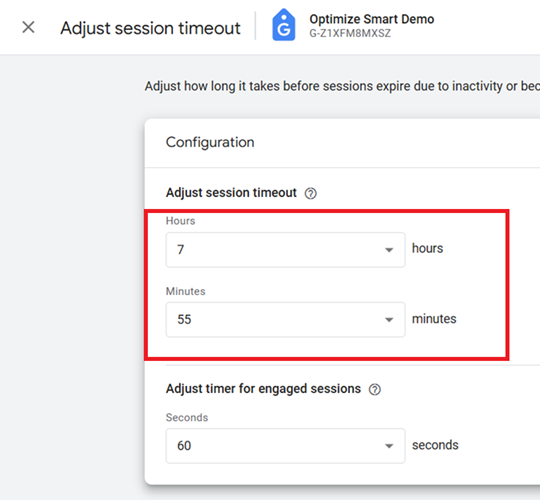
- Short session timeout periods cause new sessions to start prematurely.
#6 Incorrect implementation of User ID.
- Inconsistent or incorrect application of User ID across touchpoints.
#7 Measurement Protocol errors.
- Missing or incorrect client_id or session_id in server-side tracking.
#8 Single-page application (SPA) tracking issues.
- Incorrect implementation of tracking for SPAs.
Checklist to mitigate and prevent GA4 Session Fragmentation.
#1 Use the longest possible session timeout setting in GA4 (which is 7 hours 55 minutes):
#2 Use persistent logins to maintain user web sessions.
Ideally your user session should not time out. Let your user session continue for days, weeks, months or even years. You get the most accurate data on the customer journey when your customers log in and remain logged in.
There is a good reason why you stay logged in once you log in to your Google, Facebook, LinkedIn or X account. It’s all about preserving session attribution data.
Note: Currently, GA4 does not allow sessions that don’t timeout. So you will have to use propriety tracking if you want to maintain analytics sessions that don’t time out until a user logs out.
#3 Promote Mobile App Usage.
Encourage users to use your mobile app instead of the web app, as mobile apps face fewer browser and privacy-related restrictions. This includes fewer limitations on data storage, more control over user identification and less vulnerability to ad blockers and privacy extensions.
So, you are more likely to preserve session attribution data in a mobile app than on a web app. You can offer them incentives like a steeper discount if they make a purchase via your mobile app.
#4 Fix consent mode implementation.
- Design consent banners to prompt quick user decisions.
- Align pre and post-consent tracking by ensuring session identifiers persist when consent status changes.
#5 Align client-side vs server-side tracking.
- Ensure client_id, user_id, and session_id are consistently passed between client-side and server-side systems.
- Explicitly configure server-side tracking to handle the session_start event.
- Use timestamps (event_timestamp) to sequence events accurately.
- Regularly test event order and synchronization between client-side and server-side tracking systems.

Other Articles on GA4.
- Google Analytics 4 Measurement ID and Property ID.
- Prompt Engineering for GA4 BigQuery SQL Generation.
- Google Analytics 4 vs Universal Analytics: The Key Differences.
- How to create a new BigQuery project.
- How to create a new Google Cloud Platform account.
- How to overcome GA4 BigQuery Export limit.
- ChatGPT Workflow That Simplifies GA4 Data Analysis.
- Understanding Google Analytics 4 Sessions.
- Total vs Active, New, Returning users in Google Analytics 4.
- BigQuery Cost Optimization Best Practices.
- Google Analytics 4 Data Import Tutorial.
- Tracking ad impressions and ad clicks in Google Analytics 4.
- Testing Google Analytics 4 via Test Property.
- Google Analytics 4 GDPR Compliance Checklist.
- Google Analytics 4 Behavioral and Conversion Modeling.
- GA4 – Missing Deep Links in your App [Fixed].
- How to create custom insights in Google Analytics 4 (GA4).
- Fixing data threshold issue in Google Analytics 4 (GA4).
- (organic) or (not set) as ‘session campaign’ for google / cpc in GA4.
- Session Fragmentation Is Ruining Your GA4 Attribution Data.