

GA4 Data threshold is a privacy feature built into a GA4 property that withholds certain data from reports, explorations and API requests when the threshold is applied.
In order to comply with GDPR and CCPA, GA4 applies an “unspecified” data threshold to prevent a GA4 user from inferring the identity of individual website visitors based on demographics, interests, and/or other data signals.
When a data threshold is applied to a GA4 report or exploration, you will see the ‘following ‘Thresholding applied‘ notification after clicking on the red triangle icon:
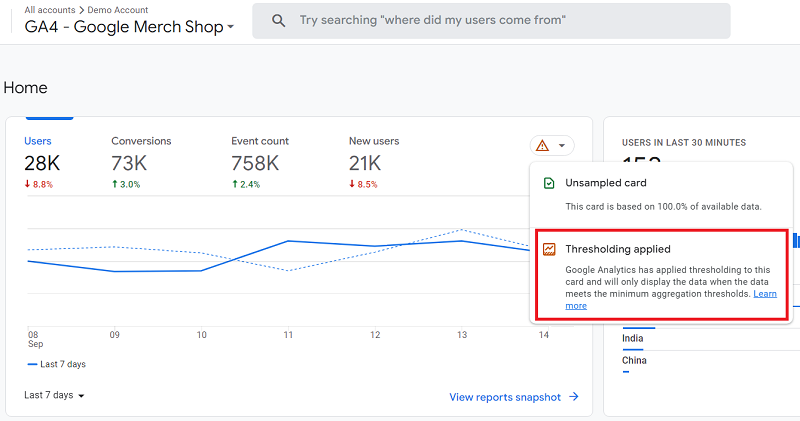
Because of the data threshold, you may not see the web pages in your GA4 reports, which have very few pageviews.
Because of the data threshold, certain dimensions and metrics could be greyed out for you in the exploration reports.
Because of the data threshold, you may not see demographic data, search query data, keywords data or even e-commerce data.
Because of the data threshold, you may see incomplete data sets in your GA4 reports.
If you are not using GA4 audiences in Google Ads, then disable Google Signals.
Follow the steps below to disable Google Signals in your GA4 Property:
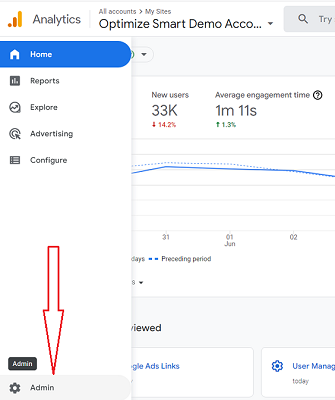
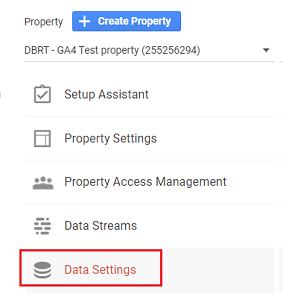
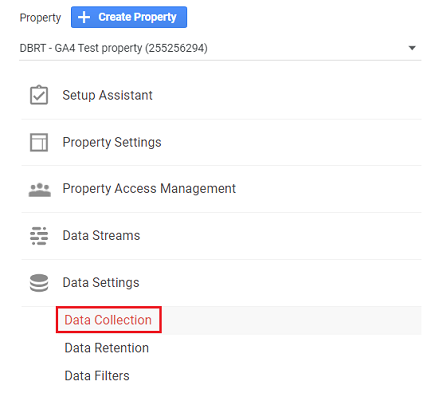
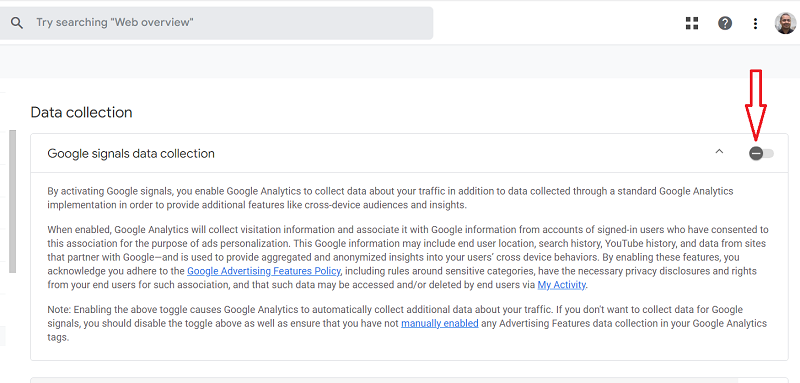
However, disabling the Google Signal will not change the historical data.
So when you analyze the historical data, you may still see the ‘thresholding applied’ warning.
If you have to use Google Signals, then change the reporting identity to ‘device-based’.
Follow the steps below to change the reporting identity of your GA4 property to ‘device-based’:
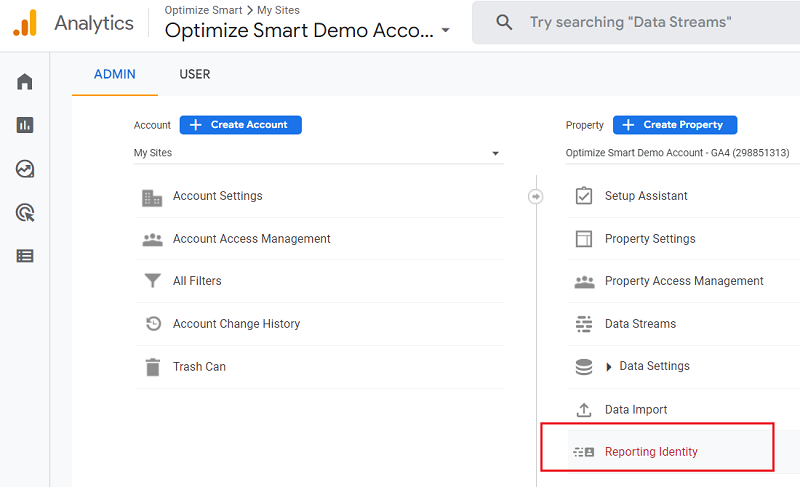
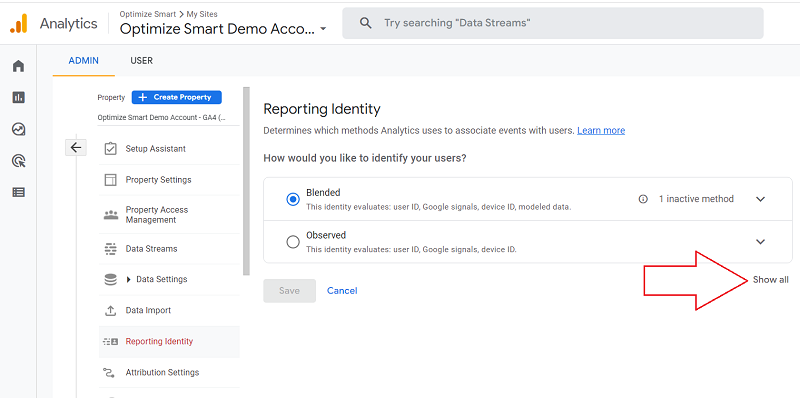
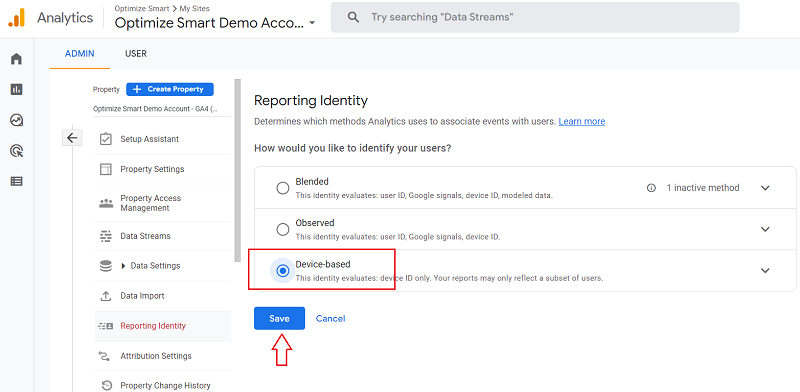
But these are all still quick fixes. They won’t solve your data threshold issues 100%.
In Google’s own words, “Data thresholds are system defined. You can’t adjust them.“
GA4 applies data threshold a lot more to low-traffic websites (less than a thousand users/day) than to high-traffic websites.
The less traffic your website gets, the more data threshold will be applied.
Conversely, the more traffic your website gets, the less data threshold will be applied.
Consider it as a penalty that you need to pay for being data-poor.
One rule for the rich and the other for the poor also applies to data processing.
So focus on increasing your website traffic.
As long as you rely on GA4 UI or data API, you will face issues related to data threshold.
But BigQuery does not suffer from data threshold. So you should use it to find missing or incomplete data sets.
Link your GA4 property to your BigQuery project today.
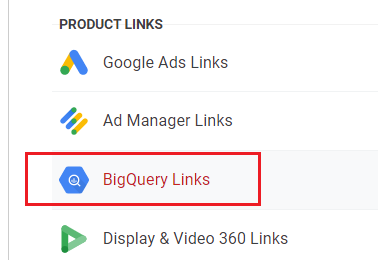
For low-traffic websites, using BigQuery is not something nice to have but a mandatory requirement.
Important points to remember about GA4 data thresholds
#1 The data threshold can apply to a standard report, an exploration report or an API request. It does not apply to GA4 BigQuery export data tables.
#2 The data threshold is independent of the data sampling. For example, your report could be based on 100% of the available data and still, data thresholding is applied to it.
#3 Data thresholding is not the same as data cardinality (which results in the (other) row.
#4 Lower user count or low event count in your GA4 reports could trigger data threshold. If you have a low user/event count, then avoid analyzing reports based on small data ranges.
#5 It’s not possible to know whether the data thresholding is applied to a report if you are using GA data API, as you don’t get any notification.
#6 You may experience data thresholding when making an API call that includes demographic information or audiences defined using demographic dimensions.
#7 Data thresholding can be continued to be applied for a period of time even after Google Signals is disabled.
#8 When utilizing device-based reporting, GA4 relies on either the client ID, which uses first-party cookies, or the app instance ID for applications. Neither of these is affected by data thresholds in reports that include user counts.
#9 You can switch the reporting identity of a GA4 property back and forth as many times as you like. It won’t affect the data collection.
This could come in handy if you want to test a new custom event and Google signals is enabled for your GA4 property.
You can temporarily change the reporting identity to ‘device-based’ while you test your custom event.

Other Articles on GA4.
- Google Analytics 4 Measurement ID and Property ID.
- Prompt Engineering for GA4 BigQuery SQL Generation.
- Google Analytics 4 vs Universal Analytics: The Key Differences.
- How to create a new BigQuery project.
- How to create a new Google Cloud Platform account.
- How to overcome GA4 BigQuery Export limit.
- ChatGPT Workflow That Simplifies GA4 Data Analysis.
- Understanding Google Analytics 4 Sessions.
- Total vs Active, New, Returning users in Google Analytics 4.
- BigQuery Cost Optimization Best Practices.
- Google Analytics 4 Data Import Tutorial.
- Tracking ad impressions and ad clicks in Google Analytics 4.
- Testing Google Analytics 4 via Test Property.
- Google Analytics 4 GDPR Compliance Checklist.
- Google Analytics 4 Behavioral and Conversion Modeling.
- GA4 – Missing Deep Links in your App [Fixed].
- How to create custom insights in Google Analytics 4 (GA4).
- Fixing data threshold issue in Google Analytics 4 (GA4).
- (organic) or (not set) as ‘session campaign’ for google / cpc in GA4.
- Session Fragmentation Is Ruining Your GA4 Attribution Data.