

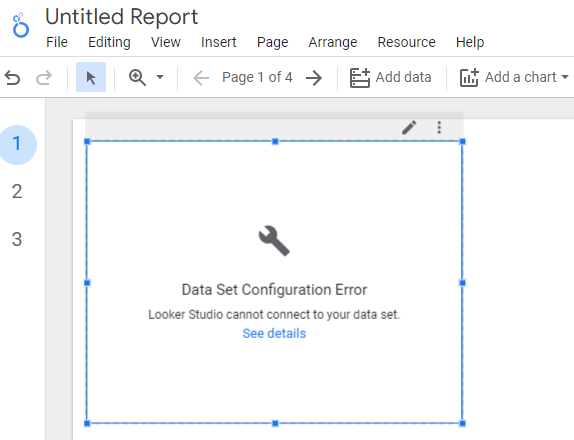
If your data source schema is not set up correctly and you create/refresh a report in Google Data Studio then your data source schema is not able to connect to your data source and you see a data set configuration error with the following message: “Google Data Studio Cannot Connect to Your Data Set”
For example, consider the following Google Sheets data source:
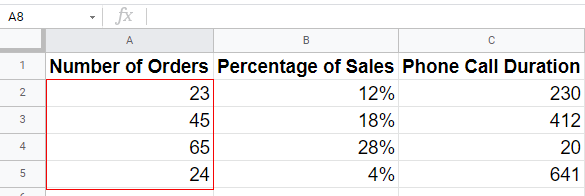
Here, the field ‘Number of orders’ is of type ‘Number’.
But what if, when deciding the data source schema (structure), we set the data type of the field ‘Number of orders’ to ‘Text’ (instead of ‘Number’):
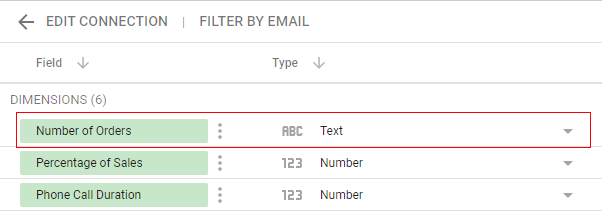
Once you set the data type of the field ‘Number of orders’ to type ‘Text’, you are telling Google Data Studio to expect values of type ‘text’ for the field ‘Number of orders’ when processing this field in the underlying data source.
Now when you create/refresh a report with the ‘Number of Orders’ field, Google Data Studio encounters a value of type ‘Number’ (instead of type ‘text’) in the data source.
Usually, Google Data Studio tries to convert values from one data type to another (like from ‘number’ to ‘percent’).
But sometimes it is not able to do that (like converting numbers to text).
And this is when your data source schema fails to connect to your data source and you see a data set configuration error:
So setting up data source schema correctly is critical.

Related Articles.
- Google Data Studio Tutorial.
- How to Change Language in Google Data Studio.
- Google Data Studio Report Tutorial.
- How to work with Boolean field in Google Data Studio.
- How to use Google Data Studio with Google Sheets.
- Stop Using Page Titles in GA4 & Google Data Studio Reports.
- Google Data Studio Geo Map – Latitude Longitude.
- Google Data Studio Data Sources – Tutorial.
- Guide to Data Types in Google Data Studio.
- Google Data Studio Date Format and Time Explained.
- Working with Numeric Data Types in Google Data Studio.
- How to embed Google Data Studio report on a website.
- The Data Set Configuration Error in Google Data Studio.
- Google Data Studio Aggregation Explained.
- Google Data Studio Calculated Fields Tutorial.
- Google Data Studio Functions, Formulas Tutorial.
- Google Data Studio Page Navigation Tutorial.
- Google Data Studio Image function.
- Avoid Using Functions and Calculated Fields in Google Data Studio.
- Data Source Fields in Google Data Studio.