

Introduction to Google Analytics 4 Metrics
In GA4, a metric is a number used to measure one of the characteristics of a dimension.
A dimension can have one or more characteristics.
For example, the following are the characteristics of the dimension called ‘Session source / medium’:
- Users
- Sessions
- Engaged sessions
- Average engagement time per session
- Engaged sessions per user
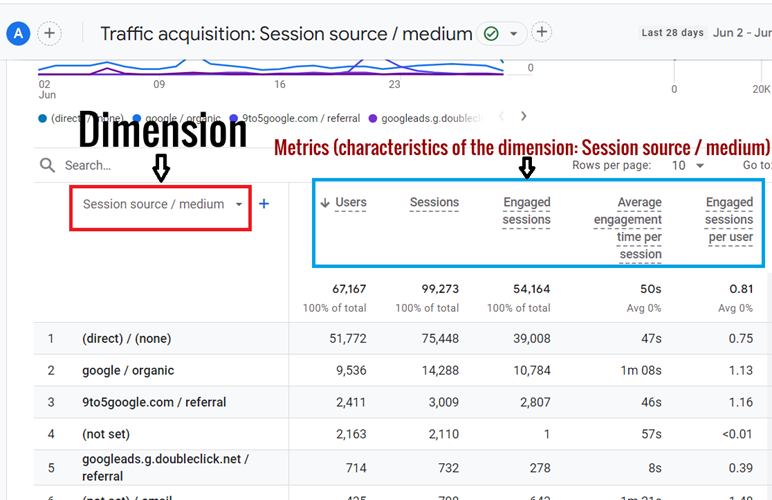
Here, ‘Users’, ‘Sessions’, ‘Engaged sessions’, ‘Average engagement time per session’, ‘Engaged sessions per user’, etc are all reported as metrics in GA4 because they are the characteristics of the dimension called ‘Session source / medium’.
Consider another example:
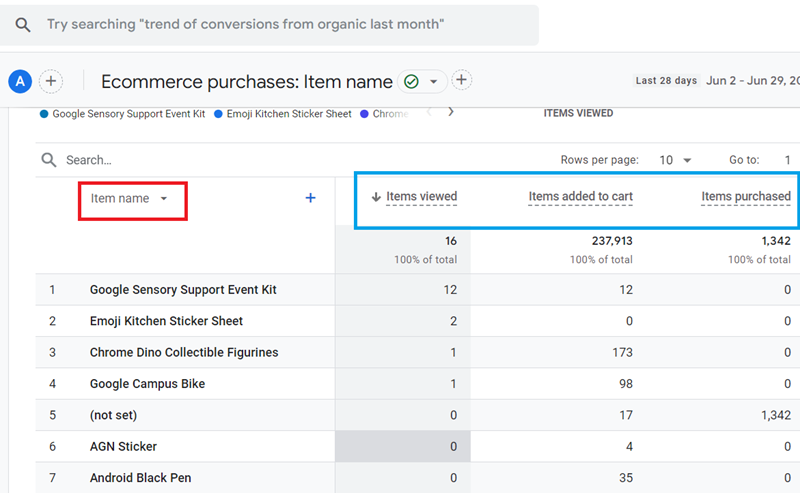
Here ‘Items viewed’, ‘Items added to cart’,’ Items purchased’, etc are all reported as metrics in GA4 because they are the characteristics of the dimension called ‘Item name’.
Difference between Dimension and Metric.
The following are the key differences between dimensions and metrics:
#1 A dimension provides context to a metric. Consequently, a standalone metric is meaningless to analyze and report.
For example,
The metric ‘Users’ is meaningless on its own and makes sense only when used together with a dimension like ‘Session source/medium’, ‘Session default channel grouping’, etc.
#2 In GA4, a custom metric can have only one scope: the ‘event’ scope. Whereas a custom dimension can have either ‘event’ scope, ‘user’ scope or ‘item’ scope.
#3 The value of a metric is (and should be) of type ‘integer’. Whereas the value of a dimension is (and should be) of type ‘text’.
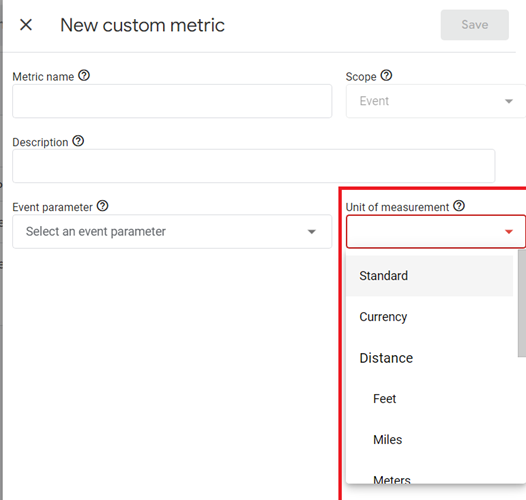
#4 While creating a custom dimension, you do not specify a unit of measurement. But while creating a custom metric, you are required to specify a unit of measurement:
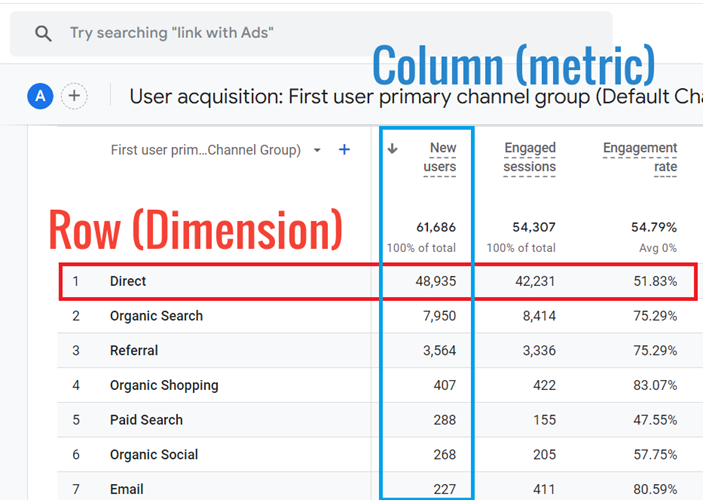
#5 Each row of a data table in a GA4 report represents a dimension, and each column represents a metric.
GA4 usually displays data in its reports as a data table.
Each row represents the value of a dimension, and each column represents the value of a metric:
Classifications of Metrics in Google Analytics 4
The metrics in GA4 can be broadly classified into two categories:
- Default metrics.
- Custom metrics.
The metrics in GA4 can also be categorised in terms of scope:
- Session-scoped metrics.
- Event-scoped metrics.
- Item-scoped metrics.
Note: Scope denotes the level at which metrics are aggregated and analysed.
The default metrics can be further classified into the following sub-categories:
- Advertising metrics.
- Ecommerce metrics.
- Event metrics.
- Page/screen metrics.
- Predictive metrics.
- Publisher metrics.
- Revenue metrics.
- Search Console metrics.
- Session metrics.
- User metrics.
- User lifetime metrics.
Note: The official help documentation from Google provides a complete list of all the default metrics available in GA4, along with their descriptions and usage.
What are the Default Metrics in Google Analytics 4
Default metrics are ready-to-use metrics that are already available via the GA4 user interface or GA4 data API.
The following are examples of default metrics:
- New users.
- Engaged sessions.
- Engagement rate.
- Engaged sessions per user.
- Average engagement time.
- Key events.
- Total revenue, etc.
What are the Custom Metrics in Google Analytics 4
Custom metrics are user-defined metrics.
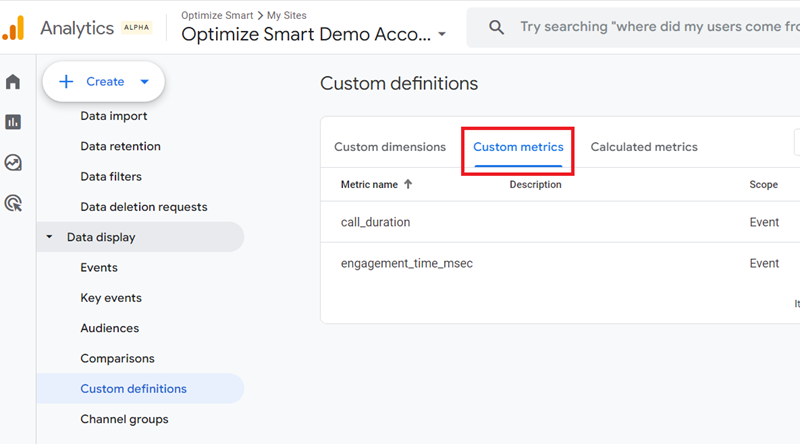
The following are the various units of measurement for a custom metric in GA4:
- Standard
- Currency
- Distance
- Feet
- Miles
- Meters
- Kilometres
- Time
- Milliseconds
- Seconds
- Minutes
- Hours
A custom metric can have only one unit of measurement at a time.
So, for example,
If you create a custom metric from the automatically collected event parameter ‘video_duration’ with ‘seconds’ as a unit of measurement, then you can not create another custom metric from the same event parameter ‘video_duration’ but this time with ‘minutes’ as a unit of measurement.
To learn more about Custom metrics, check out this article: GA4 Custom Metrics Tutorial.
Related Article: You Can’t Really Trust GA4 Engagement Metrics.

Other Articles on GA4.
- How to export GA4 data to Google Sheets for free.
- Top Google Analytics 4 Tools, add-ons and resources.
- Google Analytics 4 Audiences Tutorial.
- Understanding Automated Insights in Google Analytics 4 (GA4).
- How to build Comparisons in Google Analytics 4 (GA4).
- How to create a remarketing audience in Google Analytics 4 (GA4).
- Advanced Google Analytics Tracking – HTML DOM – Tutorial.
- Google Analytics 4 Migration Checklist - Upgrade to GA4.
- How to Install Google Analytics 4 on Shopify.
- How to link Google Analytics 4 with AdSense.
- Google Analytics 4 Subproperties Tutorial.
- How to connect Google Analytics 4 with Google Data Studio.
- Advertising Snapshot in Google Analytics 4 (GA4).
- Manage automatic event detection in Google Analytics 4.
- How to use Google Analytics 4 Event Builder.
- Is Safari Undermining Your GTM Server-Side Tagging?
- Guide to Google First Party Mode.
- You Can’t Really Trust Google Analytics 4 Engagement Metrics.
- Google Analytics 4 Metrics Tutorial.
- Google Analytics 4 Custom Metrics Tutorial.