

What is ‘Manage automatic event detection’ in GA4?
The “Manage automatic event detection” feature in GA4 allows users to configure the types of events their Google tag should automatically detect for measurement in connected destinations, such as Google Ads.
This feature operates alongside the GA4 Enhanced Measurement feature.
How to use the “Manage automatic event detection” feature?
To access the “Manage automatic event detection” feature, follow the steps below:
#1 Navigate to the Admin section of your GA4 property.
#2 Click on ‘Data Streams’ under ‘Data Collection and Modification’.
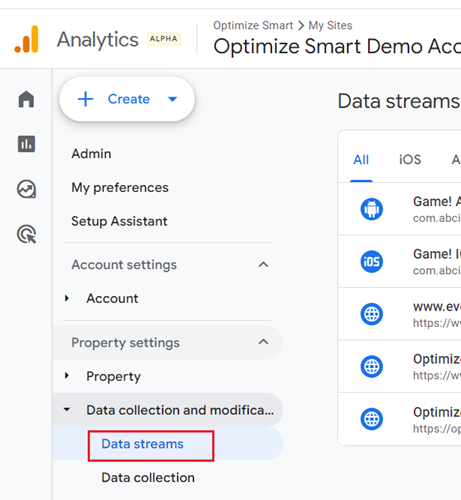
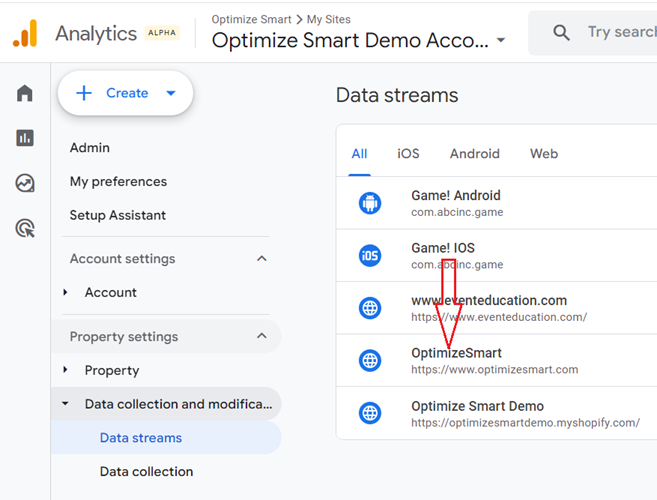
#3 Click on the web data stream whose Google Tag you want to configure:
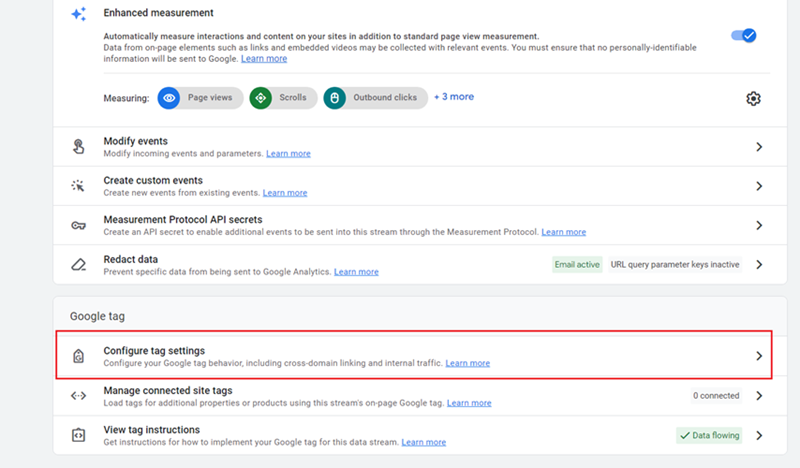
#4 Scroll all the way down and then click on ‘Configure tag settings’:
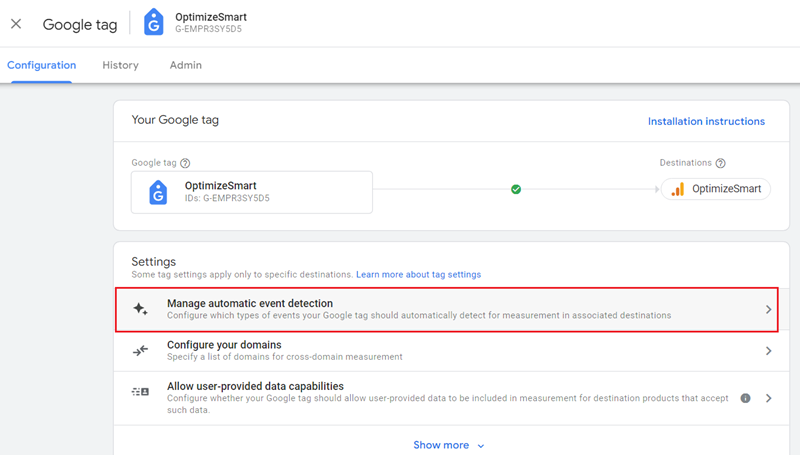
When you click on ‘Configure tag settings’, you see the Google tag configuration page:
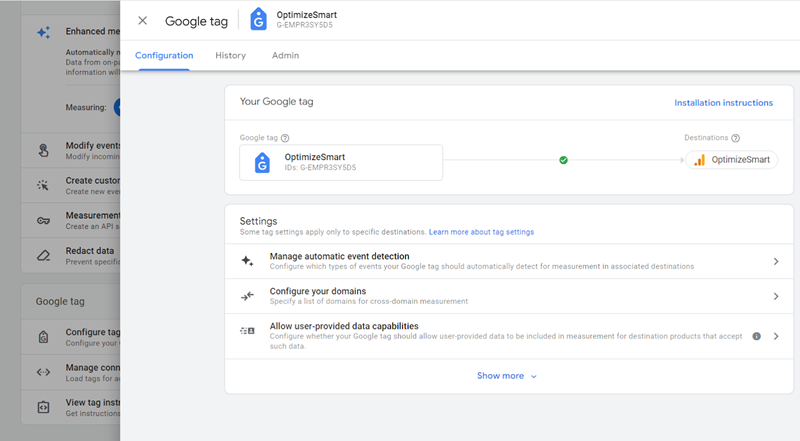
#5 Click on ‘Manage automatic event detection’:
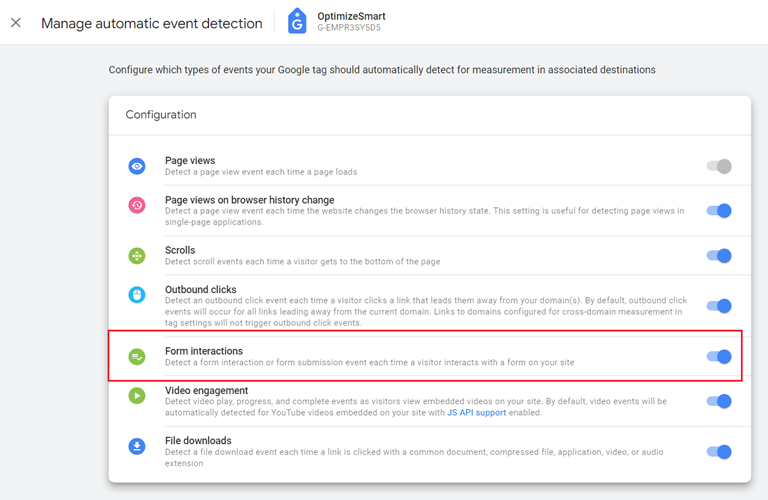
You will now see the list of all the events that you can disable (with the exception of the ‘Page views’ event):
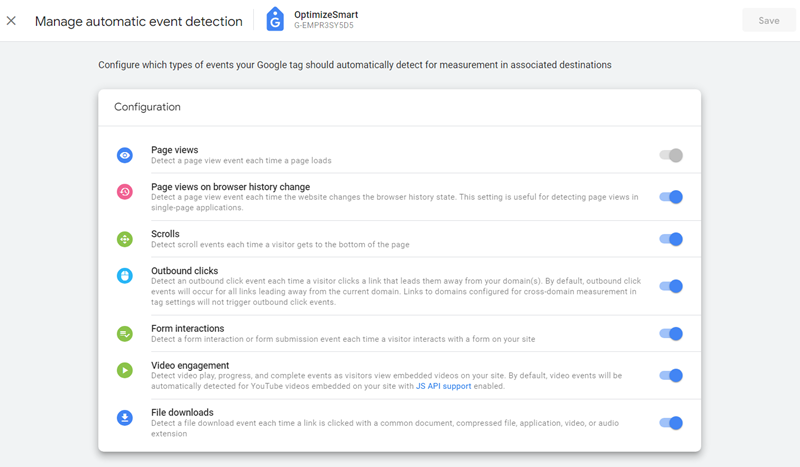
By default, all event types are enabled for automatic event detection, and if a certain event type is disabled, no Google product that uses the Google tag will be able to receive the corresponding event data.
For example, if you disable ‘Form interaction’:
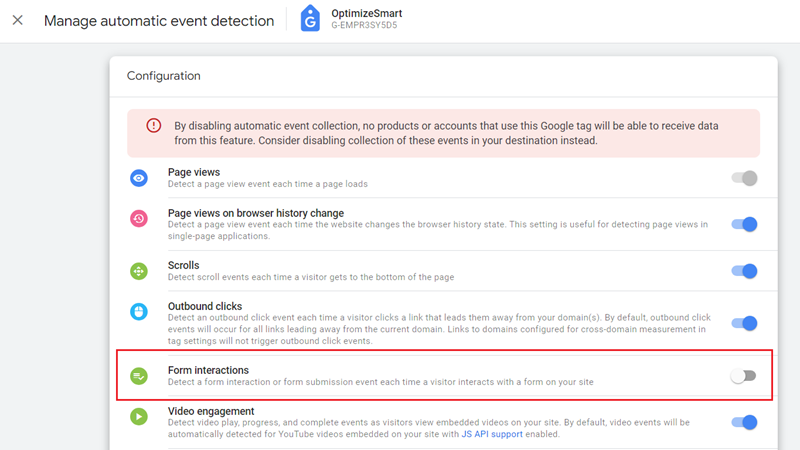
Then no Google product that uses the Google tag will be able to receive the ‘Form Interactions’ event data.
Google recommends that you disable the event for automatic event detection in the connected destination, but they do not provide detailed instructions on how to do so.
Depending on your specific tracking needs and privacy considerations, you can should certain event types.
Difference between ‘Manage automatic event detection’ and ‘Enhanced Measurement’.
The “Manage automatic event detection” setting in GA4 is focused on connected products (like Google Ads) and does not directly impact the data collection within GA4 itself.
For example, when you disable an event, such as ‘form interactions’, from the Enhanced Measurement settings within GA4, you are turning off the automatic tracking of that event type within your GA4 property.
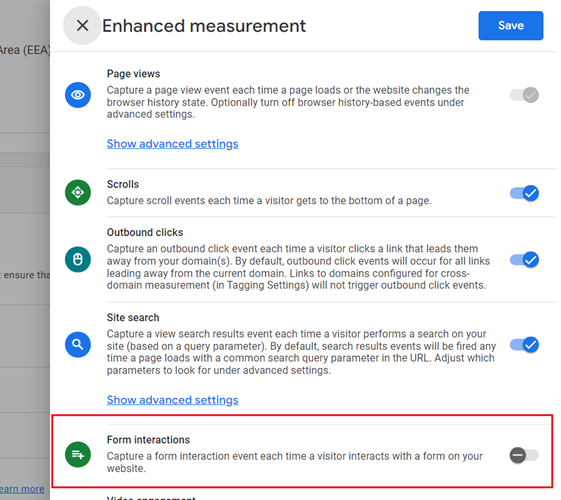
This means GA4 will not collect or report ‘form interactions’ events based on this setting alone.
However, if you keep ‘form interactions’ enabled in the “Manage automatic event detection” setting, the Google tag will continue to detect ‘form interaction events’ and can send this data to connected products that use the Google tag, such as Google Ads.
In other words, while event data will not be collected within GA4 because the ‘Enhanced Measurement’ setting is turned off, it can still be utilized in other connected Google products (like Google Ads) if it is enabled in the “Manage automatic event detection” setting.
This setup could be useful if you want to limit form interactions event reporting in GA4 but still want to use the event data in connected Google products like Google Ads.
In summary, turning off an event in Enhanced Measurement affects data collection within GA4, while the “Manage automatic event detection” setting affects how event data is sent to other connected Google products.

Other Articles on GA4.
- How to export GA4 data to Google Sheets for free.
- Top Google Analytics 4 Tools, add-ons and resources.
- Google Analytics 4 Audiences Tutorial.
- Understanding Automated Insights in Google Analytics 4 (GA4).
- How to build Comparisons in Google Analytics 4 (GA4).
- How to create a remarketing audience in Google Analytics 4 (GA4).
- Advanced Google Analytics Tracking – HTML DOM – Tutorial.
- Google Analytics 4 Migration Checklist - Upgrade to GA4.
- How to Install Google Analytics 4 on Shopify.
- How to link Google Analytics 4 with AdSense.
- Google Analytics 4 Subproperties Tutorial.
- How to connect Google Analytics 4 with Google Data Studio.
- Advertising Snapshot in Google Analytics 4 (GA4).
- Manage automatic event detection in Google Analytics 4.
- How to use Google Analytics 4 Event Builder.
- Is Safari Undermining Your GTM Server-Side Tagging?
- Guide to Google First Party Mode.
- You Can’t Really Trust Google Analytics 4 Engagement Metrics.
- Google Analytics 4 Metrics Tutorial.
- Google Analytics 4 Custom Metrics Tutorial.