

GA4 engagement metrics, when gathered via client-side tracking, could be highly inaccurate. Various factors have compromised the accuracy of these metrics.
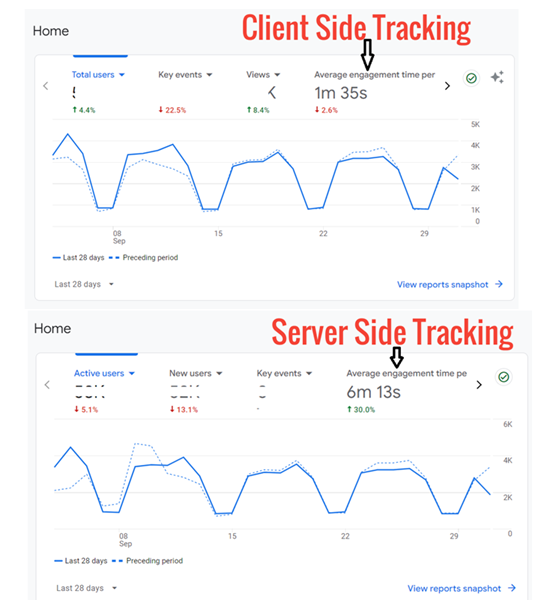
You should take engagement metrics (like ‘Average Engagement Time per Active User’ ) reported by GA4 with a significant degree of scepticism when gathered via client-side tracking, as most of them could be highly inaccurate.
Various factors like ad blockers, privacy extensions, and consent settings have compromised the accuracy of these metrics.
Engagement metrics require continuous tracking of user behaviour over time. This makes them more susceptible to disruptions caused by client-side tracking issues.
Avoid reporting these metrics as definitive unless additional validation or triangulation with other data sources exists or you have switched to server-side tracking.
Even with server-side tracking, it is crucial to maintain additional validation with other data sources (like server logs, CRM, other web analytics tools) to ensure the accuracy of engagement metrics.
If engagement metrics are your business KPIs, the transition to server-side tracking is not only beneficial but necessary for accurate decision-making.
Educate Stakeholders that almost all engagement data gathered via client-side tracking in GA4 could be completely wrong.
How do ad blockers and the rest exactly skew the avg. time on site, in technical terms?
By blocking scripts and causing GA4 event delays.
Ad blockers can significantly reduce page load times by blocking tracking and ad scripts before they load.
Faster load times can lead to longer actual engagement, as users spend less time waiting and more time interacting with content.
This increased engagement is not always accurately reflected in analytics due to blocked or compromised tracking.

Other Articles on GA4.
- How to export GA4 data to Google Sheets for free.
- Top Google Analytics 4 Tools, add-ons and resources.
- Google Analytics 4 Audiences Tutorial.
- Understanding Automated Insights in Google Analytics 4 (GA4).
- How to build Comparisons in Google Analytics 4 (GA4).
- How to create a remarketing audience in Google Analytics 4 (GA4).
- Advanced Google Analytics Tracking – HTML DOM – Tutorial.
- Google Analytics 4 Migration Checklist - Upgrade to GA4.
- How to Install Google Analytics 4 on Shopify.
- How to link Google Analytics 4 with AdSense.
- Google Analytics 4 Subproperties Tutorial.
- How to connect Google Analytics 4 with Google Data Studio.
- Advertising Snapshot in Google Analytics 4 (GA4).
- Manage automatic event detection in Google Analytics 4.
- How to use Google Analytics 4 Event Builder.
- Is Safari Undermining Your GTM Server-Side Tagging?
- Guide to Google First Party Mode.
- You Can’t Really Trust Google Analytics 4 Engagement Metrics.
- Google Analytics 4 Metrics Tutorial.
- Google Analytics 4 Custom Metrics Tutorial.